Comparison

SurveyNinja vs HubSpot Forms: surveys without a Service Hub seat

HubSpot's free forms are built for lead capture: 11 field types, HubSpot branding, and conditional logic only from Marketing Hub or Content Hub Professional. Surveys with NPS, ratings and website targeting need Service Hub Professional at $90/mo per seat, billed yearly, plus a $1,500 onboarding fee. SurveyNinja is a survey tool from day one: NPS on Free, logic from $10.50/mo, click tests, pairwise comparison and A/B tests.

Free plan with 100 responses a month and 14 days of Premium. No card required.

Prices and features checked on October 15, 2026.

SurveyNinja HubSpot Forms
Branching logic From Basic From Marketing Pro
Micro surveys on your website All plans From Service Pro
Click test with heatmap From Basic No
Pairwise comparison From Basic No

Which one is right for you

Choose HubSpot Forms if

  • You only need free lead capture forms that create contacts straight in HubSpot CRM.
  • Your support team already pays for Service Hub Professional and sends NPS and CSAT surveys after tickets.

Choose SurveyNinja if

  • You want answers you can measure, not just contact details: 28 question types with NPS on Free, and matrices, ranking, semantic differential and constant sum from Basic.
  • You want logic without a Professional hub: branching from Basic at $10.50/mo. HubSpot adds conditional logic to forms on Marketing Hub or Content Hub Professional.
  • You want to survey visitors on your website: micro surveys with page and device targeting on every plan, in beta. HubSpot's web page surveys come with Service Hub Professional.
  • You test designs and wording: click tests with heatmaps, area selection and pairwise comparison from Basic, A/B tests of question wording on every plan.
  • You want the answers analyzed: SPSS export and quotas from Basic, an AI report with themes, sentiment and quotes on Premium.
Start free

Where SurveyNinja goes further than HubSpot Forms

Features that matter for research and analysis, with the plan they are on.

Question types made for surveys

NPS on Free; matrices, ranking, semantic differential and constant sum from Basic. HubSpot forms support 11 field types, such as text, dropdown, checkboxes, date and file.

Logic from Basic

Branching, show and hide rules and screen-outs from Basic at $10.50/mo. HubSpot adds conditional logic to forms on Marketing Hub or Content Hub Professional.

Closing rules and quotas

Close a survey on a date or after a number of responses from Standard, and stop each group at its quota from Basic. HubSpot's FAQ says a form can't have a submission limit.

SPSS and an AI report

Export responses to SPSS, CSV, Excel, PDF or Word from Basic; on Premium the AI report finds themes, sentiment and quotes in open answers. HubSpot exports submissions as CSV, XLS or XLSX.

Edit surveys on your phone or your laptop

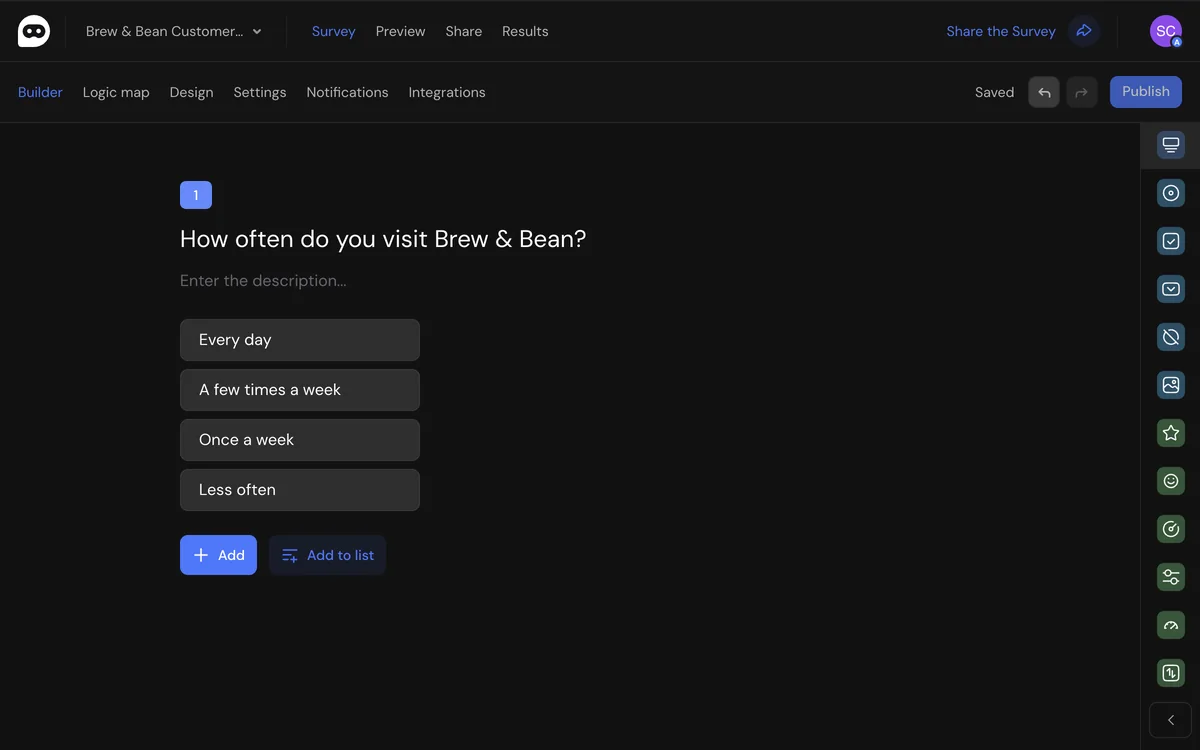
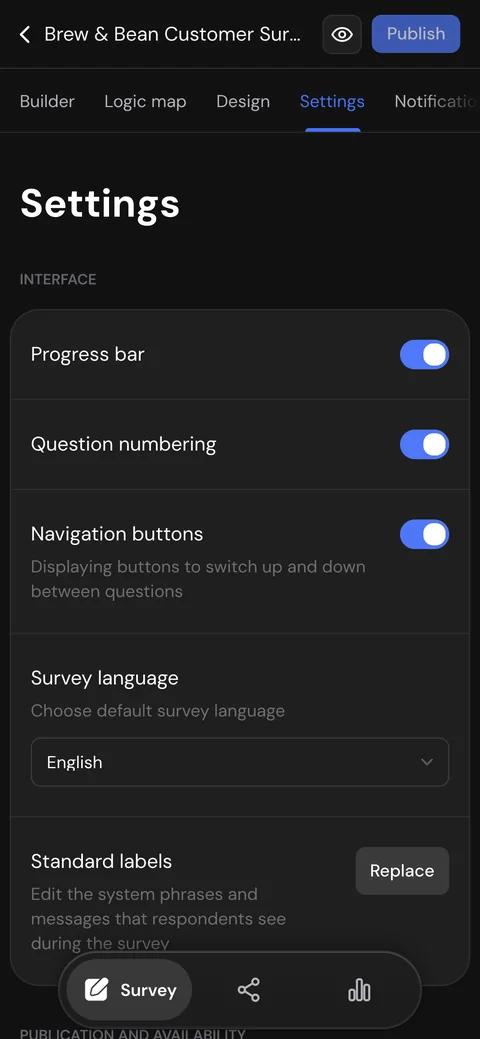
The whole builder works on a phone: questions, logic, design, publishing and responses. Fix a question on the way to a meeting, check new answers from the couch and finish the survey on your laptop.

  • Every section and setting fits a small screen
  • Logic, design and publishing, not a cut-down view
  • Pick up on your laptop right where you left off
The SurveyNinja survey builder in a browser
Survey settings in SurveyNinja on a phone

Research and UX tools in one survey builder

Test designs, rank ideas and ask visitors on your website from the same survey builder.

Micro surveys on your site

Paste one code and show a short survey in a corner card or modal: after a delay, on scroll, on exit intent (desktop) or on a click. Choose pages and devices and limit how often visitors see it.

All plans, including Free

Click test with heatmap

Upload a mockup or a screenshot and ask where people would click. The report shows a heatmap of all clicks.

From Basic Not in HubSpot Forms

Pairwise comparison

Respondents choose between two options at a time; the adaptive mode drops weak options early. The report ranks items with a win matrix.

From Basic Not in HubSpot Forms

A/B test of question wording

Show different versions of a question to different respondents and compare completion and answers by version, with a significance test.

All plans, including Free Not documented by HubSpot Forms

Map question

Respondents drop pins on a map: where they live, shop or travel. See the answers as a map and a list of places.

From Standard Not in HubSpot Forms

Area selection

Mark zones on an image and let respondents pick them, with scores and logic like any answer option.

From Basic Not in HubSpot Forms

Feature-by-feature comparison

Each cell shows whether the feature exists and the plan it starts on.

Feature SurveyNinja HubSpot Forms
Pricing and limits
Other free plan limits 3 surveys, 10 questions each HubSpot branding on forms; form steps from Starter, logic from Marketing Hub or Content Hub Professional
Cheapest paid plan Basic: $10.50/mo billed yearly ($15 monthly), 1,000 responses a month Forms are free; surveys need Service Hub Professional: $90/mo per seat billed yearly, plus $1,500 onboarding
Team seats included 1 on Free, 1 on Basic, 3 on Standard, 5 on Premium; more can be added Free tools for up to 2 users; paid hubs are priced per seat
Building surveys
Question types 28, plus 6 content blocks; NPS on Free 11 form field types; custom surveys add ratings, NPS and CSAT on Service Hub Professional
Branching logic Yes, From Basic Yes, From Marketing Hub Professional Conditional logic in forms; also on Content Hub Professional
Hidden fields from the URL Yes, From Standard Answer piping into later questions on all plans Yes, All plans, including Free Hidden fields filled from URL query strings
One form in several languages No Respondent interface in English, Spanish or Portuguese; one language per survey Yes, From Marketing Hub Professional AI translation of a form; also on Content Hub Professional
Research and UX tools
Micro surveys on your website Yes, All plans, including Free One code for the whole site: corner card or modal; shown after a delay, on scroll, on exit intent (desktop) or on a click; page and device targeting, traffic share, show frequency; beta Yes, From Service Hub Professional Custom surveys on your pages: URL rules, click, scroll, exit intent, time or inactivity triggers, frequency
Click test with heatmap Yes, From Basic Heatmap of clicks on an image; hotspot selection with drawn areas No
Area selection on an image Yes, From Basic Zones on an image work as answer options, with scores and logic No
Pairwise comparison Yes, From Basic Every pair or adaptive mode with fewer pairs; win matrix in the report No
Map question Yes, From Standard Respondents drop pins; the report shows a map and a list of places No
A/B test of question wording Yes, All plans, including Free Up to 100 versions of a question or block, even split, significance test in the report Not in HubSpot's knowledge base for forms or surveys (October 15, 2026)
Other research question types Yes, From Basic Semantic differential, 3D matrix, constant sum No No matrix, ranking or constant sum among form field types
Collecting responses
Link, QR code and website embed Yes, All plans, including Free Widget, pop-up, iframe or button Yes, All plans, including Free Embed code, share link or HubSpot pages
Your own domain Yes, From Premium Your own subdomain from Basic Partly Embed on your own site; the share link URL can't be customized
Remove the service's branding Yes, From Standard Yes
Close by date or number of responses Yes, From Standard No submission limit, per HubSpot's FAQ; a form is unpublished by hand (October 15, 2026)
Analysis and export
Reports and charts Yes, All plans, including Free Public link to the report from Basic Yes, All plans, including Free Form analytics; survey results with Service Hub Professional
Export of responses Yes, From Basic CSV, Excel, PDF, Word Yes, All plans, including Free CSV, XLS or XLSX
Integrations
Google Sheets Yes, From Standard Yes, From Professional Workflow action on any Professional or Enterprise hub
Webhooks Yes, From Standard Yes, From Data Hub Professional Send a webhook action in workflows
REST API Yes, From Basic Yes, All plans, including Free Forms API
Built-in Slack, HubSpot, Salesforce apps No Through webhooks and the API Yes, All plans, including Free Submissions create contacts in HubSpot CRM
Team and security
Single sign-on (SSO) Yes, From Premium OpenID Connect Yes, From Professional
Two-factor authentication Yes, All plans, including Free Yes
HIPAA compliance No Yes, Enterprise only Sensitive Data with a BAA
Sources: HubSpot Forms data checked on October 15, 2026 on its own website

SurveyNinja features checked on October 15, 2026; plans and limits: pricing page

Start free

Free plan, no card required

How to switch from HubSpot Forms

1

Create a free account

Sign up in a minute. The Free plan needs no card, and you get 14 days of Premium.

2

Rebuild your survey

Start from a template or describe the survey to the AI generator, then set up logic (Basic and higher). SurveyNinja does not import HubSpot forms.

3

Bring past responses

Export submissions from HubSpot as CSV or XLSX, upload the file to SurveyNinja on a paid plan and match the columns to your questions. Then share the new link.

Already paying for HubSpot Forms?

Send us a screenshot of your payment and we'll give you a free month of our top plan.

Frequently asked questions

Didn't find your answer? Write to [email protected] or use the contact page, and we'll help you move your surveys.

Try SurveyNinja for free

Free plan with 100 responses a month and 14 days of Premium after sign-up. No card required.

Start free

Not ready to switch? Try it first