 25 Questions for a Construction Customer Satisfaction Survey
 Click Test
See where people click before you build the page.
Show a mockup, ask one question and get a heatmap of where people would click. When a click is not enough, ask them to outline an area or pick a region.
Click Test, Hotspot Selection and Area Selection come with Basic and higher.
Where would you click to order coffee online?
Click or tap the page, up to 3 times
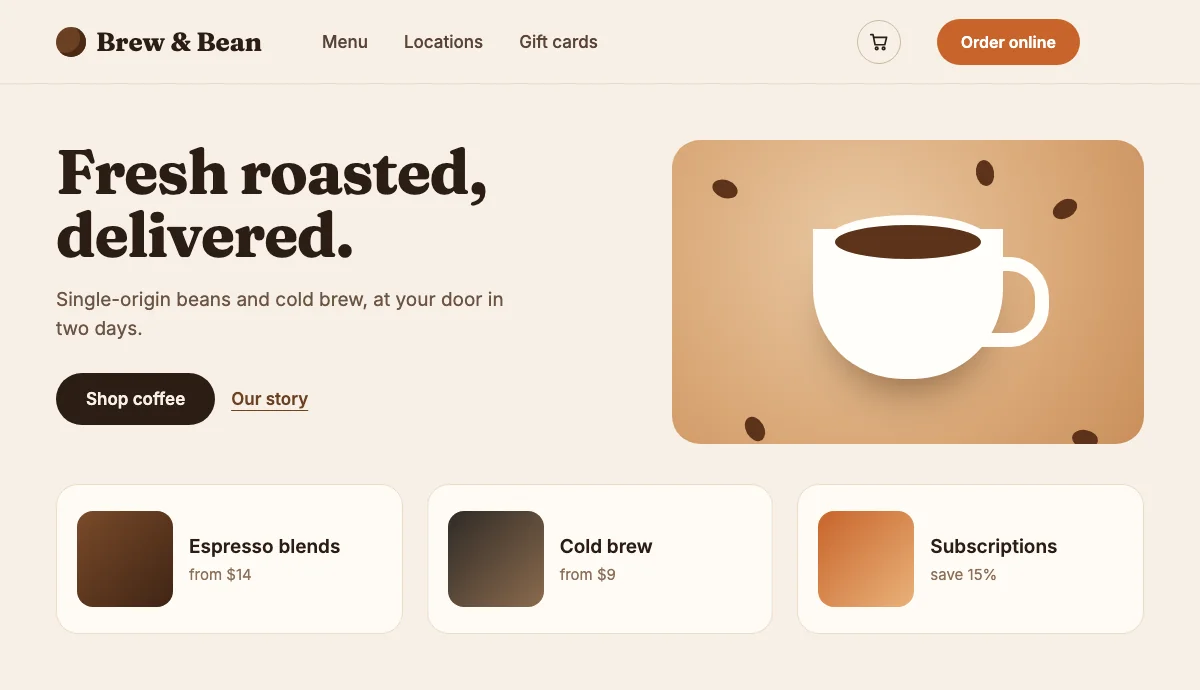
Your clicks Heatmap of 64 example answers
- Your own imageJPG, PNG, GIF or WebP.
- On phones tooA tap works like a click.
- A heatmap to downloadSave it as a PNG for your slides.
- Coordinates in the exportEvery point in CSV and Excel.
You don't need a working website to learn where people would click. Upload a mockup, ask one question and read the answer on a heatmap.
Click test, hotspot and area questions on an image.
The respondent sees your picture and answers right on it. Pick the question that fits what you want to learn.
Click Test
Respondents click or tap the image, and each click becomes a point.
- Ask for one point or several: set the minimum and the maximum.
- Turn on numbering to see the order people placed their points in.
- Branch the survey on how many points someone placed.

Hotspot Selection
Respondents drag across the image to outline areas, then move, resize or delete them.
- Good for "what catches your eye" and "what is confusing here" questions.
- Set the minimum and the maximum number of areas.
- The report shows all the areas as one heatmap.

Area Selection
You mark regions on the image in advance, and respondents pick them like answer options.
- Show the regions with their names, or keep them hidden until someone picks one.
- Use regions in logic, and give them points or mark the right one in a quiz.
- Filter responses by the region people picked.

Read the answer at a glance.
The report draws the answers on your own image, ready to drop into a slide.


In CSV and Excel, each point comes with its place on the image, for example "1. x: 0.42, y: 0.31": shares of the width and height, from 0 to 1.
What you can test with it.
- Landing pagesCheck that people find the main button before the page goes live.
- Ads and bannersSee what people notice first in a creative.
- Menus and packagingFind out where the eye goes on a menu, a label or a box.
- App screensTest navigation on a mockup, before anyone writes code.
Works with the rest of your survey.
Add a follow-up question, branch on the answer and filter responses by region.
- Ask why, right afterPut an open question after the click: "Why did you click there?" The click and the reason are saved in the same response.
- Logic and scoresBranch on the number of points or areas, or on the region picked. Regions can carry points in a quiz.
- Large imagesUp to 10 MB on Basic, 30 MB on Standard and 100 MB on Premium.
- Touch screensRespondents tap and draw with a finger, and the page stays still while they do.
- A report to shareSend a public link to the report, and the heatmap opens without signing in.
- Responses you can filterLook only at the people who picked a certain region, and see what else they answered.
From mockup to heatmap in three steps.
- 1
Upload your image.
Add a Click Test, Hotspot Selection or Area Selection question and drop in a screenshot, a mockup or a photo.
- 2
Share the survey.
Send a link, embed it on a site or print a QR code. It works on phones and computers.
- 3
Read the heatmap.
Open Reports to see the answers on your image, then download the heatmap or share the report.

Already paying for another survey tool?
Send us a screenshot of your bill and get a month of Premium free. Our team will help you move your surveys too.
Questions and answers
What is a click test?
A click test shows people an image, such as a page mockup, and asks where they would click. In SurveyNinja each click becomes a point, and the report draws all the points as a heatmap on your image.
Which plans include the click test?
Click Test, Hotspot Selection and Area Selection are on Basic and higher. The image can be up to 10 MB on Basic, 30 MB on Standard and 100 MB on Premium.
Does it work on phones?
Yes. A tap places a point, and in Hotspot Selection respondents outline an area with a finger. The page stays still while they tap or draw.
How many clicks can a respondent make?
By default, as many as they want. Turn on Selection limit to set the minimum and the maximum. Clear all removes the points and lets them start again.
What does the report show?
Click Test and Hotspot Selection show a heatmap over your image, which you can download as a PNG. Area Selection shows the count and percent for each region as a list, bars, table or donut, and on the image.
Can I export the clicks?
Yes. In CSV and Excel, each point comes with its place on the image as shares of the width and height, from 0 to 1. Hotspot Selection adds the width and height of each area, and Area Selection lists the names of the regions picked.
Does it measure how fast people click?
There is no separate time-to-click metric. The report shows where people clicked, and the question card shows the average time spent on the question.
Can I use it in a micro survey on my website?
No, these three questions can't be added to a micro survey. Share the survey by link, embed it on a page or print a QR code.
Didn't find the answer? Write to [email protected] or use the contact page.

Put your mockup in front of people.
Click Test, Hotspot Selection and Area Selection come with Basic and higher.