 25 Questions for a Construction Customer Satisfaction Survey
 Recurring schedule
Set your weekly hours, and the slots are calculated for you. Add a lunch break, days off and holidays.
For appointments, consultations and services.
Online booking
Respondents pick an open time from your schedule while they fill in the form. You get the booking, their contacts and every answer in one place.
Online booking comes with Basic and higher.
A booking link gets you a name and a time. A booking form gets you the name, the time and the answers you need to prepare for the meeting.
A schedule belongs to your workspace, so one schedule can take bookings from several surveys.
Set your weekly hours, and the slots are calculated for you. Add a lunch break, days off and holidays.
For appointments, consultations and services.
Add specific dates and times, each with its own number of seats.
For seminars, webinars, interviews and workshops.
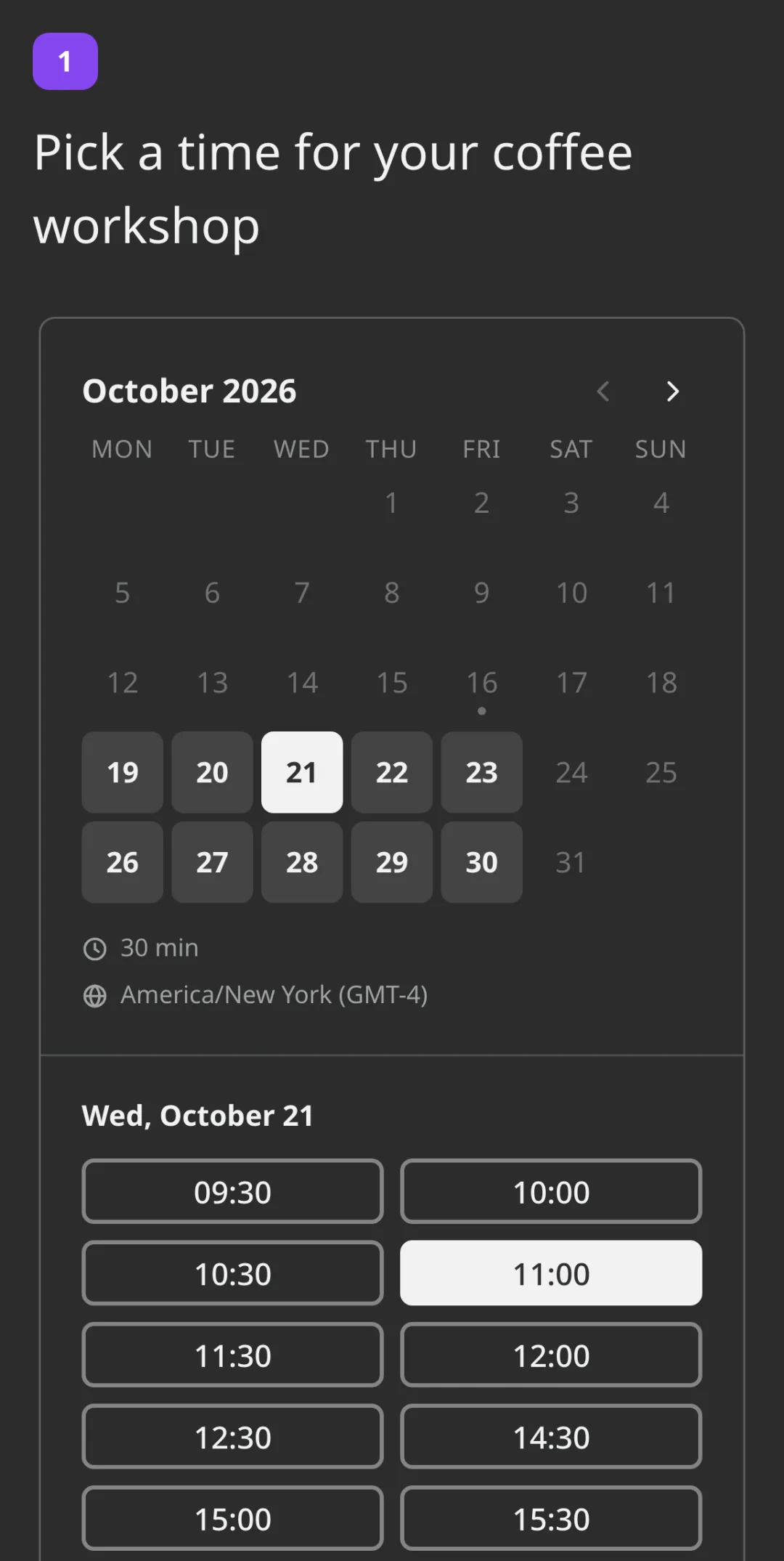
A calendar with free times only, right in the survey, on a phone or a computer.

Set them once per schedule.
All schedules and all surveys together, by day, by week or as a list.



The Booking question works with everything else in the form.
Weekly hours or individual slots, the meeting length and your rules.
Put it in your survey next to the name, phone and email questions, and choose the schedule.
Send the link, embed it on your site or print a QR code. Bookings appear in the Log.

Send us a screenshot of your bill and get a month of Premium free. Our team will help you move your surveys too.
A form where people pick an available time and answer your questions in the same step. In SurveyNinja the Booking question shows open slots from your schedule inside a survey, and the booking is saved with all the respondent's answers.
Basic and higher. On Basic you can already create schedules, add the Booking question and manage bookings in the Log.
Only if the slot has more than one seat. When a respondent clicks Book, the time is held for 15 minutes while they finish the survey, and someone who tries the same time sees that it is taken.
Their own. The schedule keeps its time zone, and each respondent sees the times converted to where they are, with the time zone shown under the calendar.
They can cancel by the link in the confirmation email until the meeting starts, and you get an email about it. Rescheduling is done by you in the Log, and the respondent gets an email with the new time.
No. Emails go out when a booking is created, confirmed, moved or cancelled. To keep bookings in another calendar or tool, download the Log as a CSV.
No, there is no payment step on SurveyNinja. Collect the booking and any details you need in the survey, and take payment your usual way.
For emails to the respondent, yes: the confirmation goes to the address from the survey's Email question. Without it, the booking still works and appears in your Log.
Didn't find the answer? Write to [email protected] or use the contact page.

Online booking comes with Basic and higher.