 WooCommerce Post-Purchase Survey: 7 Questions, When to Ask and What to Do Next
What Happens After the Trial Ends?
Updated
On this page
When you sign up, your workspace gets a 14-day trial of the Premium plan. In the account it is shown as Premium (trial). The trial is free and does not require a card, so you are not charged and there is nothing to cancel.
Checking how many days are left
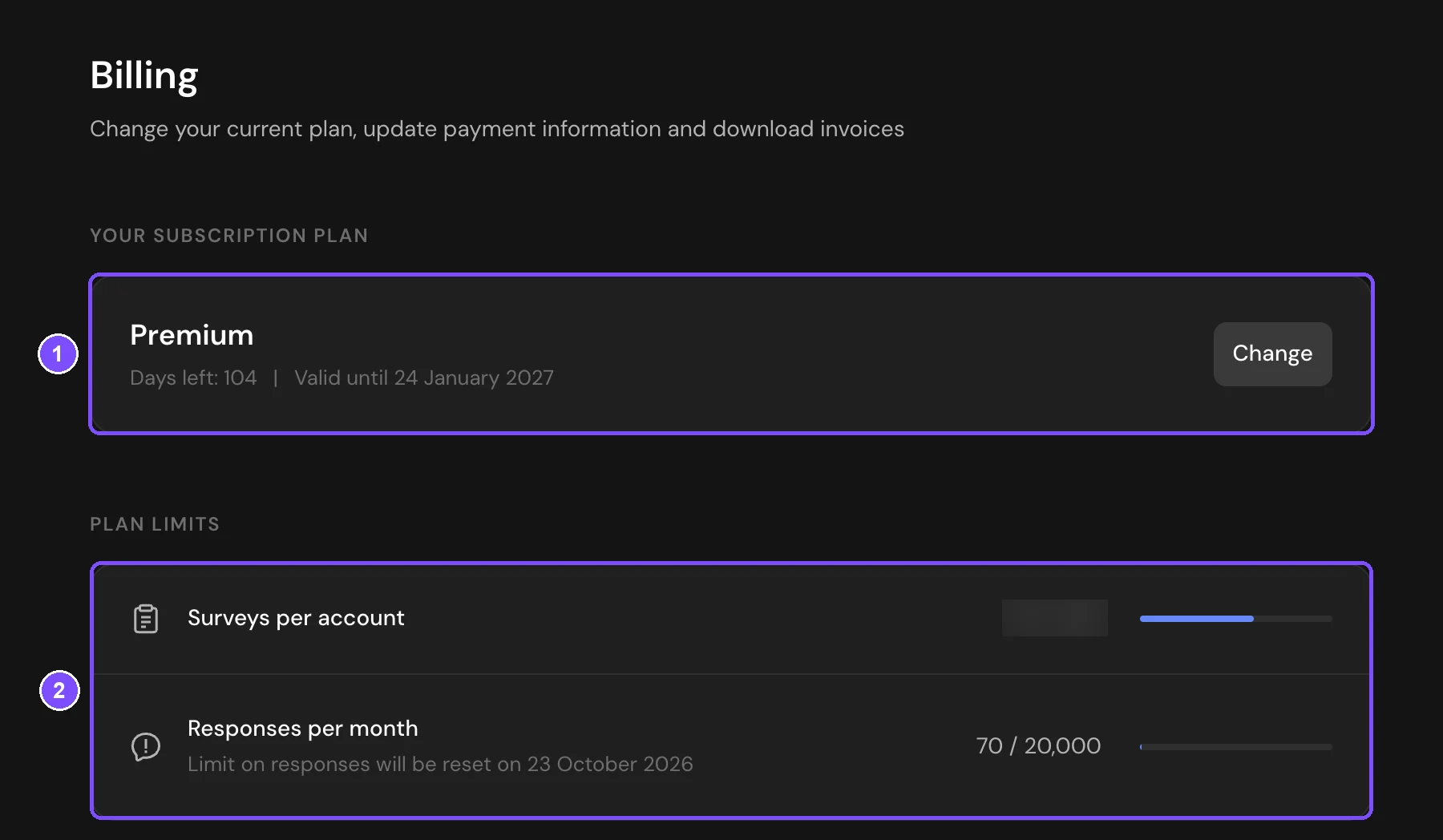
- Click your profile icon in the top right corner and choose Billing.
- Your subscription plan (1) shows the plan name, the number of days left and the end date (Valid until). During the trial, the plan is called Premium (trial).
The Plan limits block (2) below shows how many surveys and responses you have used.
When the trial ends
When the Valid until date comes, the workspace moves to the Free plan automatically. You are not charged. Every plan's limits and features are listed on the pricing page.
- Your surveys, responses and settings stay in the account. Published surveys keep their links and continue to accept responses.
- Features that are not included in the Free plan stop working. For example, surveys show the SurveyNinja logo, and your own logo is hidden. Logic jumps, Rating and Email questions, downloading responses, the API and MCP stay available.
- The Free plan allows 50 surveys. Archived surveys are not counted. If you already have 50 or more, you cannot create new ones until you archive some of them or buy a plan.
- The Free plan allows 100 responses per month. After the limit is reached, new responses are still saved, but hidden.
- The Free plan allows up to 30 elements in one survey and has 1 seat in the account, which is yours. You can't invite new members.
Keeping Premium features
You can buy a plan at any time, during the trial or after it. Click Change next to the plan name on the Billing page, or choose Plans & Pricing in the profile menu. Then choose a plan and click Buy. The steps are described in How to Buy a Plan.
If something doesn't work
- There is no trial after sign-up. If you signed up through a social network that did not share your email, the trial starts only after you add and confirm an email in Profile.
- New responses don't appear in the survey. The monthly response limit is reached, so new responses are saved but hidden. On the survey's Responses tab, you see how many are hidden and the Purchase More Responses button. Hidden responses appear after you pay for them with this button. Buying a plan raises the limit for new responses but does not show the ones already hidden. The date when the limit resets is shown under Responses per month on the Billing page.