 Secret Santa Questionnaire: 30 Questions to Send Before the Draw
The Invitation Link That Also Runs Your Headcount
Useful  Mike Taylor Updated: Sep 29, 2026 Reading time ≈ 29 min

One link can do two jobs at once: invite a guest and collect everything you need to plan the event around them. The questionnaire part is easy. Getting an accurate, complete headcount by the caterer's deadline is the hard part, and it is where most invitations quietly fail.
Most organizers find this out the expensive way. They send a nice invitation, get a pile of yes and no replies, and then spend the two weeks before the event calling people back to ask who they are bringing, whether the kids need a seat, and whether anyone has an allergy the kitchen should know about. Every one of those calls is a question that could have been asked in the same message as the invitation itself. This guide covers what to ask in that single pass, who downstream actually reads each answer, and how to run the schedule so you have real numbers before the vendors need them, not after.
Why a yes-or-no RSVP forces a second round of questions
A plain RSVP asks one thing: are you coming. It returns a yes or a no, and then, a week or two later, you are back in touch with the same people asking who they are bringing, whether their children need a seat, whether anyone eats meat, and whether they need a place to stay. Two rounds of contact for information you could have collected in the first one. Every guest you message twice is a guest more likely to go quiet on the second round, and every answer that lands ten days out is a change your caterer has already priced against.
The fix is not a longer form for its own sake. It is asking the handful of follow-up questions you already know you will need, in the same pass as the yes or no. If someone declines, none of the follow-up questions should even appear, which is what conditional logic is for: a "no" answer skips straight to a short goodbye instead of asking a non-attendee about their dinner preference. If someone accepts, you already have their headcount, their children, their diet, and their transport before the conversation ends. The RSVP itself should still read like a microsurvey, a handful of tightly scoped questions rather than a client intake form. The rest of this article is which questions earn a place in that single pass, who actually reads each answer, and how to run the send and reminder schedule so the form does its job before the vendor deadline instead of after it.
Paper, a one-page site, or an invitation with a form
There are three honest options, and the right one depends on the size of the guest list and who is on it, not on which looks nicest.
A paper invitation with a phone number or a return card still works, and for some events it is the better choice. A christening for twenty relatives the host already talks to every week does not need a form: a phone call gets a more accurate answer than any digital tool, and the host was going to call everyone anyway to coordinate rides. Paper is also the right fallback for guests who will never open a link regardless of how it is sent, which usually means the oldest generation in the family. Keep it for genuinely small, close guest lists where a phone call is the natural channel, not out of nostalgia for a printed card.
A one-page invitation website with no form attached solves the wrong half of the problem. It sets the tone with photos and the couple's or host's names, but it still routes the actual RSVP through a phone number, an email address, or a comment box, which means someone is manually compiling replies from three different channels into one spreadsheet. That manual compiling step is where names get misspelled and headcounts drift.
An invitation with a form attached is the right default once the guest list passes roughly fifteen households, or as soon as plus ones, children, or dietary needs are in the picture at all. One link carries the photos and the warm wording of an invitation and a structured set of questions behind it, and every reply lands in the same place in the same format. Starting from a template gets the layout and question order right before you have written a single word of your own copy.
The question set, and who actually uses each answer
Every question on the form should have a specific downstream user: the caterer, the person building the seating chart, whoever is booking transport, or the hotel handling the room block. If nobody on that list needs the answer, the question does not belong on the form, no matter how natural it feels to ask.
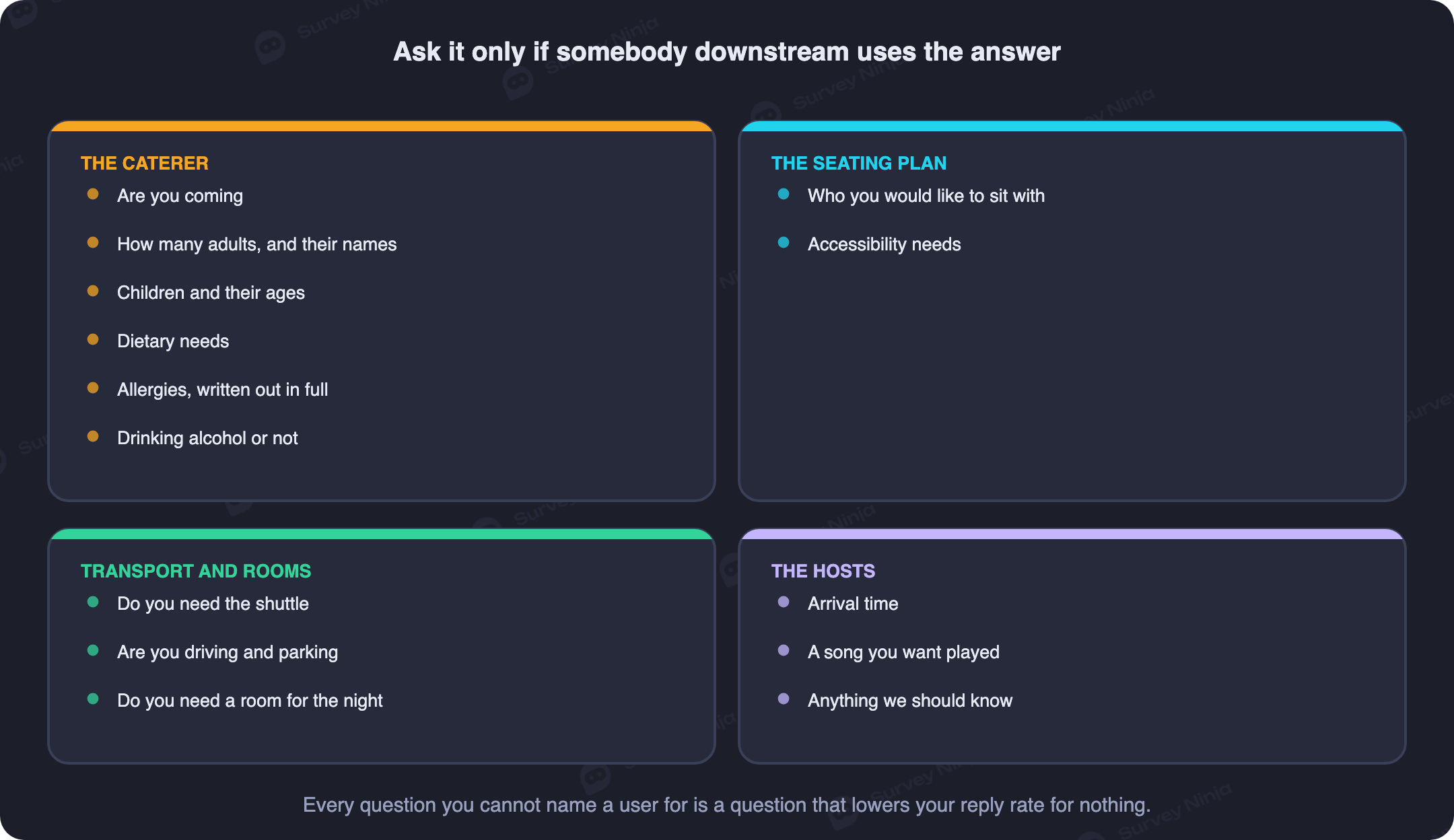
Attendance comes first, phrased as a single choice rather than open text, because everything after it depends on the answer and a "no" should skip the rest. The guest's own name follows immediately, spelled the way they want it on a place card, which the seating plan and the venue's name cards both need. Then the number of additional people they are bringing, and, critically, the name of each one: a plus one is not a headcount, it is a person who needs a seat, a meal, and possibly a place card of their own, and "1" without a name is a gap someone has to chase later.
Children are worth their own line, separate from the adult headcount, with an age for each child rather than a total count. The caterer needs ages to decide who gets the adult menu, the kids' menu, or a high chair, and the venue needs them to decide whether a child needs a booster seat or should sit at a table away from the speakers. Dietary needs and allergies are two different questions and belong on two different lines, which the next section covers on its own because it is the field most invitations get wrong. Alcohol preference, or simply whether the guest drinks, tells whoever is ordering the bar how much to buy and tells the seating planner who should not end up at the one table doing shots.
Transport and parking matter whenever the venue is not walkable from where guests are staying: ask whether they are driving themselves, need a shuttle seat, or need a ride, since a shuttle only works if you know the count before you book it. Whether they need accommodation feeds the hotel block directly, and it needs to be asked early enough that you can add rooms before the block's own cutoff, which is usually well ahead of your own RSVP deadline. Arrival time only belongs on the form when the event has more than one entry slot, a ceremony and a reception, a cocktail hour and a dinner, and the guest has a real choice to make. A song request feeds the DJ or band's set list directly and costs nothing to ask. Close with one optional free-text line for anything else, a message to the hosts, a note about a wheelchair or a car seat, anything that does not fit a structured field.
| Field | Who actually uses it |
|---|---|
| Attending: yes / no | Every other question, and the final headcount |
| Guest's name, spelled correctly | Seating plan, place cards |
| Additional guests, with names | Seating plan, caterer count, place cards |
| Children, with ages | Caterer's kids' menu, high chairs, seating away from speakers |
| Dietary needs (free text) | Caterer's menu planning |
| Allergies (separate free text) | Caterer's kitchen, plated separately |
| Drinks alcohol: yes / no | Bar order, seating near or away from it |
| Transport / parking needed | Shuttle booking, valet or lot count |
| Accommodation needed | Hotel room block |
| Arrival time (multi-slot events only) | Staggered check-in, ceremony seating |
| Song request | DJ or band set list |
| Free-text message (optional) | Hosts only, no vendor needs it |
Notice what is missing: nothing here asks the guest to guess at logistics they cannot know, and nothing collects an answer purely because it seemed like a nice thing to ask. Branching logic keeps the form short for each individual guest, since a "no" hides the entire second half and a "no children" answer hides the age fields, so nobody scrolls past questions that do not apply to them.
Why allergies need their own free-text line, not a checklist
A checkbox list of common allergens feels thorough and is quietly useless. Whatever eight items you list, someone's actual allergy is the ninth: sesame, kiwi, a specific spice, a cross-reactivity with latex that only shows up around certain fruits. The guest sees a list that does not include their allergy, ticks nothing or ticks "other," and the field that was supposed to protect them ends up blank or vague.
A single free-text field with a clear, specific prompt does better: "List any food allergy the kitchen needs to know about, and how serious it is." That wording does two things a checklist cannot. It invites the exact allergy in the guest's own words instead of forcing it into a category that might not fit, and it asks for severity, which is the difference between "avoid" and "a trace can send this person to a hospital." Open text is normally the harder field to act on at scale, but here it is the more precise instrument, because the population is small enough that someone will actually read every answer.
The part that gets skipped is what happens after the answer arrives. An allergy sitting in a spreadsheet column nobody opens again is not information the kitchen has, it is information you happened to collect. The list has to reach the caterer in a form they can use before the event, ideally a short, plainly formatted sheet: guest name, table number, allergy, severity, nothing else. Send it as its own document, not buried in a general guest count, and confirm the caterer has actually seen it rather than assuming an email attachment did the job.
Plus ones, and why "how many are you bringing" gets it wrong
"How many people are you bringing" looks like a simple question and produces a headcount you cannot trust. People round down because they forget a child counts, round up because they invited a friend who later cancels, or answer for a household without naming who is actually coming. Add up thirty of those answers and the total drifts from reality by more than anyone would guess, usually in a direction that surprises the caterer on the day.
The more reliable pattern is to collect one response per adult guest wherever your guest list allows it, rather than one response per household or one response per invitation. When each adult confirms their own attendance, their own plus one if they have one, and the names of anyone else in their party, the count is built from individual commitments instead of a single person's guess about everyone else's plans. This is more work to set up, since it means sending personalized links rather than one shared link, but it removes the single biggest source of headcount error: one person answering on behalf of people who never actually confirmed anything.
Reconciliation still matters even with individual links. Keep a running spreadsheet with the maximum possible guests per invitation as a ceiling, and flag any response that names more people than the invitation covers, since that is either a plus one you did not expect or a data entry mistake worth a quick message to sort out before it becomes a seating problem. Run that check weekly, not once at the deadline, because catching a mismatch two weeks out costs one message and catching it two days out costs a seat you do not have.
When to send it, and the reminder schedule that actually works
The schedule matters as much as the questions, and it runs on two dates that are not the same: the deadline you publish to guests, and the real deadline your caterer or venue gave you. Build a buffer of ten to fourteen days between them. That gap is not padding, it is the room you need to chase the people who miss the published deadline without missing the real one yourself.
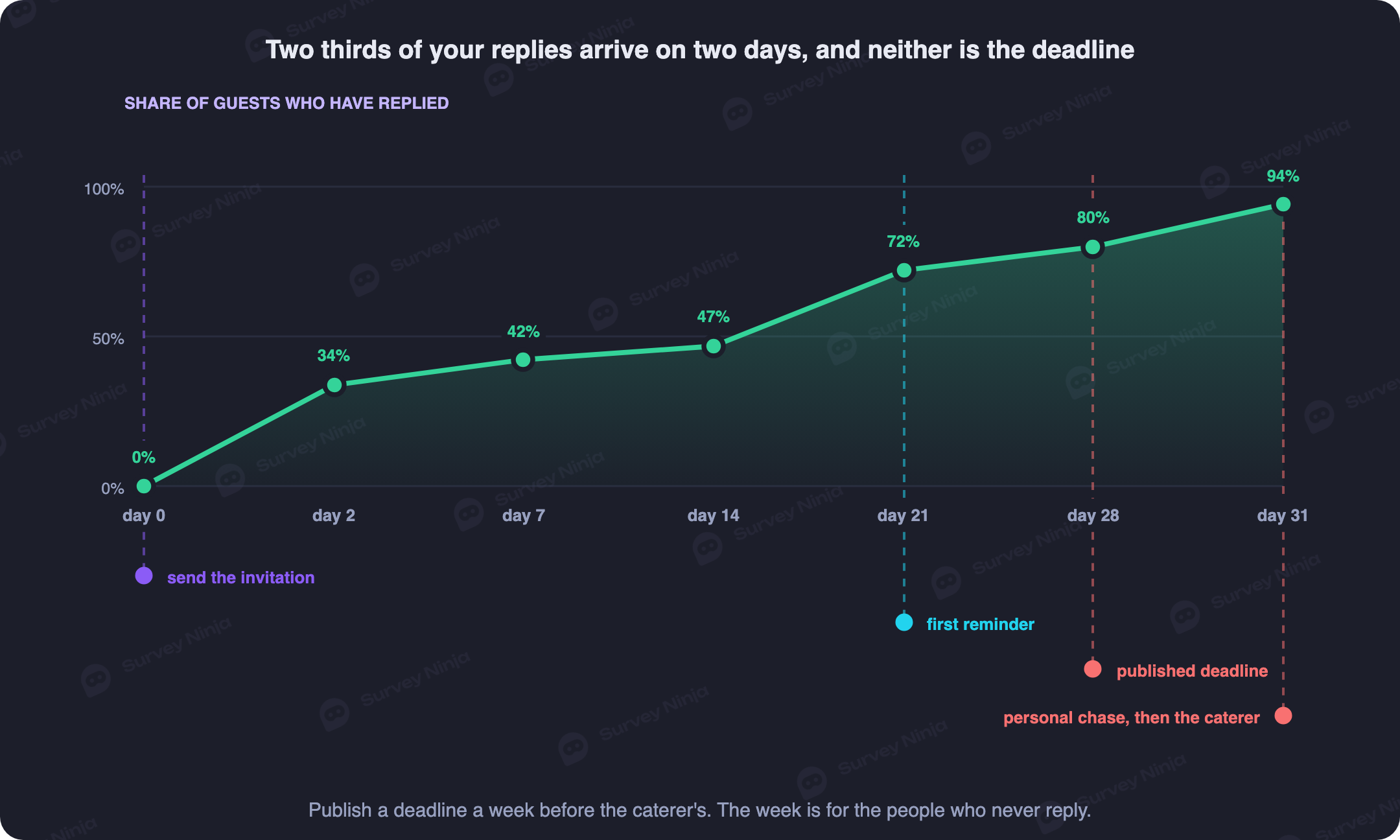
For a wedding, send the invitation with the RSVP link six to eight weeks before the event; for a birthday, family gathering, or company party, three to four weeks is usually enough. A save-the-date two to three months out is worth sending for a wedding with any significant travel involved, but it does not replace the RSVP itself. From there, a workable schedule looks like this:
- Day 0. Send the invitation with the RSVP link to every guest individually.
- Around day 10 to 12. A gentle reminder to non-responders only, never to people who already answered.
- One week before the published deadline. A firmer reminder, again only to non-responders, stating the date plainly.
- Three to five days before the published deadline. A personal message or call to whoever is still silent, one at a time, not a group blast.
- The published deadline. Close the form, or mark it clearly closed, and start planning against the numbers you have.
- The real vendor deadline, ten to fourteen days later. Send the final count to the caterer, venue, and any other headcount-dependent vendor.
The personal chase at the end is not optional and it is not the same as the automated reminders before it. By the time you reach the last handful of non-responders, an email is not going to move them, a text or a call from the host usually will, and it is worth the ten minutes it takes, since the same names tend to reappear in this slot for the reason covered in how to reduce survey dropout: silence is rarely refusal, it is usually the message getting buried.
What a real RSVP curve looks like
Plan around the shape the responses actually take, not the shape you wish they took. A burst arrives in the first forty-eight hours, typically somewhere around a third to two-fifths of the eventual total, from the guests who open messages promptly and decide quickly. After that burst, expect a long flat stretch, often a week or two where almost nothing comes in even though the invitation is sitting unopened or unanswered in dozens of inboxes. That flat middle is normal, not a sign the invitation failed.
The second burst arrives only after a reminder, which is exactly why the reminder at day ten to twelve matters more than any wording choice on the form itself. A well-timed nudge to the still-silent group typically pulls in another third of the total within a few days. What is left after that second burst is a small, stubborn group that a third automated reminder will not move, which is what the personal chase near the deadline is for. Track response rate and completion rate as two separate numbers here, the way you would for any survey: response rate tells you how many people have engaged with the form at all, and completion rate tells you how many of those actually finished it, since a guest who opened the form and abandoned it halfway is a different problem from one who never opened it at all.
How you send it changes how many people answer
Distribution decides more of your response rate than anything about the form's design. A personal message, one guest or one household at a time, with a link and their name in the greeting, consistently outperforms a group broadcast, for the same reason a personal email beats a generic newsletter blast, a pattern email surveys covers in more general terms.
A family or friend group chat feels efficient and produces the opposite of what you want. Someone posts the link, three people reply "we're in!" directly in the chat instead of through the form, one person assumes someone else already RSVP'd for their whole side of the family, and the actual form ends up with fewer, messier responses than the number of people who said something in the thread. You end up cross-referencing chat messages against form submissions, which defeats the entire point of using a form.
For guests who will not comfortably open a link, print a QR code on a physical invitation card that points to the exact same online form. This works well for older relatives who keep a paper invitation on the fridge or by the phone: they, or a family member helping them, scan the code once and land on the identical questions everyone else answered, so their reply lands in the same spreadsheet instead of a separate phone call you have to transcribe by hand. The mechanics of doing this well are covered in QR code surveys.
Making it feel like an invitation, not a form
The line between an invitation and a form is thinner than it looks, and it is mostly a handful of concrete choices rather than a vague sense of "warmth."
Put a real cover image at the top, a photo of the couple, the birthday person, or the host, not a generic stock graphic, since that single image is what signals "this is personal" before anyone reads a word. Lead with the hosts' or couple's names and a first-person sentence in their voice: "We would love for you to join us" reads entirely differently from "Please complete the following form." Keep that voice through the form itself, in the labels and the short intro line above the first question, rather than switching to a clipped, form-like tone the moment the questions start.
The confirmation screen after someone submits is the most skipped opportunity on the entire form. A generic "Thank you for your submission" reads like a customer support ticket. A confirmation that says something like "You're on the list! We'll send the venue address and timing two weeks before the day" tells the guest their answer registered and tells them exactly what happens next, which quietly reduces the number of people who message you afterward asking whether their RSVP went through.
Watching the numbers come in, and what each vendor needs from you
Once responses start arriving, the form is only useful if someone is actually watching it, not just collecting it. A live view of the headcount, broken down by confirmed adults, confirmed children, and declines, tells you in real time whether you are tracking toward the number the venue is set up for or drifting away from it early enough to do something about it.
Different vendors need different slices of the same data, at different times:
- The caterer needs the final adult and child count plus the compiled allergy sheet, ideally seven to ten days before the event, once the published deadline has closed and the last personal chases are done.
- The seating plan needs names, party groupings, and any note about who should or should not sit together, and it can only be finalized once the headcount is genuinely locked, usually three to five days out.
- The hotel block needs the accommodation answers as early as possible, since room blocks have their own cutoff that is often well ahead of your RSVP deadline, not after it.
- Transport or shuttle booking needs a count as soon as it is stable enough to book against, since most shuttle services price by seat and want numbers well before the event.
Exporting the live responses into a shared spreadsheet, through a direct integration rather than a manual copy-paste, keeps everyone working from the same numbers instead of three slightly different versions emailed around in the final week.
Privacy: what you are actually collecting, and for how long
An RSVP form collects names, who is related to whom, children's ages, and dietary or allergy information, which is health-adjacent data about private individuals who never agreed to be in a database. Treat it accordingly, even for a birthday party among friends.
Share only what each vendor actually needs, and nothing more: the caterer gets names, counts, and allergies, not phone numbers or addresses; the hotel gets the accommodation list, not the allergy sheet. Never make the guest list or the responses public, even informally, such as posting a spreadsheet link in a group chat where anyone can open it. Once the event is over and the vendors have been paid, delete the collected data rather than letting it sit indefinitely in a form you will forget about; there is no ongoing reason to keep a stranger's child's allergy on file a year later. The general principles behind minimal collection and honest handling are covered in anonymous surveys, and they apply here even though this form is the opposite of anonymous by design.
A wedding for 96 households, start to finish
A concrete run keeps all of this from staying abstract. A couple sends invitations to 96 households, representing a possible 162 guests once every plus one and child is counted at the maximum.
Day 0: the personalized invitation link goes out to each household by name. Within the first 48 hours, 38 households reply, covering 64 confirmed guests, a little under two fifths of the eventual total, matching the usual early burst. Then the flat stretch: over the next ten days, only 6 more households answer. On day 11, a reminder goes to the 52 still-silent households, and it works the way reminders usually do: 29 of them respond within four days, adding 48 more guests and bringing the running total to 73 households and 118 guests confirmed.
That leaves 23 households silent one week before the published deadline. The couple splits the list and personally texts or calls each one over three evenings. Eighteen respond to the direct message, two decline outright, and three never answer at all and are counted as non-attending for planning purposes. Final tally at the published deadline: 91 households confirmed attending, covering 149 guests, 3 declined, and 2 never responded.
Of the 149 confirmed guests, 34 are children, ranging from infants who need no meal to young teenagers on the adult menu, and the caterer gets ages for each one rather than a single "kids" count. Eleven guests list a dietary restriction and four of those eleven name an actual allergy, tree nuts and shellfish between them, which becomes a two-column sheet handed to the kitchen directly rather than left in the response export. Sixteen out-of-town guests request the hotel recommendation, which the couple sends to the hotel's block coordinator a full three weeks before the deadline, well ahead of the room block's own cutoff. The final numbers, adjusted for two last-minute cancellations that arrive four days out, go to the caterer at day minus eight: 147 guests, 34 of them children, allergy sheet attached.
Common mistakes worth avoiding
- Asking yes or no and stopping there. Every question you did not ask in the first pass becomes a second round of messages closer to the deadline, when people are least likely to reply.
- A checkbox list for allergies. It never covers the actual allergy in the room, and the guest either skips it or ticks the wrong box.
- Trusting "how many are you bringing." It produces a plausible-looking number that does not match who actually shows up. Ask for names, not just a count.
- Publishing your real caterer deadline as the RSVP deadline. It leaves no room to chase stragglers, and stragglers are guaranteed.
- Sending the invitation into a group chat. It produces duplicate replies from people who answered in the thread and silent guests who assumed someone else already spoke for them.
- Skipping the reminder because it feels pushy. The second burst of responses only arrives after a reminder; without one, the flat middle just continues.
- No confirmation screen, or a generic one. Guests who are not told what happens next message you separately to check their RSVP registered, which is more work than writing one good sentence up front.
- Keeping the guest list and allergy data indefinitely. There is no reason to still hold a private individual's dietary or health information months after the event is over.
Most of this runs on a normal survey builder rather than anything specialized: branching logic to skip irrelevant questions, a free-text field for allergies, and an export you can hand to a caterer without reformatting it by hand. SurveyNinja's free plan puts no cap on responses, which matters here specifically, since even a modest wedding guest list can pass a hundred replies before the deadline and a response limit is the last thing you want to hit two weeks out. Build the RSVP form, attach it to the invitation, and send it as a personal message to each guest rather than a group thread. If you are planning to check in with guests again after the event, a short thank-you note works better as its own short follow-up than as an extra section bolted onto the RSVP; see event surveys for how to time that separately.
Frequently asked questions
What should an RSVP form ask besides yes or no?
The guest's own name, the number and names of anyone they are bringing, children with their ages, dietary needs and allergies as two separate fields, whether they drink alcohol, transport or parking needs, whether they need accommodation, and one optional free-text line. Ask only what a specific vendor, such as the caterer, the seating plan, or the hotel, will actually use.
How many reminders should I send before an event?
Two automated reminders plus one personal chase works for most guest lists: a gentle nudge around day ten to twelve to non-responders only, a firmer one about a week before your published deadline, and a personal text or call to whoever is still silent three to five days before that deadline.
Should I collect one RSVP per adult guest or one per household?
One per adult guest wherever your list allows it. A single household response often hides who is actually attending, since one person answers for everyone else's plans. Individual links produce a headcount built from real commitments instead of a guess.
What is the best way to ask about food allergies?
A single free-text field with a specific prompt, such as asking for any allergy the kitchen should know about and how serious it is. A checkbox list of common allergens always misses someone's actual allergy, so the guest either leaves it blank or ticks the wrong box.
Should I send the invitation as a group chat message or individually?
Individually, one message per guest or household. A group chat produces duplicate replies from people who answer in the thread instead of the form, and it produces silent guests who assume someone else already replied on their behalf.
How far in advance should I send a wedding or party invitation with RSVP?
Six to eight weeks before a wedding, three to four weeks for a birthday, family gathering, or company party. Publish your RSVP deadline ten to fourteen days before the real deadline your caterer or venue actually needs, so you have room to chase people who miss it.
What should the confirmation screen say after someone submits their RSVP?
Confirm the response was received and say what happens next in a specific, personal sentence, such as when the venue details will follow. A generic "thank you for your submission" reads like a support ticket and leaves guests messaging you separately to check it went through.
How long should I keep the guest list and RSVP data after the event?
Delete it once the event is over and any vendor who needed it, such as the caterer or hotel, has been paid. Names, children's ages, and allergy information are private data about people who did not agree to be in a permanent database, and there is no ongoing reason to keep it.
Updated: Sep 29, 2026 Published: Aug 24, 2026