Comparison

SurveyNinja vs Microsoft Forms: more than a form and an Excel file

A free Microsoft account caps a form at 200 responses, Microsoft 365 Personal at 1,000, and the results land in Excel. SurveyNinja Basic gives you 1,000 responses every month for $10.50/mo billed yearly, with your logo and click tests with heatmaps. A/B tests of question wording, micro surveys on your website (beta) and SPSS export come with every plan, including Free. On Premium an AI report reads your open answers, no Copilot license needed.

Free plan with 100 responses a month and 14 days of Premium. No card required.

Prices and features checked on October 15, 2026.

SurveyNinja Microsoft Forms
Click test with heatmap From Basic No
Pairwise comparison From Basic No
Map question From Standard No
Other research question types From Basic Partly

Which one is right for you

Choose Microsoft Forms if

  • You work inside Microsoft 365 and want quick forms next to Teams, Outlook and Excel at no extra cost.
  • You need one form that respondents can read in several languages.

Choose SurveyNinja if

  • You hit the 200-response cap of a free Microsoft account: SurveyNinja Basic covers 1,000 responses a month for $10.50/mo, billed yearly.
  • Your survey goes to customers and should look like your brand: your logo from Basic, no SurveyNinja branding from Standard, your own domain on Premium.
  • You test designs and wording: click tests with heatmaps, pairwise comparison and area selection from Basic, map questions from Standard, A/B tests on every plan.
  • Your boss wants more than an Excel file: SPSS, CSV, Excel, PDF and Word exports on every plan, including Free, and an AI report with themes, sentiment and quotes on Premium.
  • You want answers from website visitors: micro surveys targeted by page, device and visit frequency.
Start free

Where SurveyNinja goes further than Microsoft Forms

Features that matter for research and analysis, with the plan they are on.

Research question types

Click tests with heatmaps, area selection on images and pairwise comparison from Basic, map questions from Standard. Microsoft Forms has 8 question types: choice, text, rating, date, ranking, Likert, file upload and NPS.

A/B tests of question wording

Show two versions of a question's wording to different respondents on any plan. From Standard, the report shows which one more people complete, with the confidence level. Microsoft's help center does not describe A/B tests.

Exports beyond Excel

Download responses as SPSS, CSV, Excel, PDF or Word on every plan, including Free. Microsoft Forms opens results in Excel.

AI report included in Premium

Themes, sentiment, quotes and group comparison from open answers on Premium at $48.30/mo, with a link and PDF to share. Copilot in Microsoft Forms needs a Microsoft Copilot license.

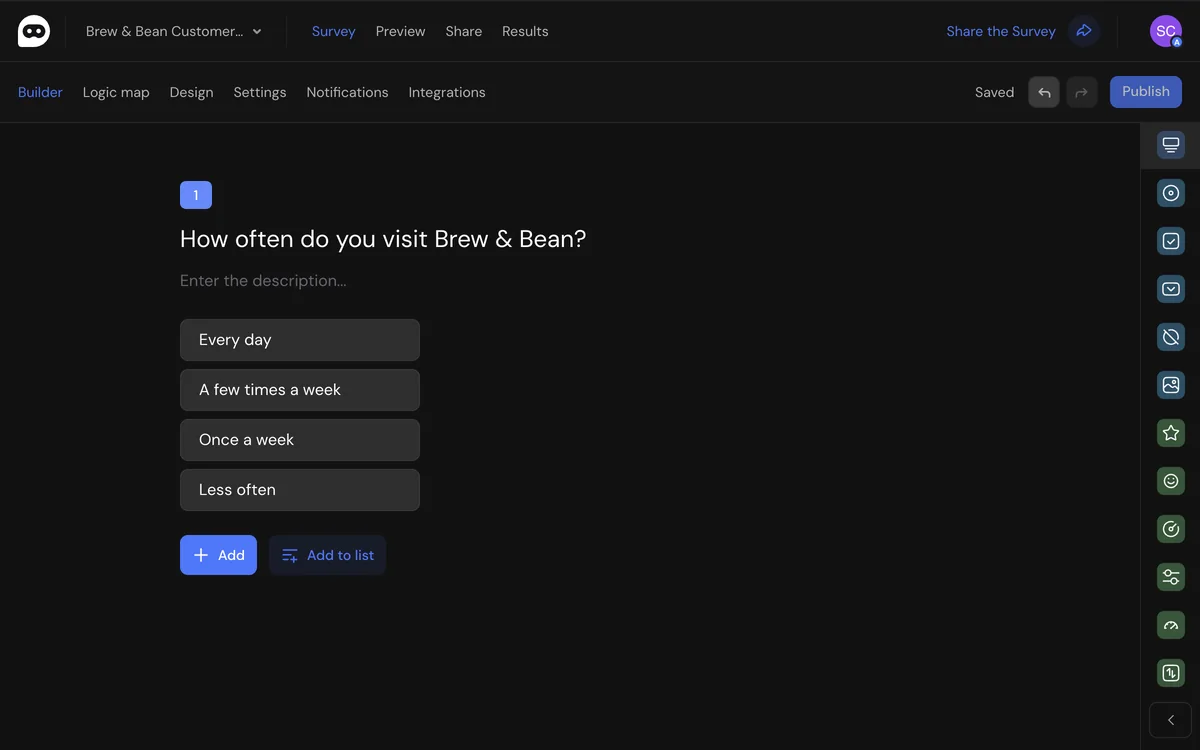
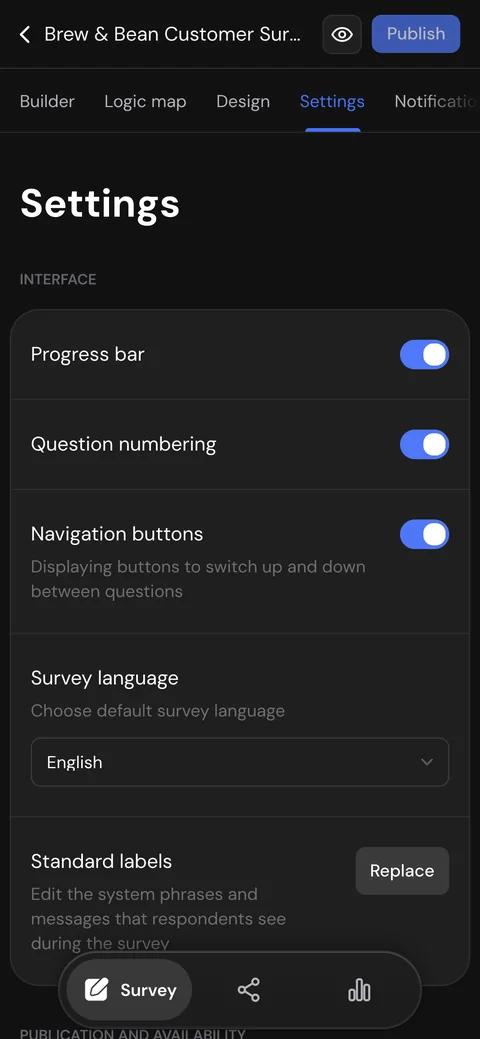
Edit surveys on your phone or your laptop

The whole builder works on a phone: questions, logic, design, publishing and responses. Fix a question on the way to a meeting, check new answers from the couch and finish the survey on your laptop.

  • Every section and setting fits a small screen
  • Logic, design and publishing, not a cut-down view
  • Pick up on your laptop right where you left off
The SurveyNinja survey builder in a browser
Survey settings in SurveyNinja on a phone

Research and UX tools in one survey builder

Test designs, rank ideas and ask visitors on your website from the same survey builder.

Micro surveys on your site

Paste one code and show a short survey in a corner card or modal: after a delay, on scroll, on exit intent (desktop) or on a click. Choose pages and devices and limit how often visitors see it.

All plans, including Free Not documented by Microsoft Forms

Click test with heatmap

Upload a mockup or a screenshot and ask where people would click. The report shows a heatmap of all clicks.

From Basic Not in Microsoft Forms

Pairwise comparison

Respondents choose between two options at a time; the adaptive mode drops weak options early. The report ranks items with a win matrix.

From Basic Not in Microsoft Forms

A/B test of question wording

Show two versions of a question's wording to different respondents. From Standard, the report shows which one more people complete, with the confidence level.

All plans, including Free Not documented by Microsoft Forms

Map question

Respondents drop pins on a map: where they live, shop or travel. See the answers as a map and a list of places.

From Standard Not in Microsoft Forms

Area selection

Mark zones on an image and let respondents pick them, with scores and logic like any answer option.

From Basic Not in Microsoft Forms

Feature-by-feature comparison

Each cell shows whether the feature exists and the plan it starts on.

Feature SurveyNinja Microsoft Forms
Pricing and limits
Responses on the free plan 100 responses a month Up to 200 per form; 1,000 with Microsoft 365 Personal; no monthly limit
Other free plan limits 50 surveys, 30 questions each Up to 400 forms and 200 questions per form
Cheapest paid plan Basic: $10.50/mo billed yearly ($15 monthly), 1,000 responses a month Free with a Microsoft account; Microsoft 365 Personal $9.99 a month or $99.99 a year, Business Basic $7 per user a month billed yearly
Building surveys
Create a survey with AI from a description Yes, All plans, including Free Survey or quiz from a text prompt; beta Yes Draft with Copilot; needs a Microsoft Copilot license
Question types 28, plus 6 content blocks; NPS, star rating and scale on Free 8: choice, text, rating, date, ranking, Likert, file upload and NPS
Branching logic Yes, All plans, including Free Yes, All plans, including Free Branching by answer to a later question, a section or the end
Quizzes with scores Yes, All plans, including Free Yes, All plans, including Free Points, practice mode and answer explanations
One form in several languages No Respondent interface in English, Spanish or Portuguese; one language per survey Yes Up to 11 languages; you translate each one by hand
Research and UX tools
Micro surveys on your website Yes, All plans, including Free One code for the whole site: corner card or modal; shown after a delay, on scroll, on exit intent (desktop) or on a click; page and device targeting, traffic share, show frequency; beta Link, email, QR code or embed code; no on-site widget with triggers in Microsoft's docs (October 15, 2026)
Click test with heatmap Yes, From Basic Heatmap of clicks on an image; hotspot selection with drawn areas No
Area selection on an image Yes, From Basic Zones on an image work as answer options, with scores and logic No
Pairwise comparison Yes, From Basic Every pair or adaptive mode with fewer pairs; win matrix in the report No
Map question Yes, From Standard Respondents drop pins; the report shows a map and a list of places No
A/B test of question wording Yes, All plans, including Free Versions of a question's wording, 50/50 split by default; from Standard the report marks the leader with its confidence level Not in Microsoft's help center (October 15, 2026)
Other research question types Yes, From Basic Semantic differential, 3D matrix, constant sum Partly Likert, ranking and NPS; no semantic differential or constant sum
Collecting responses
Link, QR code and website embed Yes, All plans, including Free Widget, pop-up, iframe or button Yes, All plans, including Free Link, email, QR code or embed code
Your own domain Yes, From Premium Your own subdomain from Basic Not in Microsoft's help center; forms open on Microsoft's domain (October 15, 2026)
Remove the service's branding Yes, From Standard Not in Microsoft's help center (October 15, 2026)
Close by date or number of responses Yes, From Standard Partly, All plans, including Free Start and end date; closing at a number of responses is not documented
Analysis and export
Reports and charts Yes, All plans, including Free With a public link to share Yes, All plans, including Free Response summary and a summary link anyone can open
AI analysis of open-ended answers Yes, From Premium Themes, sentiment, quotes and group comparison; shareable link and PDF Partly Copilot helps analyze results; needs a Microsoft Copilot license
Export of responses Yes, All plans, including Free CSV, Excel, PDF, Word Yes, All plans, including Free Excel workbook
SPSS export (.sav) Yes, All plans, including Free Excel only (October 15, 2026)
Integrations
Webhooks Yes, From Basic Partly Power Automate trigger on each new response; work or school accounts only
REST API Yes, All plans, including Free No public Forms API in Microsoft's docs; a Power Automate connector reads responses (October 15, 2026)
Built-in Slack, HubSpot, Salesforce apps No Through webhooks and the API Partly Teams and Outlook; other apps through Power Automate
Team and security
Roles and permissions Yes Owner, admin, member; custom roles with folder access on Premium Yes, Microsoft 365 work or school accounts only Owner and up to 100 co-authors who edit the form and see responses
Single sign-on (SSO) Yes, From Premium OpenID Connect Yes, Microsoft 365 work or school accounts only
Two-factor authentication Yes, All plans, including Free Yes, All plans, including Free Microsoft account two-step verification
Install on your own servers Yes Separate offer Cloud only
Switching
Import forms from other services Yes, All plans, including Free Typeform and Google Forms in one click; past responses, also from CSV or Excel, on paid plans Partly, All plans, including Free Quick Import from Word and PDF files
Sources: Microsoft Forms data checked on October 15, 2026 on its own website

SurveyNinja features checked on October 20, 2026; plans and limits: pricing page

Start free

Free plan, no card required

How to switch from Microsoft Forms

1

Start on Free

Sign up without a card and get 14 days of Premium to try branding, exports and the AI report.

2

Rebuild your survey

Start from a template or describe the survey to the AI generator, then set up branching, which is on every plan, including Free.

3

Bring responses and share

Download your results from Microsoft Forms as an Excel workbook, upload it to SurveyNinja on a paid plan and match the columns to your questions. Then swap the Microsoft Forms link for the new one.

Frequently asked questions

Didn't find your answer? Write to team@surveyninja.io or use the contact page, and we'll help you move your surveys.

Try SurveyNinja for free

Free plan with 100 responses a month and 14 days of Premium after sign-up. No card required.

Start free

Not ready to switch? Try it first