 25 Questions for a Travel Agency Customer Satisfaction Survey
QR code surveys
A QR code survey people answer before they leave.
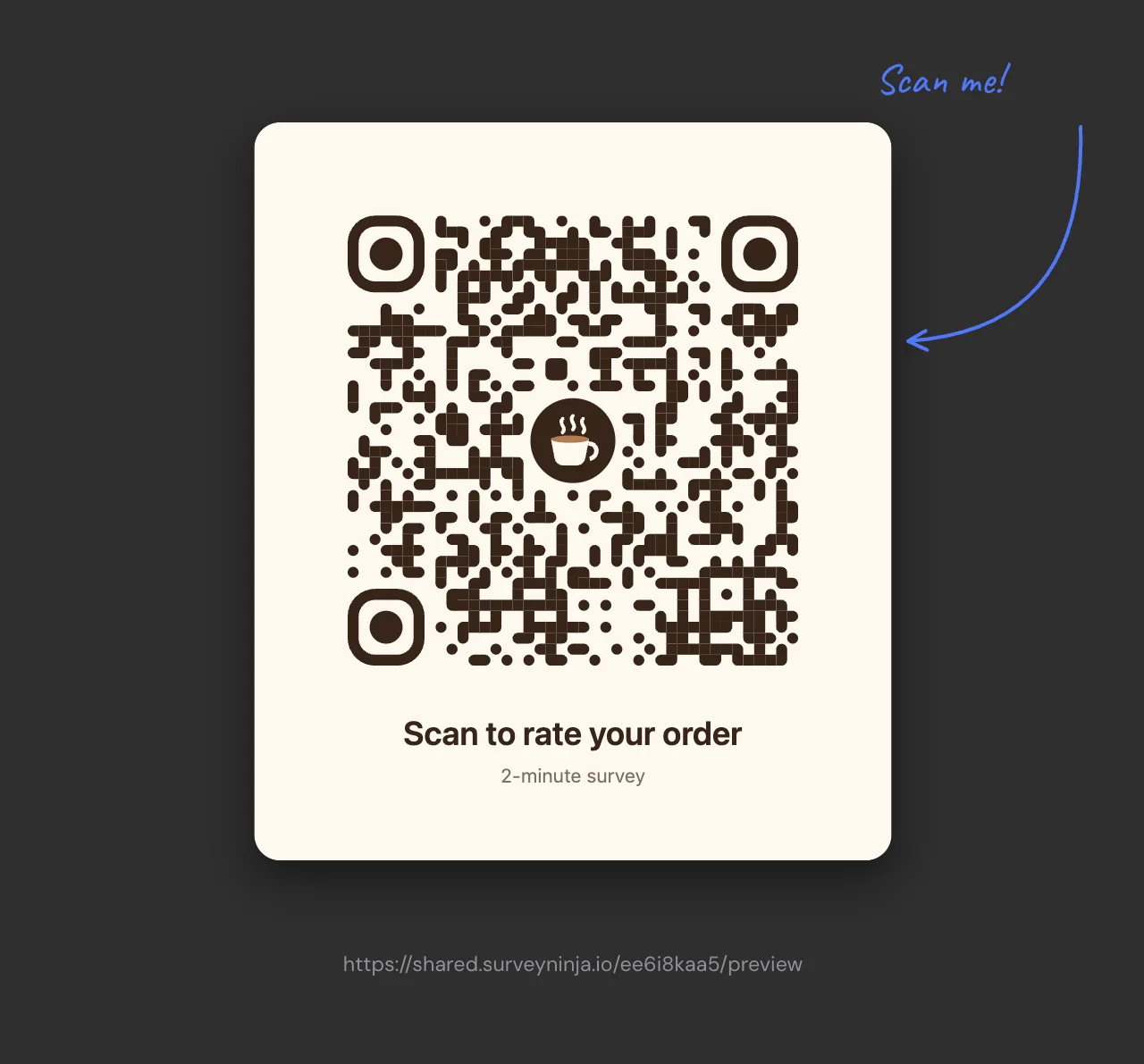
Make a survey, give its QR code your colors and logo, and put it on a table, a receipt, a poster or a slide. People point the phone camera at it and answer in the browser, with no app.
Free plan: 50 surveys and 100 responses a month. QR codes on every plan. What's free →
- Your brandColors, dot shapes and your logo.
- PNG or SVGFrom 512 to 4096 px.
- Ready to printA sheet, a business card or a sticker.
- No appThe phone camera opens the survey.
How to make a QR code survey.
Three steps from an empty survey to a code on the counter.
- 1
Create the survey
Start from a template, describe it to AI or build it from scratch. Short surveys work best on a phone.
- 2
Design the code
Click Share and open QR code. Pick the colors and the dot shape, add your logo and a caption.
- 3
Download or print
Save it as PNG or SVG, or print it on an A4 sheet, a business card or a sticker.
A code that looks like your brand.
The preview shows exactly what you download. Change a color and the code redraws before your eyes.

- Your colorsThe code and the background in any color you like.
- Dots and cornersSix dot styles and three corner marker shapes.
- Your logoA PNG, JPG or SVG in the middle, in three sizes.
- A card with a captionA caption and a subtitle tell people why to scan.
- PNG or SVGFrom 512 to 4096 px, for screens and for print.
- Error correctionFour levels. With a logo, pick a high one so the code reads well.
Print it in the right size.
Print opens a page with the code already sized for the format. Send it to your printer or to a print shop.
- A4 sheet: a 12 cm code with the caption, for walls and doors.
- Business card 90×50: a 3 cm code with the caption, for the counter and the bag.
- Sticker 5×5: a 4.5 cm code, for products, devices and packaging.

Where a QR code survey works.
- Cafés and restaurantsA card on the table or on the bill. Guests rate the visit while they wait. Café feedback template →
- Shops and receiptsPrint the code on the receipt or the bag and ask about the purchase at home.
- Events and conferencesPut it on the badge, the stand or the last slide and collect feedback before people leave the hall.
- Classes and talksShow it on a slide: the room answers from their phones in a minute.
- Products and packagingA sticker on the box or the device leads to a product feedback survey.
- Offices and front desksA sheet at reception or in the elevator for visitor and employee feedback.
Tips for more scans and answers.
- Say why to scanA caption like "Rate your order" or "2-minute survey" tells people what they get.
- Keep it shortPeople scan while waiting or on the way out. Three to seven questions fit that minute.
- Keep the linkThe code holds the survey link. Change the questions any time, but not the link once the code is printed.
- One code per placeWith unique links, each table, store or event gets its own code, and you see the answers by link. Standard plan.
What's free, and what comes next.
Surveys, the QR code designer with your logo and printing are free. Paid plans add filters, a code for each place and more responses.
| What you get | Free | Basic | Standard | Premium |
|---|---|---|---|---|
| Price | $0 | $10.50/mo | $25.90/mo | $48.30/mo |
| Responses a month | 100 | 1,000 | 5,000 | 20,000 |
| Surveys | 50 | 100 | 500 | Unlimited |
| QR code with your colors and logo, PNG or SVG | Yes | Yes | Yes | Yes |
| Print on a sheet, a business card or a sticker | Yes | Yes | Yes | Yes |
| Anonymous mode, one response per person | Yes | Yes | Yes | Yes |
| Export responses | Yes | Yes | Yes | Yes |
| Filter responses | No | Yes | Yes | Yes |
| A separate link and QR code for each place | No | No | Yes | Yes |
| Close by date or after N responses | No | No | Yes | Yes |
| Without SurveyNinja branding | No | No | Yes | Yes |
Prices per month, billed yearly, in USD. All plans and prices →
More ways to share a survey.
Already paying for a survey tool?
Send us a screenshot of your invoice and get a month of Premium free. Our team also helps you move your surveys to SurveyNinja.
Questions and answers
How do I create a QR code for a survey?
Create the survey, click Share and open QR code. Choose the colors, the dot style and a logo, then download the code as PNG or SVG or print it.
Is the QR code free?
Yes. The QR code designer, the logo and printing are on every plan, Free included. The Free plan has 50 surveys and 100 responses a month.
Do people need an app to scan it?
No. The phone camera reads the code and opens the survey in the browser. People do not need an account either.
Can I change the survey after printing the code?
Yes. The code holds the survey link, so new questions and texts show up for everyone who scans it. Do not edit the link itself after printing: the printed code would lead to the old address.
Can I put my logo in the QR code?
Yes, a PNG, JPG or SVG in three sizes. With a logo, choose a high error correction level so the code still reads well.
PNG or SVG?
PNG for websites, slides and social media, up to 4096 px. SVG scales to any size without losing sharpness, so print shops prefer it.
Can I have a different code for each table or store?
Yes. Unique links on the Standard plan and higher give each place its own link and QR code, and the results show the answers by link.
How do I stop the same person from answering twice?
Turn on one response per person: SurveyNinja checks the browser cookie, the IP address or a link parameter. It works on every plan.
Didn't find the answer? Write to team@surveyninja.io or use the contact page.
Your code can be on the counter today.
Start free with no credit card, design the code with your logo and read every answer in one report.