SurveyNinja Joins ChatGPT Plugins, Claude Connectors, and Cursor
Product updates  Mike Taylor Nov 25, 2026 Reading time ≈ 10 min
Contents
SurveyNinja is now listed in the ChatGPT plugin directory, the Claude connector directory, Cursor Directory, and the Official MCP Registry (io.surveyninja/mcp). Connect the remote MCP server at https://mcp.surveyninja.io/mcp/v1 and 25 plain-text agent skills on every plan, including Free, to create surveys, read responses, and export data.
Key points
- Install SurveyNinja directly from ChatGPT plugins (v1.1.0, added November 24, 2026), Claude connectors (October 2026), Cursor Directory, or the Official MCP Registry (
io.surveyninja/mcp). - One Streamable HTTP endpoint exposes 166 tools with OAuth ("Allow access") or 173 tools with a personal API key, up to 180 requests per minute.
- 25 plain-text
SKILL.mdagent skills ship with ChatGPT and Cursor installs, install via Claude Code ornpx skills, and download free without sign-up. - Both the MCP server and REST API work on every plan, including Free (50 surveys, 100 responses per month, and 30 questions).
Where to install SurveyNinja across AI directories
Directory listings replace manual JSON setup in ChatGPT, Claude, and Cursor while connecting every client to the same remote server at https://mcp.surveyninja.io/mcp/v1.
- ChatGPT plugin directory (added November 24, 2026): Search "SurveyNinja" on
chatgpt.com/pluginsor open the SurveyNinja ChatGPT plugin listing. Listed under Productivity as version 1.1.0 by developer SurveyNinja with subtitle "Build surveys, read results" and an "Install plugin" button, it bundles the MCP server and 25 skills; sign in and pick one workspace. - Claude connector directory (added October 2026): Open the SurveyNinja Claude connector listing (Community label) and click "Connect to Claude".
- Cursor Directory (community directory): Open the SurveyNinja Cursor Directory page, public after security review, go to MCP Servers, and click "Add to Cursor" for the server and 25 skills.
- Official MCP Registry and GitHub: Registered as
io.surveyninja/mcp(v1.0.0, active, published October 27, 2026) with DNS TXT verification onsurveyninja.io. Configs, tool docs, and all 25 skills live in the MIT-licensed surveyninja-mcp GitHub repository (verifiedsurveyninja.ioorg).
| Client | Directory or source | Included | Setup method |
|---|---|---|---|
| ChatGPT | ChatGPT plugin directory (v1.1.0, "Install plugin") | MCP server + 25 skills | SurveyNinja OAuth (one workspace), or manual connector in developer mode |
| Claude | Claude connector directory (Community, "Connect to Claude") | MCP server | SurveyNinja OAuth (one workspace), or manual connector in Settings |
| Cursor | Cursor Directory (community listing, "Add to Cursor") | MCP server + 25 skills | OAuth in Cursor MCP settings, or manual ~/.cursor/mcp.json |
| Claude Code, VS Code, CLI | GitHub repo (MIT) and Official MCP Registry | Claude Code plugin (server + 25 skills) or npx skills | OAuth via /mcp, .vscode/mcp.json for Copilot Chat, or API key |
See client-specific screenshots and manual configs on the SurveyNinja MCP server page and the MCP setup guide.
What 166 to 173 MCP tools let your assistant do
Every tool executes inside your SurveyNinja workspace using your role and plan limits, so one chat covers building, publishing, reading results, and exporting files.
For authoring, your assistant creates surveys from scratch, starts from templates like the NPS survey template or customer satisfaction survey template, or generates a draft with AI. It edits questions, branching logic, design, and settings, then publishes when you confirm.
For analysis, the server reads individual responses, summaries, filtered reports, and SurveyNinja survey reports, plus Smart Analytics AI reports on Premium and Enterprise. Ask for response exports in CSV, Excel, Word, or SPSS, or report exports in PDF or Word; download links expire after 1 hour and can be regenerated on request.
Workspace tools handle public links to reports, summaries, or responses, response tagging, notifications, webhooks, integrations, and workspace invitations. Every action carries a read-only or mutating annotation so assistants can ask before changing, publishing, or deleting data.
How the 25 open agent skills work with MCP
An MCP tool performs one API call, while an agent skill documents the workflow: what to clarify first, which tools to call in order, and what to skip. Every entry in the AI skills catalog is a plain-text SKILL.md file with no executable code, verified against production MCP tools, and downloadable individually or via /skills/all.zip without sign-up.
ChatGPT and Cursor directory installs bundle all 25 skills. For local agents, the files follow the SKILL.md format read by Claude Code (.claude/skills/), Codex, Cursor, and Gemini CLI (.agents/skills/):
- Claude Code plugin: Run
/plugin marketplace add surveyninjaio/surveyninja-mcp, then/plugin install surveyninja@surveyninja, and sign in with/mcp. - Skills CLI: Run
npx skills add surveyninjaio/surveyninja-mcpto install all 25 skills. - Gemini CLI extension: Run
gemini extensions install https://github.com/surveyninjaio/surveyninja-mcpor unpack/skills/all.zipinto.agents/skills/.
Common workflows include building a survey from a brief, running a pre-launch audit on wording and logic, and summarizing incoming responses and open comments. Because each skill is plain markdown under the MIT license, teams can inspect or adapt instructions directly.
OAuth permissions vs. personal API keys
Connect https://mcp.surveyninja.io/mcp/v1 with OAuth ("Allow access") for scoped single-workspace sessions, or use a personal API key from the API / MCP page for multi-workspace workflows.
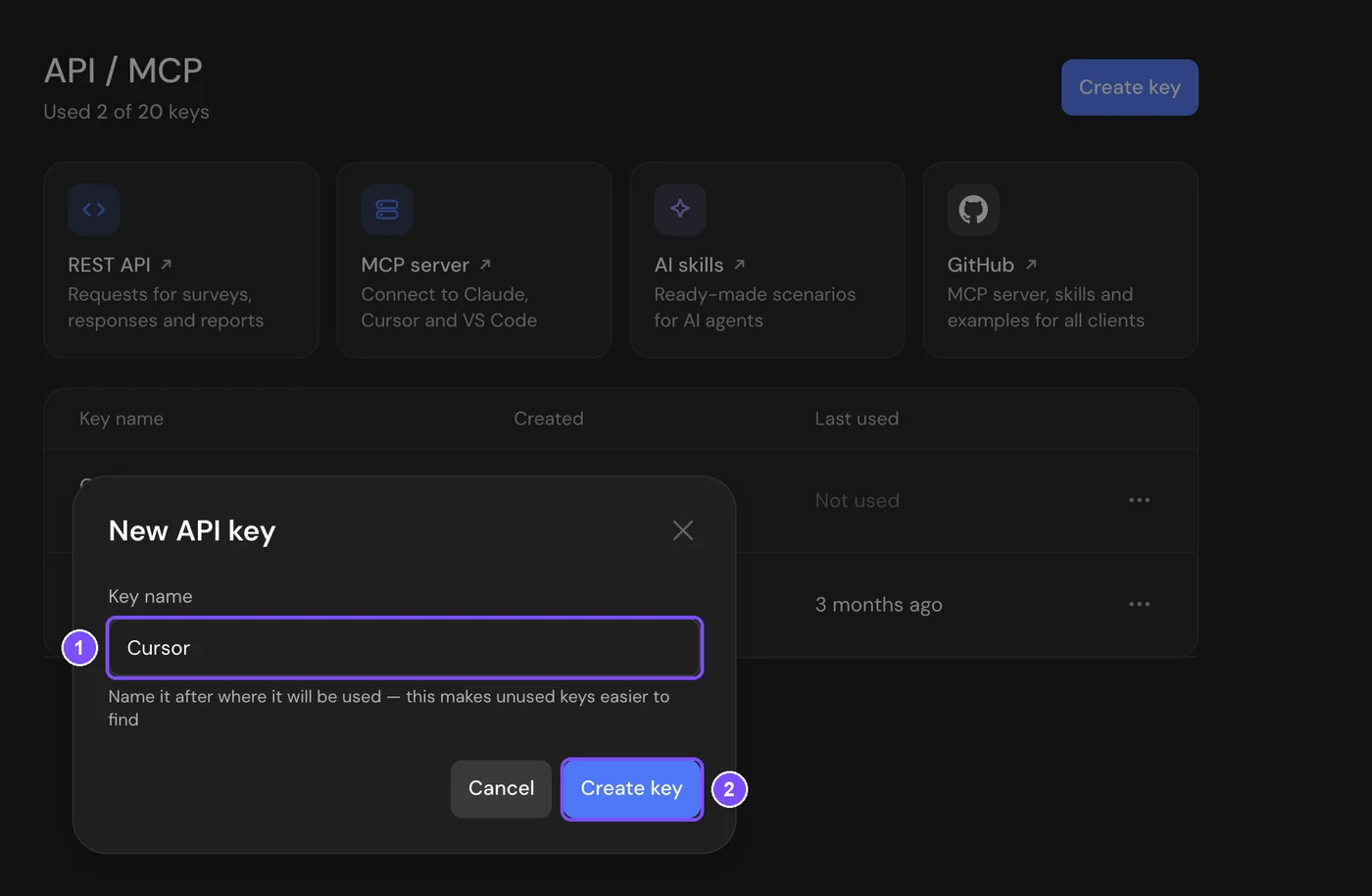
OAuth ("Allow access") binds the assistant to one chosen workspace, refreshes tokens automatically, and exposes 166 tools. It hides seven sensitive tools: actions that route responses to a new external destination (creating or editing webhooks, confirming a new email recipient) and account-level tools (profile, sessions, affiliate settings). Enabling, testing, and retrying existing webhooks still works. Removing the connector or leaving the workspace ends access.
A personal API key reaches every workspace you own or belong to, enables all 173 tools, and authenticates the SurveyNinja REST API. See the MCP developer documentation for headers and method details. Deleting the key on API / MCP revokes access immediately.
Both modes allow up to 180 requests per minute per user. Responses stay stored in SurveyNinja; when an assistant reads them, they pass to that assistant under its provider's terms, just like pasted chat text.
How to connect SurveyNinja in four steps
Both the MCP server and REST API are available on every plan, including Free (50 surveys, 100 responses per month, and 30 questions), Basic, Standard, Premium, and Enterprise. Compare full allowances on the SurveyNinja pricing page.
- Pick a directory or endpoint Install from ChatGPT plugins, Claude connectors, or Cursor Directory, or copy
https://mcp.surveyninja.io/mcp/v1for Claude Code, VS Code, or another Streamable HTTP client. - Authenticate Sign in with Allow access for one workspace (166 tools), or create a named key on
API / MCPfor all workspaces and 173 tools. - Load the 25 skills locally if needed ChatGPT and Cursor bundle them; for local agents, install the Claude Code plugin, run
npx skills add surveyninjaio/surveyninja-mcp, or unzip/skills/all.zip. - Start with a read-only prompt List existing surveys or audit a draft before approving mutating actions like publishing or deleting responses.
Need another MCP tool, skill, or integration? Vote or submit a request on the SurveyNinja roadmap.
Frequently asked questions
Which plans include the SurveyNinja MCP server and REST API?
Every SurveyNinja plan includes both the MCP server and the REST API, including Free (50 surveys, 100 responses per month, and 30 questions) as well as Basic, Standard, Premium, and Enterprise. The assistant follows your workspace role and plan features, so Smart Analytics AI reports still require Premium or Enterprise.
Why does OAuth expose 166 tools while a personal API key exposes 173?
OAuth ("Allow access") hides seven sensitive tools by design: tools that send responses to a new external destination, such as creating or editing webhooks or confirming a new email recipient, plus account-level tools for profile and session settings. You can still enable, test, and retry existing webhooks through OAuth, or use a personal API key for all 173 tools.
Are the 25 SurveyNinja agent skills safe to download and inspect?
Yes. Each of the 25 skills is a plain-text SKILL.md file with no executable code, published under the MIT license and verified against production MCP tools. You can read every line on GitHub or download the archive without signing up. Skills only guide how your assistant calls the MCP server using permissions you grant.
How do I disconnect ChatGPT, Claude, or Cursor from SurveyNinja?
If you connected through OAuth ("Allow access"), remove the SurveyNinja plugin or connector in your assistant's settings; access also ends automatically if you leave the selected workspace. If you used a personal API key, open the API / MCP page in SurveyNinja and delete that key to revoke access immediately across every client.
What are the rate limits and export link rules for the MCP server?
The SurveyNinja MCP server allows up to 180 requests per minute per user over Streamable HTTP. When your assistant exports responses to CSV, Excel, Word, or SPSS, or reports to PDF or Word, each generated download link stays valid for 1 hour. Ask the assistant to generate a fresh export link whenever one expires.
Published: Nov 25, 2026