 SurveyNinja Joins ChatGPT Plugins, Claude Connectors, and Cursor
40 New Survey Templates with Design Themes and Full Mobile Editing
Product updates  Mike Taylor Nov 25, 2026 Reading time ≈ 9 min
Contents
On November 18, 2026, SurveyNinja shipped 40 new survey and form templates with built-in design themes, expanding the catalog to 124 ready templates per language in English, Spanish, and Portuguese. Clicking "Use this template" copies both the questions and the visual theme into your workspace, and the full builder works directly in any phone browser.
Key points
- 40 new templates span customer feedback, onboarding, beauty and hospitality, events, app and website feedback, concept testing, demographics, community needs, memberships, rental applications, and inspections, reaching 124 per language.
- Clicking "Use this template" copies the survey together with its built-in design theme: colors, fonts, background image or gradient, and question card surface.
- Respondents see the copied design on every plan, including Free; changing colors, fonts, and backgrounds or creating custom themes starts on Basic, and branding removal starts on Standard.
- The entire SurveyNinja builder runs in a phone browser with all sections, branching logic, and question settings intact and no app to install.
What shipped in the 40 new survey templates
This update expands the catalog across customer service, product research, events, and operational intake. Each template ships with domain-specific questions, clear answer scales, and branching logic where follow-up prompts depend on an earlier answer. All 40 templates are available in English, Spanish, and Portuguese so multilingual teams can run parallel surveys from the same structure.
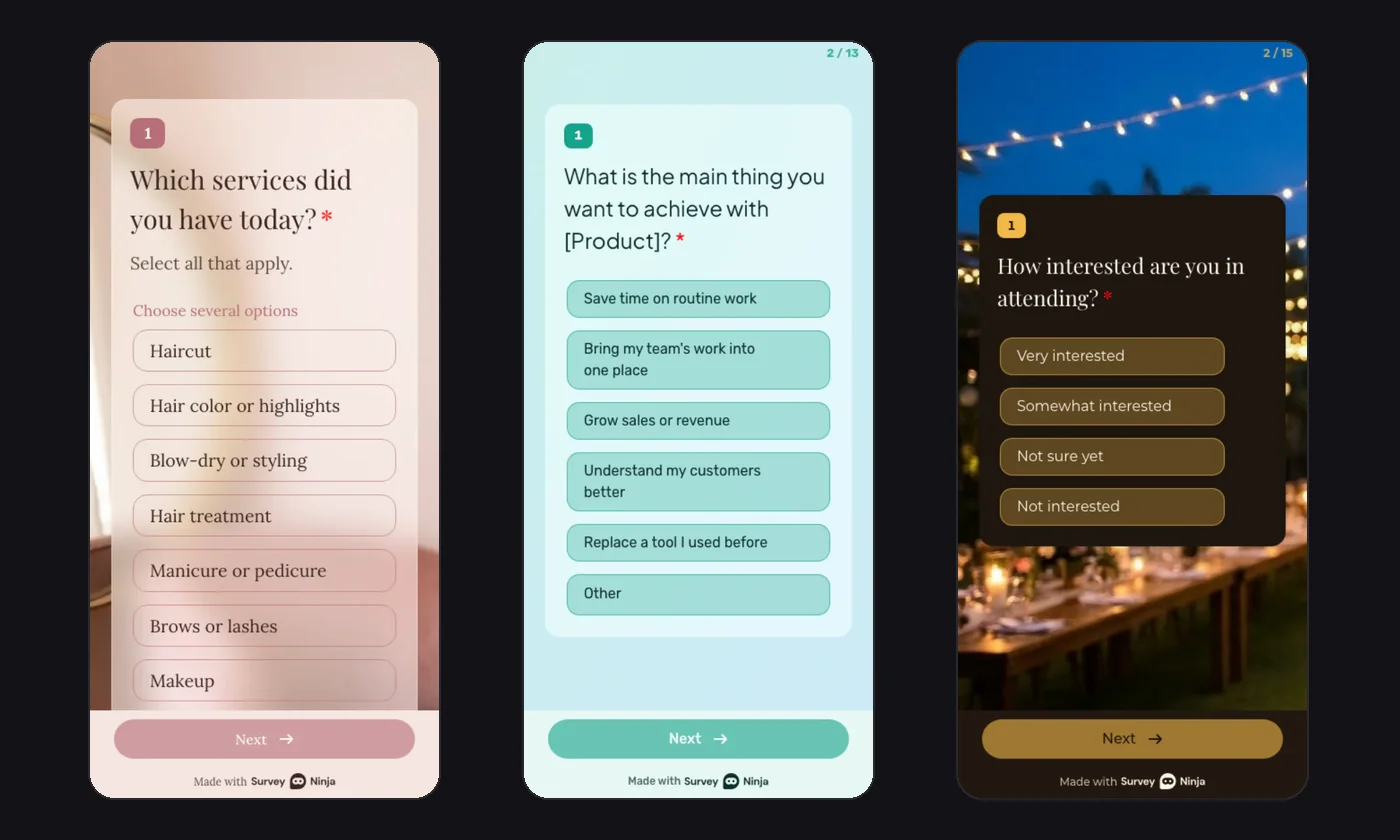
Each template arrives styled for its setting rather than opening on a plain default screen. A salon feedback survey uses warm tones and serif headings, a SaaS onboarding flow uses rounded pill options on a light mint backdrop, and an event planning survey pairs a dark card surface with an evening venue photograph.
| Use case | Representative new templates | What comes ready to edit |
|---|---|---|
| Customer and hospitality | Salon Customer Satisfaction Survey, Hotel Guest Satisfaction Survey, Customer Onboarding Survey, and Post-Purchase Survey | Service checklists, stay ratings, onboarding goals, and follow-up branching |
| Product and UX | App Feedback Survey, Concept Testing Survey, and Website Feedback Survey | Star ratings, bug-report jumps, open first-reaction fields, and purchase intent scales |
| Events and community | Event Planning Survey, Community Needs Assessment Survey, and Demographic Survey | Attendance interest, schedule and format choices, optional accessibility and demographic items |
| Operations and intake | Membership Application Form, Rental Application Form, and Vehicle Inspection Checklist in the full template catalog | Structured intake fields, yes/no inspection checks, and reference consent items |
The 40 also cover HR, education, and quizzes, from employee onboarding and performance reviews to student feedback and trivia quizzes, bringing the catalog to 124 per language. After tailoring a survey for recurring projects, you can save it for your own workspace using custom templates.
How built-in design themes copy into your workspace
When you open any template page and click "Use this template", SurveyNinja copies the survey into your workspace together with its visual theme. That copy carries the color palette, typography, background image or gradient, button accents, and the translucent, light, or dark question card surface.
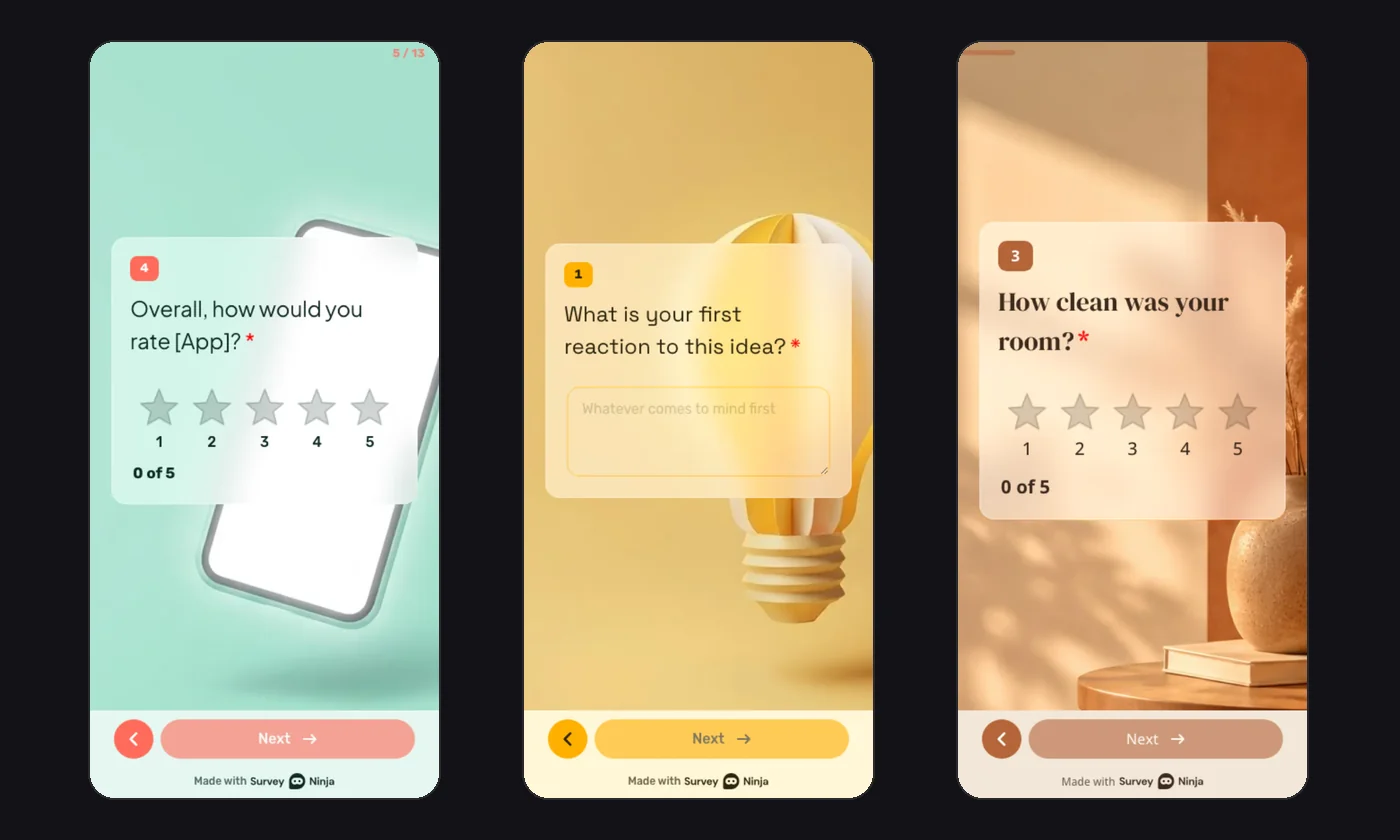
Because the visual theme copies directly with the survey, you can skip manual color picking and contrast adjustments before sharing your first link. Question cards stay legible over photographic or gradient backdrops on desktop monitors and phone screens alike, and respondents see that design on every plan, including Free.
Updating the survey content keeps the visual layout untouched. You can replace bracketed placeholders such as product or salon names, delete items you do not need, add questions, or modify logic rules without losing the copied theme.
Using and customizing design themes by plan
Each template comes with its own design, and respondents always see that styling after you publish. Plans differ only in how far you can customize theme properties:
- Free plan: Includes 50 surveys, 100 responses per month, up to 30 questions per survey, branching logic, quotas, QR codes, and CSV, XLSX, SPSS, and PDF export. You can use the copied template theme as-is or switch to any shared gallery theme. Surveys include SurveyNinja branding.
- Basic plan: Adds theme customization in Design settings, where you can change colors, fonts, and backgrounds, upload a custom logo or background, and build your own custom themes. Basic also adds response filters, hidden variables, Google Sheets, and webhooks.
- Standard plan: Removes SurveyNinja branding from respondent screens and increases survey, question, and monthly response limits alongside timers, partial responses, and unique links.
To compare monthly response limits, seats, and integrations alongside design controls, see the full tier breakdown on SurveyNinja pricing.
Full survey editing straight from a phone browser
Many of the new templates serve teams that work away from a desk: beauty salons, hotels, live events, property managers, and field inspections. The entire SurveyNinja survey maker works directly in a phone browser with no app to install.
Every section and feature is available on a phone, with nothing cut down. You can edit questions, configure branching logic and question settings, preview the copied design theme, copy a direct link or generate a QR code, and check summary reports from the same mobile browser tab.
That keeps small updates quick in real workflows. A salon owner can copy the satisfaction template between clients, replace the sample service options, and place a QR code at reception. An event organizer can update session choices while walking the venue, and a team lead can inspect incoming checklist entries on the move. Edits sync to the same workspace, so you can switch between phone and laptop anytime.
How to launch a themed template from desktop or phone
From a laptop or from a phone browser, going from a template page to a live survey takes four steps.
- Pick a template and copy it Open one of the 40 new templates in English, Spanish, or Portuguese and click "Use this template" to copy the survey and its design theme into your workspace.
- Adapt questions and logic Replace placeholders with your salon, hotel, event, or product name, trim extra items, and verify skip rules in the builder on desktop or phone.
- Review the design Keep the copied theme as-is on Free (or pick a shared gallery theme), or open Design settings on Basic and higher to adjust colors, fonts, and backgrounds.
- Publish and share Publish the survey, share the link or print a QR code, and track answers in built-in charts or export to CSV, XLSX, SPSS, or PDF.
To check recent product releases and vote on ideas for upcoming updates, visit the SurveyNinja roadmap.
Frequently asked questions
Can I use the new themed templates on the Free plan?
Yes. Clicking "Use this template" copies both the survey and its built-in design theme into your workspace, and respondents see that design on every plan, including Free. On Free, you can keep the copied theme as-is or switch to a shared gallery theme, with 50 surveys, 100 responses per month, logic, quotas, QR codes, and exports.
Which plan lets me edit a template's colors, fonts, and background?
Editing a copied theme's colors, fonts, or background, uploading your own logo or background, or creating custom themes starts on the Basic plan in Design settings. If you also want to remove SurveyNinja branding from respondent screens, branding removal starts on Standard.
Do I need to install an app to edit surveys on my phone?
No. The entire SurveyNinja builder runs directly in your phone browser with no app to install. All sections and features work on mobile, including editing questions, setting up branching logic and question settings, previewing themes, sharing a link or QR code, and reviewing reports.
Are all 124 templates available in English, Spanish, and Portuguese?
Yes. All 40 newly added templates and the rest of the 124-template catalog are available in English, Spanish, and Portuguese. Each language version includes localized questions, answer choices, and button labels, and the 40 new templates keep their design theme in every language, so multilingual teams can launch surveys in parallel from the same structure.
Will editing questions in a template remove its built-in design theme?
No. Replacing placeholders, changing question titles, adding or deleting items, and adjusting branching logic keeps the template's copied design theme intact on every plan, including Free. Respondents continue seeing the same colors, fonts, background, and card layout after you publish.
Published: Nov 25, 2026