 SurveyNinja Joins ChatGPT Plugins, Claude Connectors, and Cursor
Audio and Video Survey Responses with Automatic Transcripts
Product updates  Mike Taylor Nov 25, 2026 Reading time ≈ 9 min
Contents
Audio and video response questions are live in SurveyNinja as of November 19, 2026. Respondents record straight from their microphone or camera inside the browser, upload a file, or reply in text. Automatic transcripts run in English, Spanish, and Portuguese, and AI Themes groups answers with timestamped quote playback.
Key points
- Two new open-ended types, Audio response and Video response, bring SurveyNinja to 36 question types total (30 that collect responses).
- Respondents record in the browser with no app required, or use optional file upload and text fallback controlled per question.
- Automatic transcription supports English, Spanish, and Portuguese, paired with built-in playback, search, filters, and AI Themes from 3 responses.
- Included on Premium (100 transcription minutes/month), Enterprise, and the 14-day trial (20 minutes), with 12-month extra packs starting at $20.
What respondents see when they answer by voice or camera
Open text boxes work well for brief comments, yet people often skip detailed explanations on a phone keyboard. Adding an Audio response or Video response question lets participants speak or show context inside the survey. With this release, SurveyNinja offers 36 question types total, 30 of which collect responses.
Recording runs in the browser on phones and computers without an app download. Before a take starts, the survey checks the microphone level meter or camera frame. During recording, it displays an elapsed and maximum duration timer along with a clear notice under the question: "The survey author will receive the recording." Respondents can also upload a pre-recorded file or reply in text, and you can turn either fallback off per question. SurveyNinja creates a compatible playback copy so clips play reliably in Safari and on iPhone.
| Specification | Audio response | Video response |
|---|---|---|
| Max recording length | 10 seconds to 5 minutes (default 2 minutes) | 10 seconds to 5 minutes (default 2 minutes) |
| Max upload size | Up to 25 MB, within your plan's file size limit | Up to 150 MB, within your plan's file size limit |
| Accepted formats (verified by content) | MP3, M4A (AAC), WAV, OGG, WebM (Opus) | MP4 (H.264), MOV, WebM |
| Automatic transcription | English, Spanish, and Portuguese | English, Spanish, and Portuguese |
| Plan availability | Premium, Enterprise, and 14-day trial | Premium, Enterprise, and 14-day trial |
Automatic transcripts, playback, and search in Results
Listening to dozens of clips one by one slows down review. After a respondent submits the survey, SurveyNinja transcribes answers spoken in English, Spanish, and Portuguese automatically. Recordings in other languages are still saved and remain playable and downloadable in your workspace, without reliable automatic transcription.
In the Responses tab, each recorded answer pairs a built-in player with a timestamped transcript and a Download original button. Clicking any line jumps playback to that second. Search scans transcripts and typed replies together, and filters narrow submissions by answer format (recording or text) and transcription status. Every status label and filter is documented in the audio and video results guide.
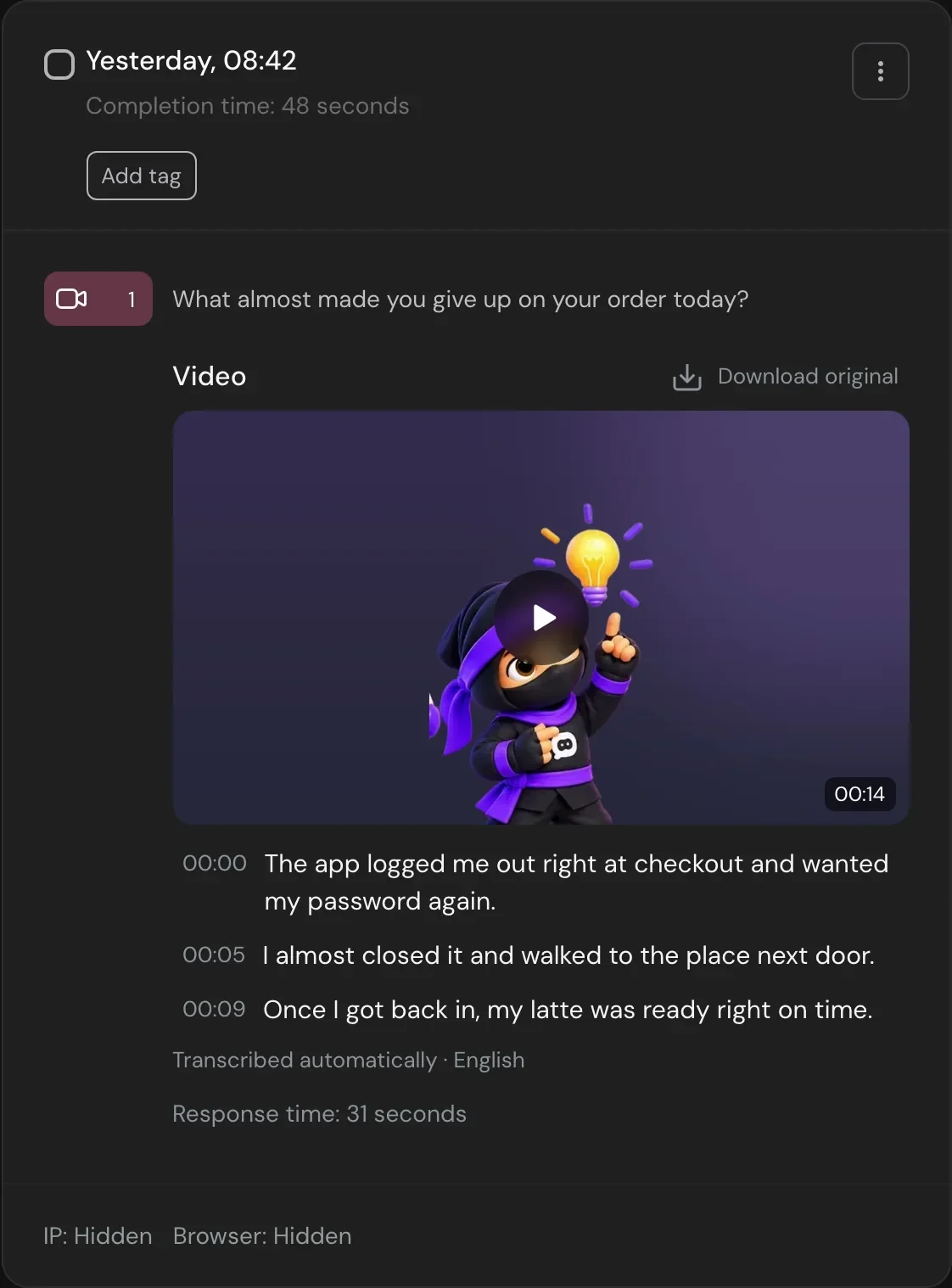
Pairing playback and text in one card lets you skim transcripts quickly to spot recurring product issues, then play the exact recordings that need closer review.
Grouping spoken answers with AI Themes
Once a question collects at least 3 responses, the Themes view in Reports uses AI to group answers by topic and sort them by text sentiment: complaints, praise, and neutral. Sentiment reflects the written transcript and typed replies. Alongside our AI survey analysis tools, Themes gives you a fast read before opening individual recordings.
Expanding any theme shows exact quotes drawn from the responses. Clicking a quote starts playback at the exact second that sentence was spoken, so you can verify context without scrubbing through the whole clip. Each theme also includes Listen to all for audio questions, or Watch all for video questions, to play every quoted excerpt in that theme back to back.
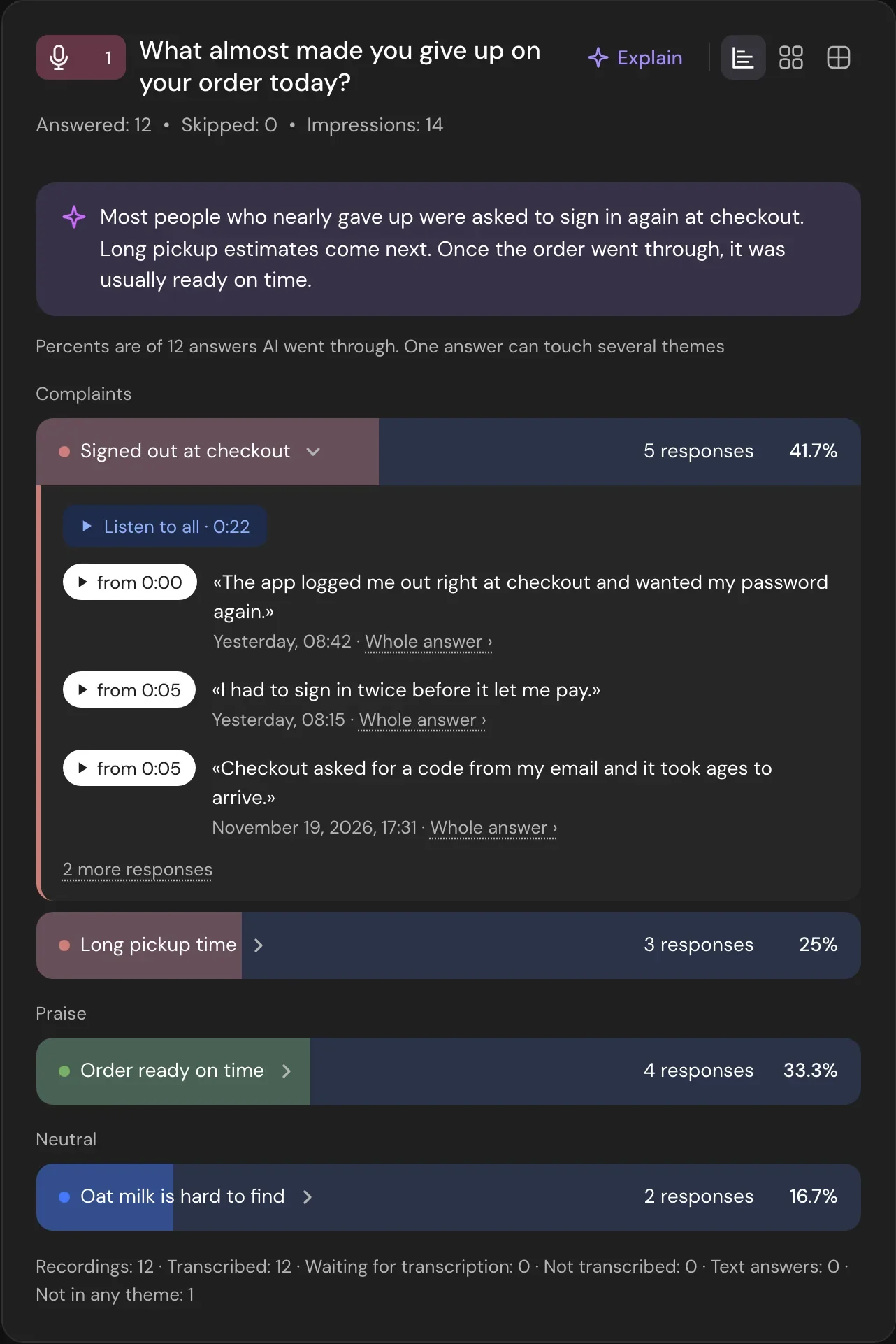
Adding a single voice or video prompt to a customer satisfaction survey or a product feedback survey pairs structured ratings with short customer clips grouped by topic.
Privacy, exports, and webhooks
Recordings stay private by default. Files are never placed on a public CDN; SurveyNinja serves them via short-lived links only after checking workspace permissions. Shareable links to responses or reports keep recordings and transcripts hidden unless you explicitly switch those options on for that link.
Recorded responses also fit existing reporting pipelines. CSV, XLSX, SPSS, Word, and PDF exports include response mode, duration, transcription status, and transcript text. For automation, the transcript.ready webhook event triggers as soon as a recording finishes transcribing.
The question timer setting does not apply to Audio response or Video response questions.
How to set up audio and video responses in SurveyNinja
Audio and video responses are available on Premium, Enterprise, and the 14-day trial. Premium includes 100 transcription minutes per month, and the 14-day trial includes 20 minutes for the trial period. Extra minute packs stay valid for 12 months: 1,000 minutes ($20), 5,000 minutes ($80), and 20,000 minutes ($258). Compare plans on the pricing page.
- Add an Audio or Video response question Open your survey in the builder, click the plus icon, and pick Audio response or Video response under open-ended questions.
- Set duration, fallbacks, and language In question settings, pick a max length from 10 seconds to 5 minutes, toggle file upload and text replies, and select the transcription language.
- Share the survey Send a link, QR code, email, or website embed so respondents can check their mic or camera and record in the browser.
- Search transcripts and open Themes Filter or export answers in Responses, then review AI Themes in Reports once 3 responses arrive.
For field-by-field instructions, including embed permissions, see the audio and video response setup guide. To follow upcoming releases or request additions, visit the SurveyNinja roadmap.
Frequently asked questions
Do respondents need to install an app to record audio or video?
No. Respondents record directly from their microphone or camera inside the survey browser on a phone or computer. Before recording starts, SurveyNinja checks the microphone level or camera frame, shows an elapsed and maximum timer during recording, and displays a notice that the survey author will receive the recording. Optional file uploads and text replies work in the same question.
Which languages does automatic transcription support?
Automatic transcription supports recordings spoken in English, Spanish, and Portuguese. When a respondent records an answer in another language, SurveyNinja still saves the audio or video file so you can play and download it in Results, though it does not generate a reliable automatic transcript, and transcript search and AI Themes rely on completed transcripts.
What are the recording length and file upload size limits?
You set the maximum recording length per question from 10 seconds to 5 minutes, with 2 minutes as the default. Uploaded audio files can be up to 25 MB in MP3, M4A (AAC), WAV, OGG, or WebM (Opus). Uploaded video files can be up to 150 MB in MP4 (H.264), MOV, or WebM, capped by your plan's file limit.
Who can listen to or watch survey recordings?
Recordings are private by default and accessible only to workspace members with permission to view results. Files are not hosted on a public CDN and open through short-lived links after permission checks. Shareable links to responses or reports keep recordings and transcripts hidden unless the survey author explicitly turns those switches on.
Which plans include audio and video responses and transcription minutes?
Audio and video response questions are included on Premium, Enterprise, and the 14-day trial. Premium includes 100 transcription minutes per month, and the 14-day trial includes 20 minutes for the trial period. Extra minute packs stay valid for 12 months and cost $20 for 1,000 minutes, $80 for 5,000 minutes, and $258 for 20,000 minutes.
Published: Nov 25, 2026