 25 Questions for a Travel Agency Customer Satisfaction Survey
How to Build an Online Quiz That Scores Itself
Useful  Mike Taylor Updated: Aug 26, 2026 Reading time ≈ 26 min
An online quiz is a set of questions with right and wrong answers, points behind each option and a score the tool works out for you. Build it once, share a link, and every attempt gets graded automatically.
People reach for quizzes for very different reasons: checking that a training session actually landed, filtering applicants before the first interview, entertaining an audience with a knowledge round, or helping someone place themselves on a scale. The machinery underneath is the same in all four cases, and it is simpler than most people expect. What separates a quiz that produces trustworthy scores from one that produces noise is mostly the order in which you build it.
This guide walks the whole path: sorting out what a quiz is and is not, choosing a purpose, writing questions that measure something real, assigning points and a pass mark, closing the obvious loopholes, publishing, and then reading the results so the next version comes out sharper. There is a worked example in the middle, a list of the mistakes that come up most often, and an honest note on what any of this costs.
Quiz, survey, test: three words people keep mixing up
English is loose with these terms, so it pays to nail them down before you build anything. A quiz has right and wrong answers: points sit behind the options, the answers add up, and the participant finishes with a score. A survey has none of that. It collects opinions, every answer is equally valid, and there is nothing to total up at the end. The presence of a correct answer is the whole dividing line. If you are gathering views rather than grading knowledge, what you want is a survey, and the available formats are laid out in our piece on types of surveys and question types.
The third word, test, usually signals a quiz that carries consequences. Nobody is denied a promotion because of a Friday trivia round, but a compliance test or a hiring assessment decides something, so it gets stricter settings: a time limit, one attempt, shuffled questions, correct answers hidden afterwards. An exam is the same object with the dial turned further still. Technically you are always building the same thing, and the differences live in the settings rather than in the tool.
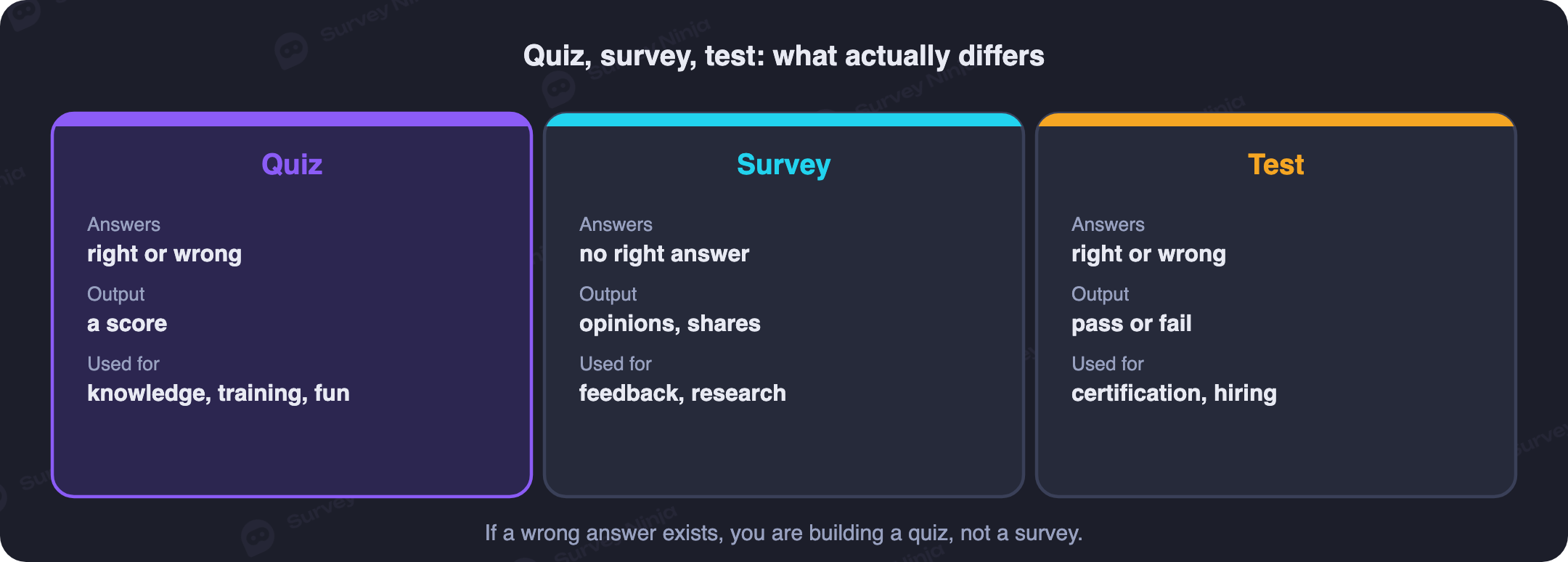
One more variant deserves a mention, because it breaks the neat rule above: the personality quiz. "Which team role are you" has no correct answers at all, yet it still scores, because each option carries a hidden weight and the total lands in a band with a written interpretation. So the honest formulation is this: a quiz converts answers into a number, a survey does not. Whether that number represents knowledge or a personality profile depends on what you attach to the options.
Step 1. Decide what the quiz is for
Everything downstream follows from the purpose: the wording, the strictness, the pass mark, even the tone of the result screen. Before adding a single question, finish this sentence: when someone completes this quiz, the following will happen. Four scenarios cover most real cases.
- Checking knowledge after training. A course, an onboarding session, a safety briefing, a webinar. The quiz shows what stuck and what the next session needs to cover again, and it gives the trainer something more solid than a room full of nodding heads.
- Screening and certification. A short assessment sent before the first interview saves hours of talking to people who are not a fit, and a periodic recertification keeps a team's knowledge from drifting. Here the score influences a decision, so the settings need to be tight.
- Engagement and lead capture. The marketing quiz: light questions, a shareable result, a contact form at the end. Precision matters less than pace, and a quiz of this kind usually earns its keep as a friendlier alternative to a plain form.
- Self-assessment and personality profiles. No right answers in the school sense, but weighted options, score bands and interpretations. The questions are the easy part here; the result texts are the product.
Write the purpose down somewhere visible. It is the thing you will check every question against later, and most weak quizzes are weak because nobody ever chose one.
Step 2. Write the questions
The workhorse of quizzing is the multiple-choice question with one correct option out of four. It is fast to answer, unambiguous to grade, and it handles the majority of what you will ever need. Mix in other formats so the experience does not flatten out, but get the basics right first, because a badly built question measures the wrong thing no matter how it is presented. The general craft of phrasing carries over from survey work, and our guide on how to write a questionnaire covers the shared ground.
A handful of rules separate a good quiz question from a bad one.
- One question, one fact or skill. Questions with two conditions folded into them measure reading comprehension rather than the thing you meant to check.
- Make the wrong options plausible. If two distractors out of three are obviously absurd, you have built a coin toss. Good distractors come from real misconceptions, which is why the sources below matter so much.
- No double negatives and no trick phrasing. "Which of the following is not an incorrect statement" trips up the people who know the material, which is the opposite of what a quiz is for.
- Keep it short. Ten to twenty questions is usually enough for a knowledge check, five to ten for a light quiz. Length is the single biggest driver of abandonment, and a bloated quiz reads as survey fatigue to the person taking it.
Order matters too. Open with something easy so people commit, then raise the difficulty, and put the questions that genuinely separate strong from average near the end. Starting with your hardest item is the fastest way to lose half the group in the first thirty seconds.
Which question types actually work in a quiz
Builders support a dozen or more question types, but only a few of them grade cleanly. These are the ones most quizzes are assembled from.
- Single correct answer. Four options is the sweet spot: three makes guessing too easy, six makes reading tiring.
- Multiple correct answers. Harder to guess and more informative, provided the scoring is fair: full points for an exact match, partial credit for some of the right options with nothing extra ticked.
- Matching. Pair terms with definitions, drugs with dosages, tools with jobs. One matching question does the work of four or five ordinary ones.
- Short text answer. A date, a number, a single term typed in. Guessing is off the table, but you have to allow for spelling variants so that "1945" and "in 1945" both count.
- Image-based questions. "What is wrong in this photo", "which of these layouts is correct". Indispensable wherever the knowledge is visual: design, medicine, engineering, retail merchandising, food safety.
- Rating scale. For self-assessment: how strongly you agree, from one to five. No correct answer, but the points accumulate and land in a band. The mechanics are the same as a Likert scale in survey research.
Long free-text answers are the one format that does not fit automatic scoring. Someone has to read them. For a quiz taken by fifty people that is still manageable; at five hundred it stops being realistic, so leave open-ended questions to surveys and interviews. If you do want one, add it at the very end as optional feedback rather than as a scored item, and never make it a required question.
Where the questions come from
The most common stall happens right here: the structure is clear, the blank question list is not. There are four dependable sources. The first and best is the material people actually learned from, where every key point in the course or the briefing converts into one question. The second is real mistakes: pull the errors new hires typically make, the recurring support tickets, the findings from the last audit, and you end up testing what genuinely goes wrong instead of what is easy to ask.
The third source is the person who holds the knowledge. Ask your best operator or your senior nurse to name the ten things you cannot work in this area without, and you have a question list with the right priorities built in. The fourth is AI as a first draft: an AI question generator will sketch twenty items from your material in seconds. Check every one of them by hand. Models are confidently wrong about facts, and they are especially bad at distractors, tending to produce options that are either transparently silly or accidentally correct.
A shortcut worth using: start from something that already works. Browsing ready-made templates shows you the structure at a glance, how many questions a comparable quiz uses, how the options are built and how the result screens are written, and rewriting a proven skeleton for your own topic is considerably faster than inventing one.
Step 3. Set the points and the pass mark
Now give every question a price. The simple approach gives each one a single point, which is fine for most quizzes and keeps the arithmetic transparent to participants. The more precise approach weights harder or more consequential questions above easy ones, so the total reflects competence rather than volume. Weighting is worth the effort when one specific piece of knowledge matters far more than the rest: the step that prevents an accident, the rule that protects a customer's money.
Then set the threshold. Somewhere between 70 and 80 percent of the available points is the usual pass mark for a knowledge check after training. A threshold under 60 percent is normally a signal that either the quiz is too hard or the training did not work, and it is worth investigating before you lower the bar any further. A threshold of 100 percent is justified only where an error is genuinely unacceptable, such as safety procedures or handling controlled substances.
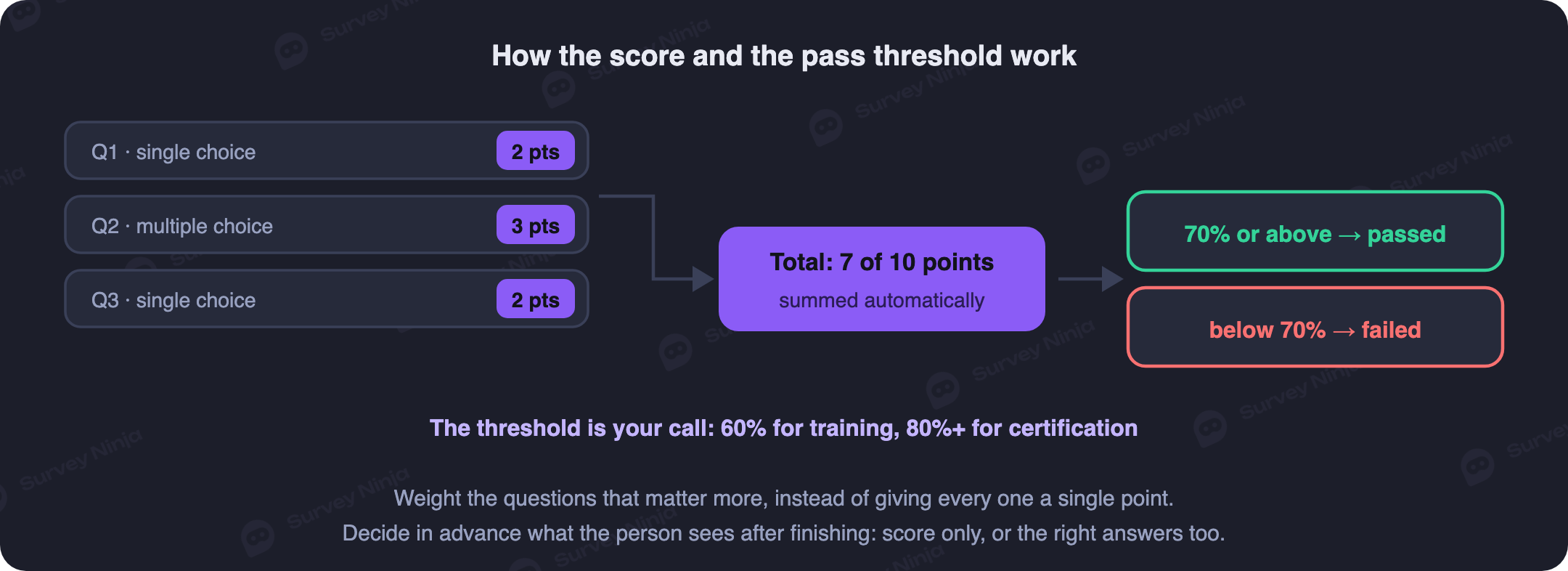
For self-assessment quizzes, replace the single threshold with score bands: nought to ten points gives one interpretation, eleven to twenty another, and so on. Draft those texts before you finalise the questions, because the interpretation is the reason anyone takes the quiz in the first place, and a band with a vague description feels like a broken promise.
A worked example: five questions after a barista briefing
Concrete beats abstract, so here is a small real-shaped quiz. A coffee shop has trained a new barista and wants to confirm the briefing landed before letting them work a shift alone. Five questions, eight points in total.
- What temperature should milk be steamed to for a cappuccino: 55 to 65, 75 to 85 or 90 to 95 degrees Celsius. Single correct answer, 1 point.
- What is the first thing to do when a guest complains about a drink: four courses of action. Single correct answer, 2 points, because this one touches money and reputation.
- Match each drink to its milk volume. Matching question, 2 points.
- How many minutes after grinding does espresso start losing flavour. Short numeric answer, 1 point.
- Here is a photo of a workstation at the end of a shift: what was cleaned down incorrectly. Image question, 2 points.
Eight points available, pass mark six, which is 75 percent. Anyone below that repeats the briefing and retakes the quiz a week later, and because the rule was announced up front, nobody experiences it as a punishment. Assembling something like this takes about twenty minutes and replaces hours of verbal spot-checking with every new hire. It also leaves a record, which matters the day someone asks whether a particular member of staff was ever trained on a particular procedure.
Step 4. Make guessing and cheating harder
If the score influences an outcome, it is worth making life inconvenient for shortcuts. The standard toolkit is short: shuffle the order of questions and of the answer options, so a single crib sheet does not serve the whole room; cap the time available; limit the number of attempts; and hide the correct answers once someone has finished, so the first candidate cannot hand a completed key to the second. Add a question pool if your topic allows it, drawing ten questions at random from a bank of thirty, and two people sitting side by side no longer see the same quiz at all.
Timing deserves a moment of arithmetic rather than a guess. Budget roughly a minute for an ordinary multiple-choice question and a minute and a half to two minutes for matching or typed answers, then set the limit slightly tighter than that total. The aim is to remove the spare time in which someone would go looking things up, not to turn a knowledge check into a reading-speed contest. Online cheating can never be eliminated completely, only made more expensive than simply learning the material. For a light engagement quiz, skip all of this: barriers cost you participants and there is nothing at stake.
What the person sees at the end
The result screen is the most underrated part of a quiz. It is the only moment when you have someone's full attention, and most quizzes waste it on a bare fraction. A few better options:
- A score with an interpretation. Not "12 out of 16" but "12 out of 16: the basics are solid, go back over the refunds policy." That turns a mark into feedback.
- A result with no detail. For hiring and certification, keep the correct answers hidden. Otherwise your question bank leaks within a week.
- Different screens per score band. Congratulations and the next module for the top group, links to the material and a retake invitation for everyone else. This is ordinary branching logic applied to the ending rather than the middle.
- A next step. After a marketing quiz, a subscription offer or a discount code; after a training quiz, the link to the next lesson. The result page is the natural place to ask for the next action.
Step 5. Publish and share it
A finished quiz travels exactly like a survey: a link in an email or a chat app, an embed on your own site, a QR code for an offline event. Embedding usually performs best, because nobody has to leave the page they are already on. Before you send anything to anybody, take the quiz yourself on a phone: confirm the points add up the way you intended, the images load, the typed answers accept the variants you listed, and the right result screen appears. A five-minute pilot run catches the typo in a correct answer that would otherwise corrupt every single response.
Access settings are worth a separate thought. For internal certification, one attempt per person plus a name field before the start prevents a results table full of five anonymous attempts from the same employee. For a public quiz the logic inverts: every field you demand before the first question costs you participants. If the quiz is tied to a deadline, close responses on a date so late arrivals do not distort the statistics.
One last thing before you hit publish: think about the data you are about to collect. The moment a quiz records names, emails or employee IDs, the results are personal data, and the same expectations apply as anywhere else. Say plainly what you are collecting and why, ask for consent when consent is what your basis requires, keep scores only as long as you actually need them, and restrict who on the team can open individual attempts. If you operate under GDPR or a similar regime, or your organisation has rules about where data may be stored, check your provider's data residency and processing terms before you send the link rather than after.
Step 6. Read the results properly
Here is where a quiz stops being a formality. Look at the average score and the spread, of course, but the real value sits in the per-question breakdown. A question that 80 percent of people got wrong is a signal, and it points in one of two directions: either the topic was never learned, or the question is badly worded. Check the wording first. A question that everybody answers correctly measures nothing at all and can be replaced in the next version with something that discriminates.
Behaviour matters alongside the scores. Watch the completion rate and the time taken. If one person in three abandons the quiz, it is too long or too steep at the start, and the same fixes apply as in any other form, which we cover in the guide on reducing dropout. If someone finished in two minutes out of the fifteen allowed, they are either exceptional or clicking at random, and their answer pattern will tell you which within seconds. Comparing scores across groups (by department, by trainer, by cohort) is where quiz data starts feeding decisions, and the basics of that kind of segmentation apply here just as they do to survey results.
Treat the first run as a draft. Rewrite the questions that misfired, drop the ones that measured nothing, adjust the threshold if the distribution says you set it in the wrong place, and by the third round you have an instrument that reliably tells people who know from people who guess.
Common mistakes
- No purpose. "Let's just check what they know" produces questions about everything and nothing. Decide first what happens after the score: clearance to work, a retake, a segment.
- Too long. Almost nobody finishes forty questions in a row. Two short quizzes by topic beat one marathon.
- Never testing the quiz. A typo in a correct answer ruins the data for every participant and takes two minutes of self-checking to catch.
- A score with no feedback. Someone finishes and sees "7 out of 10". Good or bad? What should they revisit? Write an interpretation for every band.
- One quiz for every audience. Beginners and veterans, teenagers and specialists need different wording. Adapt rather than reuse.
- A flat difficulty curve. Good quizzes warm up and then climb. Uniform difficulty either bores the strong or scares off the weak in the first minute.
- Set and forgotten. Procedures change, products ship new versions, and last year's quiz quietly tests obsolete material. Review the questions every few months.
What it costs
For a one-off quiz with a modest audience, free plans are genuinely enough: nearly every builder lets you assemble a scored quiz and collect the first responses without paying anything. Money enters the picture when volume and requirements grow: hundreds of attempts a month, your own domain, exports into spreadsheets, integrations with a CRM or an LMS, seats for a team, longer data retention. A paid plan on any reasonable platform costs less than an hour of the specialist time you would otherwise spend marking answers by hand, which is the comparison that actually matters; current numbers are on the pricing page.
The sensible order of operations is to build the quiz on a free plan, run it on a real group, and only then decide which paid capabilities you need. That way you pay for things you have already used rather than for features that sounded useful in a comparison table.
How this works in SurveyNinja
In SurveyNinja a quiz is built in the same visual editor as a survey or a form: you add questions, mark the correct options, assign points per question, and the total is calculated for you. You set a pass threshold, and you can define several result screens so that different score bands see different messages, from a congratulation and a next module to a link back to the study material. For assessments there are the strict settings described above: a time limit, shuffled questions and options, and correct answers hidden after submission.
Publishing works the way you would expect. Share a link, embed the quiz on any site or landing page, or hand out a QR code at an event, and responses flow into statistics with a per-question breakdown plus every individual attempt, so you can see exactly who scored what and where they went wrong. Exports and the rest of the feature set are there when you need to move results elsewhere.
Trying it costs nothing: the free plan has no limit on the number of responses, and there are ready-made templates if you would rather not start from an empty page. Open the quiz maker, build your first quiz following the steps above and run it past a few colleagues; if you decide you need an opinion survey rather than a score, the survey builder is one click away.
Frequently asked questions
What is the difference between a quiz and a survey?
A quiz has right and wrong answers: options carry points, the answers add up, and the participant gets a score compared against a threshold. A survey collects opinions, so no answer is more correct than another and there is nothing to total. Both are built in the same tool; the difference is whether correct answers exist.
How many questions should an online quiz have?
Ten to twenty for a knowledge check: fewer is too thin to draw a conclusion from, more starts tiring people out. Five to ten is plenty for a light engagement quiz. If you have a lot of ground to cover, several short quizzes by topic work better than one long one.
What pass mark should I set?
Seventy to eighty percent of the available points is the usual benchmark for a knowledge check after training. A hundred percent is justified only where mistakes are unacceptable, such as safety procedures. If most people fail, review the wording of the questions before you lower the threshold.
Can I create an online quiz for free?
Yes. A quiz with points and automatic scoring can be built on the SurveyNinja free plan, which has no cap on responses, so you can assemble it, send the link and read the results without paying. Paid plans matter once volumes and setup requirements grow.
How do I stop people cheating on an online quiz?
The basic set: shuffle question and answer order, cap the time, limit attempts, and hide correct answers after submission. Drawing questions at random from a larger pool helps too. You cannot eliminate cheating online, but these settings make it more expensive than just learning the material.
How can I tell whether my quiz is any good?
Look at the per-question statistics after the first attempts. A question almost everyone fails is either about material that was never learned or is badly worded. A question everyone gets right measures nothing. A good quiz reliably separates the people who know from the people who guess.
How do I embed a quiz on a website?
Builders give you an embed code: the quiz opens inside the page, in a popup or behind a button. In SurveyNinja that code comes from the publishing settings and drops into any platform, from WordPress to a custom landing page. Participants never leave your site, and completion rates are noticeably higher as a result.
How much time should I allow for a quiz?
Budget about a minute per multiple-choice question and a minute and a half to two minutes for matching or typed answers, then set the limit a little tighter than that total. Tight enough to remove time for looking things up, loose enough that you are not measuring reading speed.
How do I build a personality quiz with result ranges?
Instead of correct answers, each option carries a weight, and the total lands in one of several score bands with a prepared description: nought to ten points gives one result, eleven to twenty another. The questions are the easy part here. The interpretation texts are what people actually come for.
Can I see one participant's individual answers?
Yes. Quiz statistics show both the summary across everyone and each attempt on its own: who took it, when, what they scored and which questions they missed. For certification that is the basis of a useful conversation, since discussing specific errors beats discussing an overall mark.
Updated: Aug 26, 2026 Published: Aug 5, 2026