 Secret Santa Questionnaire: 30 Questions to Send Before the Draw
How to Build a Feedback Form
Useful  Mike Taylor Updated: Sep 29, 2026 Reading time ≈ 23 min

A feedback form is a short survey that collects opinions about a product, a course or an event so you can work out what to fix. The catch is that each of those situations needs its own questions, and a form borrowed from the wrong context comes back full of polite answers you cannot use.
This guide covers the rules that make feedback questions work no matter who is answering, the blocks a feedback form is assembled from, and three ready question banks you can copy: one for customers, one for people who just finished a training course, one for guests leaving an event. Then a worked example, what to do with the answers and how often to ask. For the broader theory of question design, see what a questionnaire is; for the mechanics of building and sending one, how to create an online survey.
What a feedback form is, and when you need one
You collect feedback when the number on your dashboard tells you what happened but not why. Repeat purchases dropped and nobody knows whether it is the price, the delivery or the person answering the phone. A feedback form is the structured way to ask, and the word structured is doing real work there: you set the questions and the scales, so the answers are comparable between people, between segments and between one month and the next.
That structure is the whole difference between a feedback form and a public review. A review gets written on the respondent's own initiative, in free text, usually at an emotional peak. Reviews matter for reputation, but they arrive from a self-selected minority and they resist counting. A form gives you numbers that move over time plus the open comments that explain why they moved. Reviews tell you what people say about you, while a feedback form tells you what to change.
Three situations cover the bulk of real demand: customers rating a product or a service interaction, participants rating a training course, and guests rating an event. Internal team feedback and partner feedback exist too, and the same principles carry over. Whatever the case, one rule does not bend. Ask while the impression is fresh, because a form that lands a week after a conference collects vague, generous answers from the few people who still remember being there.
Rules that separate a usable form from a decorative one
These rules hold for every scenario, and they are where most feedback forms quietly break. None is difficult, they are just easy to skip when every draft question looks reasonable on screen.
One question asks about one thing. "Were you happy with the price and the quality?" cannot be answered honestly by anyone who liked one and not the other, and whatever number comes back belongs to neither. The mistake has its own name, the double-barrelled question, and the fix is to split it in two. Scan your draft for the word "and" inside a question, since it flags most of them.
Move from general to specific. Open with the overall rating, then go into the components. Somebody who has just given a service a 4 out of 5 has committed to answering and will happily rate the four things that make up that 4, while somebody asked about queue length before anything else is more likely to close the tab. The order helps later too: when the overall score and the component scores disagree, that gap is usually the finding.
Keep the wording neutral. "How much did you enjoy our excellent service?" has already told the respondent which answer you are hoping for, and a leading question inflates your scores while destroying their usefulness. "Rate the service you received, from 1 to 5" asks the same thing without the nudge. Watch for evaluative adjectives and for absolutes such as always and never.
Scales for the numbers, one open question for the reasons. Rated questions count themselves and let you track a trend; open questions catch the thing you never thought to ask about. The working ratio is a majority of rated questions plus one or two open ones near the end, a balance we unpack in open vs closed questions. Label the ends of every scale and keep the direction consistent, following the conventions in our Likert scale guide, because a bare 1 to 5 with no anchors means something different to every respondent.
Keep it short. Ten to fifteen questions is the practical ceiling, and the good forms are shorter. Every extra question costs you completed responses, and abandoned forms skew the data toward people with the most time and the strongest opinions; the levers are in how to reduce survey dropout. If you catch yourself building one long form for every situation, build three short ones instead.
Offer anonymity where honesty is at risk. People rate a trainer, a manager or an internal process far more honestly when the answer cannot be traced back to them, so an anonymous survey is the right default for training and internal feedback. If you also need to follow up on a complaint, do not compromise the whole form: keep the contact field separate and optional, say what it will be used for, and treat anything typed there as personal data under privacy rules such as GDPR, with a stated purpose and a retention period.
The blocks every feedback form is built from
Whatever the scenario, a feedback form is assembled from the same components in the same order. Once you can see the shape, a new form takes minutes instead of a blank page and an afternoon.
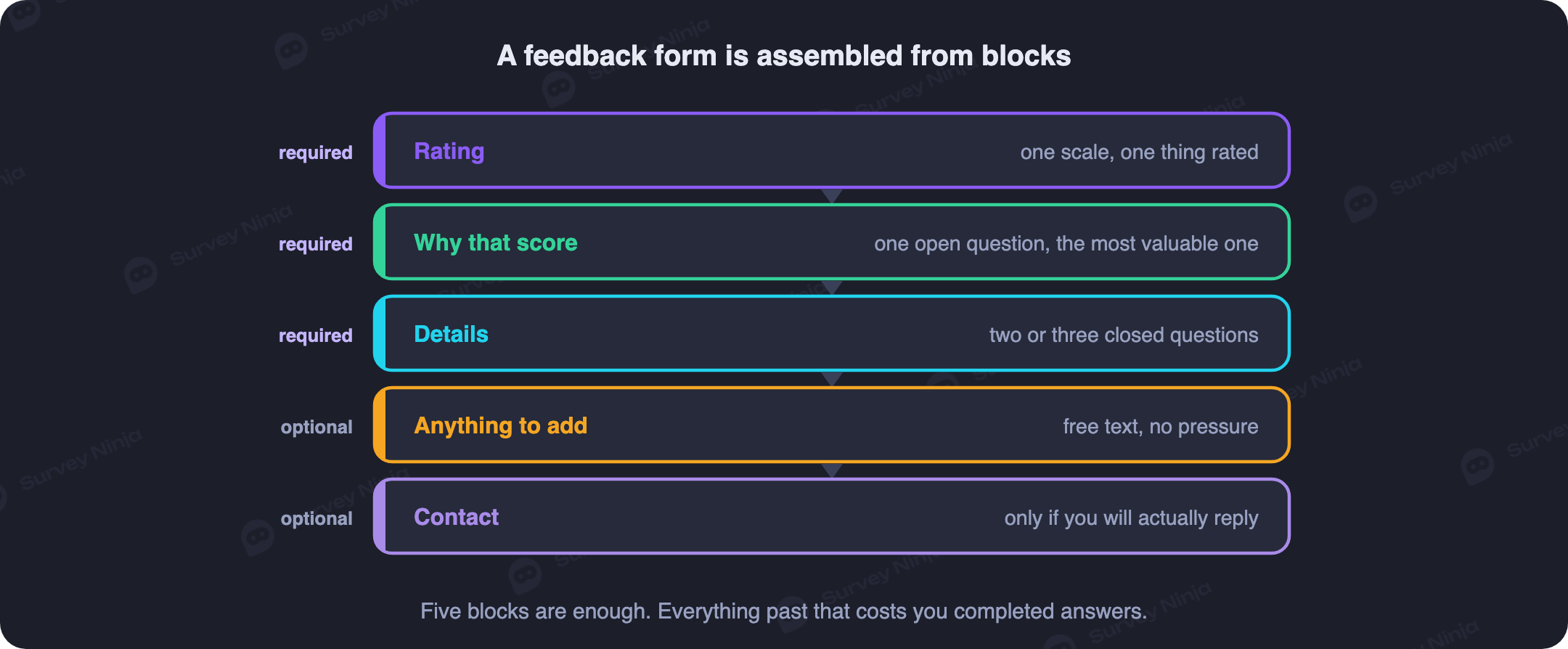
It starts with a short opening screen: one or two sentences saying what the answers are for, how long the form takes and whether it is anonymous. That screen is the cheapest thing you can do for your response rate, and promising two minutes then delivering two minutes is what makes people answer the next one.
The core is the rating block: the overall score plus the component scores, which is what gives you comparable numbers month after month. Keep this block stable once you have launched it, because changing a scale or rewording a rated question breaks the comparison with everything collected before.
Immediately after the overall rating comes the open question that earns its place more than any other: some version of "what is behind that score?" Asked while the reason is still in the respondent's head, it produces specifics. Asked at the end of a long form, it produces "all good, thanks". This is also where branching logic pays off, since somebody who rated you 2 and somebody who rated you 9 have genuinely different things to tell you and should get different follow-ups.
Then come the detail questions: the specific components, the yes-or-no intention question, the choice list. Last and optional, a contact field or a grouping question such as how often the person visits or which session they attended. Put anything identifying at the end, keep it optional, and include it only if you know which comparison you intend to make with it, because a demographic field you never cut the data by is just a reason to abandon the form.
Three contexts, three different question banks
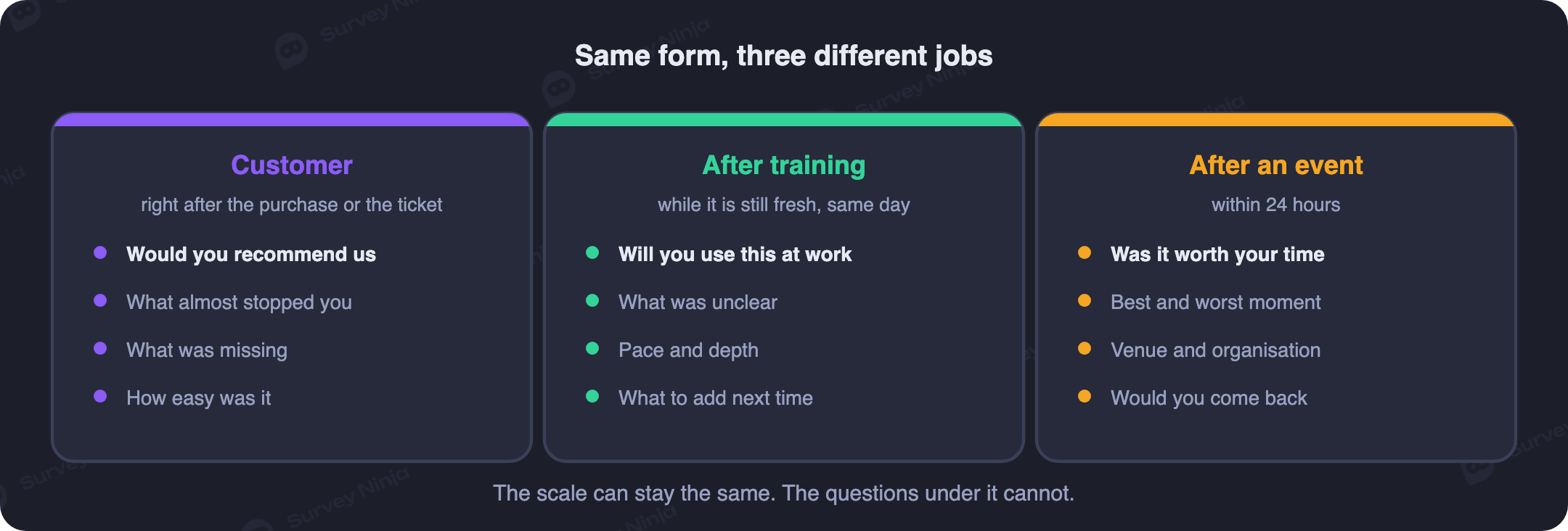
Here is where a generic feedback form falls apart. A customer, a training participant and an event guest have had completely different experiences, and questions that produce a decision in one context produce nothing in the others. The banks below are written out in full, so you can copy them, adjust the nouns and launch.
Customers: were they satisfied, and will they come back
The goal of a customer feedback form is narrow: find out whether the person got what they came for and whether they will return. Satisfaction with a specific interaction is measured by CSAT, willingness to recommend you by NPS, and the difference is worth understanding before you pick one, which is what CSAT vs NPS is for. A working bank:
- Overall, how satisfied were you with your purchase? (scale of 1 to 5, ends labelled)
- How likely are you to recommend us to a friend or colleague? (scale of 0 to 10)
- How easy was it to place your order or get your question resolved? (scale of 1 to 5)
- What did you like most? (open)
- What should we improve first? (open)
- Would you buy from us again? (yes / probably yes / probably no / no)
Decide in advance what happens when somebody rates you 1 or 2. Add a branch that shows those respondents a "tell us what went wrong" field plus an optional contact field, so you can put it right personally. Recovering an unhappy customer this way works more reliably than any discount, and it catches the complaint before it becomes a public review. Send the form right after the purchase or the support conversation, not at the end of the month. For more wording to choose from, there is a longer list in 50 customer satisfaction survey questions.
Training participants: was it clear, useful and well run
A post-training form measures reaction, the first and shallowest layer of training evaluation. It does not tell you what anyone learned, and it is not supposed to, since that is what a scored test does. It tells you whether the programme was clear, relevant and competently organised, which is exactly the part you can fix before the next cohort.
- How useful was this course for your day-to-day work? (scale of 1 to 5)
- How clearly was the material explained? (scale of 1 to 5)
- How would you rate the instructor? (scale of 1 to 5)
- How well organised was the session: schedule, venue, equipment? (scale of 1 to 5)
- How confident do you feel applying this at work tomorrow? (scale of 1 to 5)
- What was the most useful part? (open)
- What was missing, or what would you change? (open)
- Would you recommend this course to a colleague? (yes / no)
Collect these before people leave the room or close the call, because response rates fall off a cliff the moment a session ends. Leave a free comment box addressed to the instructor at the bottom as well, since the most valuable observations are usually the ones that fit no scale. Keep the form anonymous, and adapt the structure from a template such as our course feedback survey.
Event guests: was it worth their day
After a conference, a company party or a webinar, the form answers two questions: is this format worth repeating, and what needs fixing next time. Keep two moments apart here. Quick reactions collected on site, from a screen or a badge, are good for individual session ratings. The considered feedback form goes out afterwards, once the person has an impression of the whole thing.
- How would you rate the event overall? (scale of 1 to 10)
- Which session or format did you enjoy most? (choice list of the actual sessions)
- How would you rate the organisation: registration, schedule, venue? (scale of 1 to 5)
- Did the event meet your expectations? (yes / partly / no)
- What should we change next time? (open)
- Who or what would you like to see on the programme next time? (open)
- Would you attend our next event? (yes / maybe / no)
The choice list of sessions is the question people forget to include, and it is the one that decides next year's programme. Send the form the same evening or the following morning at the latest. A ready structure is available as an event feedback survey template, and the internal version sits in company event survey.
Getting the form in front of people
A good form that nobody opens produces nothing, and the right channel depends on the scenario. Customers are easiest to reach immediately after the transaction: a link in the order confirmation, in the receipt, in the message that closes a support ticket. Training participants should get the form while they are still in the room, ideally as a QR code on the final slide. Event guests get a link that evening or the next day, once their impression has settled into something they can describe.
A handful of tactics reliably lift response. Put the form one tap away rather than behind three redirects. State the honest length in the invitation and then honour it. For anything offline, print the QR code where people are already looking: on the table, the receipt, the badge, the closing slide. And send exactly one reminder to the people who did not answer, since a good share of them meant to do it later and forgot. One reminder recovers them, three annoy everybody.
A worked example: a coffee shop losing its regulars
Take a small coffee shop with a problem it cannot explain: plenty of first visits, not enough second ones. The scenario is a customer one, so the form is built around satisfaction, and it has to be short enough to finish while a drink cools.
The finished form runs to seven questions: an overall rating from 1 to 5, separate ratings for the coffee, the food and the service, a recommendation question on a 0 to 10 scale, one open question asking what would make the visit better, and one grouping question about how often the person comes in. The QR code goes on the receipt and on a card by the till, and over two weeks it collects around two hundred responses.
The result is unambiguous once you look past the overall average. The coffee scores 4.7 and the service scores 3.9, and the open answers keep repeating one phrase in different words: waiting too long at the till during the morning rush. The problem is not the product, it is throughput at peak hours. That is something you can act on, unlike an overall 4.3 with no explanation attached. The owner puts a second person on the till between eight and ten in the morning, then reruns the same form a month later to see whether the service score moved. To start from something similar, adapt the ready cafe guest feedback survey.
What to do once the answers land
Collecting is the half most teams do properly. Rated questions turn into averages and distributions automatically, and it is the distribution that deserves your attention: an average of 4 hides the difference between everybody saying 4 and half the room saying 2 while the other half says 5. Track the movement rather than the absolute figure, because 4.2 on its own means very little, while 4.2 after three months at 3.8 means your fix worked.
Open answers get read and grouped by meaning, so recurring themes become countable. Ten people describing the same delay in ten different sentences is one problem, not ten anecdotes, and our guide to thematic analysis shows how to do that without drowning. Then cut the data by the groups you set up in advance, because a perfectly acceptable overall number often hides one segment where everything is going wrong, usually new customers or one particular training group.
The rule that matters most: feedback without action devalues every form you send afterwards. If people see that their answers changed nothing, they stop answering, and your response rate decays until the data is useless. Pick one or two changes from each round, make them, and tell the respondents what you did. A single line saying you asked for faster delivery, so here is what changed, does more for the next form than any incentive.
How often to ask
Frequency follows the scenario. Training and events are one-off occasions: send the form once, right afterwards, and that is the cycle. Customers are harder, because the temptation is to ask after every interaction, and a business that asks constantly trains its customers to ignore it.
A sensible rhythm is a short form after key moments only, meaning a first purchase, a support conversation, a delivery, plus one fuller satisfaction measurement once or twice a year. That combination catches urgent problems tied to specific situations while still giving you the slow trend line. Watch your response rate across rounds as a warning light, because a sliding one means you are asking too often or asking too much each time.
Common mistakes
- One form for everything. Thirty questions covering every possible scenario gets completed by nobody. Three short context-specific forms beat one universal one every time.
- Asking too late. A week after the event the impression has faded and you get generic praise instead of specifics.
- Only scales, or only open questions. Scales give you numbers without reasons, open text gives you reasons you cannot count. You need both.
- Leading wording. It inflates your scores and leaves you with a form that cannot detect the problems you built it to find.
- Making everything required. Forced answers are guesses, and guesses are worse than blanks because you cannot tell them apart later.
- Collecting and then doing nothing. The most wasteful mistake of all: you have the data, you have no decisions, and next time nobody answers.
Where to build it
A feedback form needs less from a tool than a research survey does, but it needs a specific set of things: rating scales that count themselves, branching so low scores get a follow-up, a mobile layout that works from a QR code, and reporting that filters by segment and groups the open answers. SurveyNinja covers that in the form builder, with CSAT and NPS calculated automatically and a chart per question. Distribution works by link or QR code, and every response lands in the same report.
The free plan has no cap on responses, which matters more for feedback than for anything else, since feedback is collected continuously rather than in one campaign. The template library has ready forms for customer, training and event scenarios, and the paid tiers on the pricing page add team access and heavier analytics rather than the right to collect answers. Build your feedback form and start with whichever of the three banks matches your situation.
Frequently asked questions
What questions should a feedback form include?
It depends on the scenario. For customers: overall satisfaction, willingness to recommend, ease of the interaction and what to improve. For training participants: usefulness, clarity, the instructor and the organisation. For event guests: the overall rating, the best session, the organisation and what to change next time. In every case, include one open question about improvements, because that is where the answers you did not anticipate come from.
How many questions should a feedback form have?
Ten to fifteen is the practical ceiling, and most effective forms are shorter: a few rated questions plus one or two open ones at the end. Longer forms get abandoned halfway, which leaves you with incomplete data skewed toward the people with the most time. Three short forms built for three specific situations beat one long universal form.
When should you send a feedback form?
Straight after the experience, while the impression is fresh. Customers right after a purchase or a support conversation, training participants before they leave the room, event guests within a day or two of the event. The later it arrives, the lower the response rate and the vaguer the answers.
Should a feedback form be anonymous?
Usually yes. Anonymity raises honesty, particularly when people are rating a trainer, a manager or an internal process. If you need to follow up on a specific complaint, keep the contact field separate and optional rather than making the whole form identified, explain what it will be used for, and handle it as personal data under privacy rules such as GDPR.
How is a post-training feedback form different from a test?
A feedback form measures reaction: whether the course was useful, clear and well run. A test measures learning: what the participant can now do. They are different instruments answering different questions, and a good training programme uses both. The feedback form tells you what to fix about the session, the test tells you whether the session worked.
What do you do with open text answers?
Read them and group them into recurring themes such as long wait or great speaker, then count how often each theme appears so the loudest comment does not outrank the most common one. Rated questions are summarised automatically as averages and distributions, so the open answers are where your interpretation effort should go.
How do you get more people to fill in a feedback form?
Send it at the right moment, keep it short, and say in the opening line what the answers are for and how long it will take. Offer anonymity where honesty matters, put the form one tap away rather than behind several clicks, and send exactly one reminder to people who did not respond. For anything offline, a QR code on the receipt, the badge or the closing slide works better than any link.
Can you create a feedback form for free?
Yes. A form with rating scales, choice questions, open fields and automatic CSAT and NPS calculation can be built on a free plan, and SurveyNinja does not cap the number of responses on it. That is enough to collect feedback from customers, training participants or event guests and get a report with charts for every question.
Updated: Sep 29, 2026 Published: Aug 10, 2026