 Secret Santa Questionnaire: 30 Questions to Send Before the Draw
How to Migrate from Google Forms
Useful  Mike Taylor Updated: Aug 26, 2026 Reading time ≈ 17 min

For years Google Forms was the default answer to almost any question about surveys: it is free, it is simple, and the responses land straight in a spreadsheet. For a growing business, though, that habit quietly builds up a cost.
The tool has a functional ceiling, and, more importantly, once your forms start collecting real customer data, you have to answer where that data lives and how it is governed under privacy laws like the GDPR. Below we look at when a move is actually worth it, what to check in a replacement, and how to carry your forms and your collected responses across without losing anything.
For transparency: this article is written by the SurveyNinja team, one of the tools you could move to. So we will be honest about what Google Forms still does well, where it genuinely runs out of road, and where a dedicated survey platform earns its place. You can also see the side-by-side view on our Google Forms comparison page.
Three reasons teams move off Google Forms
The first reason is the functional ceiling. Google Forms was built as a simple tool and it stayed one. That is a strength for a quick poll, but the moment a business needs real branching logic, an NPS calculation with segmentation, an embeddable widget on your own site, a survey that fires automatically after a purchase, or branding without the Google label on it, the form hits a wall. These are not exotic requests, they are everyday marketing and research jobs, and dedicated survey builders handle them out of the box while Google Forms simply cannot.
The second reason is data privacy and compliance. Surveys and intake forms almost always collect personal data: a name, an email, a phone number, sometimes far more in an application. Under privacy regimes like the GDPR, you as the operator are responsible for where that data is stored, who processes it on your behalf, and whether respondents gave informed consent. With Google Forms the answers sit inside Google's infrastructure under Google's terms, and getting a signed data processing agreement, real control over where data lives, or the paper trail an auditor will ask for can be awkward. One fair caveat: a fully anonymous form that collects no names or contacts is low-stakes. But any form with a "phone" or "email" field is a different story, and that is where teams start looking for a platform with a clearer data-handling story.
The third reason is branding and a professional experience. A form carrying someone else's logo, with almost no room to match your colors, fonts or domain, reads as a stopgap rather than part of your product. When a survey goes out to customers under your name, that matters. Dedicated tools let you theme the form to your brand, remove the builder's own branding, and send respondents to a page that looks like it belongs to you rather than to a generic utility.
If none of these touch you, if your forms are anonymous, the features are enough and nobody is asking about data governance, then you do not have to move at all. For everyone else, the rest of this guide is the plan.
What Google Forms still does well, and what you give up
An honest conversation about migrating starts by admitting the strengths of the place you are leaving. Google Forms is free with no cap on responses, it can be learned in ten minutes, and it drops answers seamlessly into Google Sheets, where you can slice them with formulas and pivot tables. It has instant sharing through Google accounts and a familiar interface that just about every respondent has seen before. For an anonymous poll among friends, a student research project, or a quick pulse check inside a team, it is still an excellent tool, and moving off it for the sake of moving makes no sense.
Now for what changes. The familiar link to Sheets is replaced by an integration or an export: some platforms offer a direct Google Sheets connection, others cover it with webhooks or a regular export to XLSX. Real-time co-editing of a form, the way you collaborate in a Google Doc, is usually more modest in a survey builder: roles and access exist, but simultaneous editing with your colleagues' cursors on screen generally does not. And you will have to get used to a new interface, which is fair to budget a day or two for.
In exchange you get the things Google Forms never had: serious branching logic, ready-made metrics, embeddable widgets, branding without a foreign logo, report exports to PDF and Word, responsive support, and a cleaner compliance posture under laws like the GDPR. For business workflows the trade is almost always worth it. For personal tasks you can happily stay where you are.
What to look for in a replacement
The checklist is short. Data privacy: look for a plain statement on where data is stored, a data processing agreement you can actually sign, and explicit GDPR compliance, especially if your forms collect names or contacts. Question types and logic: at a minimum choice questions, scales, matrices, file uploads and branching, and it helps to understand how question types shape your analysis, which we cover in our piece on open and closed questions. Export and integrations: XLSX and CSV as the floor, then whatever you need on top, an API, webhooks, Google Sheets, Slack, Zapier. A free entry point: the ability to build a test form before you pay, and here watch the response limits, because many tools quietly cap responses on their free and cheaper plans. And separately, the fate of the "answers into a spreadsheet" habit: check whether the platform offers a direct Google Sheets integration or webhooks that replace it.
Google Forms vs a dedicated survey platform
Here is how Google Forms stacks up against a dedicated survey tool like SurveyNinja across the dimensions that usually drive the move. We have kept it to features rather than prices, since plans change often and the point is to see where the ceiling is, not to quote a number that will be stale next quarter.
| What matters | Google Forms | SurveyNinja |
|---|---|---|
| Free plan | Free, no response limit | Free plan with no response limit |
| Question types | Around ten basic types | 14+ types, including scales, matrices and file upload |
| Logic and branching | Basic section skipping only | Full logic jumps and branching |
| Built-in metrics | None, you build them in Sheets | NPS and CSAT calculated automatically |
| Website widgets and embeds | Simple iframe embed | Embeddable widgets and pop-ups for your site |
| Branding | Google-branded, minimal theming | Full theming, remove builder branding |
| Exports | Google Sheets | XLSX, CSV, PDF, Word, plus Google Sheets |
| Integrations | Sheets and add-ons | Google Sheets, Slack, Zapier, HubSpot, Salesforce, webhooks |
| AI question generation | None | AI generator drafts the survey for you |
| Data privacy and GDPR | Google terms, DPA harder to obtain | DPA available, clear data handling |
SurveyNinja was built with exactly this kind of move in mind. There is a free plan with no response limit so you can start without paying, an AI question generator that drafts a survey from a plain text description (which speeds up rebuilding old forms enormously), and the familiar Google Sheets integration so your "responses into a spreadsheet" habit survives the move intact. On top of that sit the things Google Forms never offered: branching logic, a ready NPS calculation, embeddable widgets for your site, notifications, and exports to XLSX, CSV, DOC and PDF. If you want to skip the blank page entirely, our ready-made templates cover most common survey jobs, and you can adapt one in minutes.
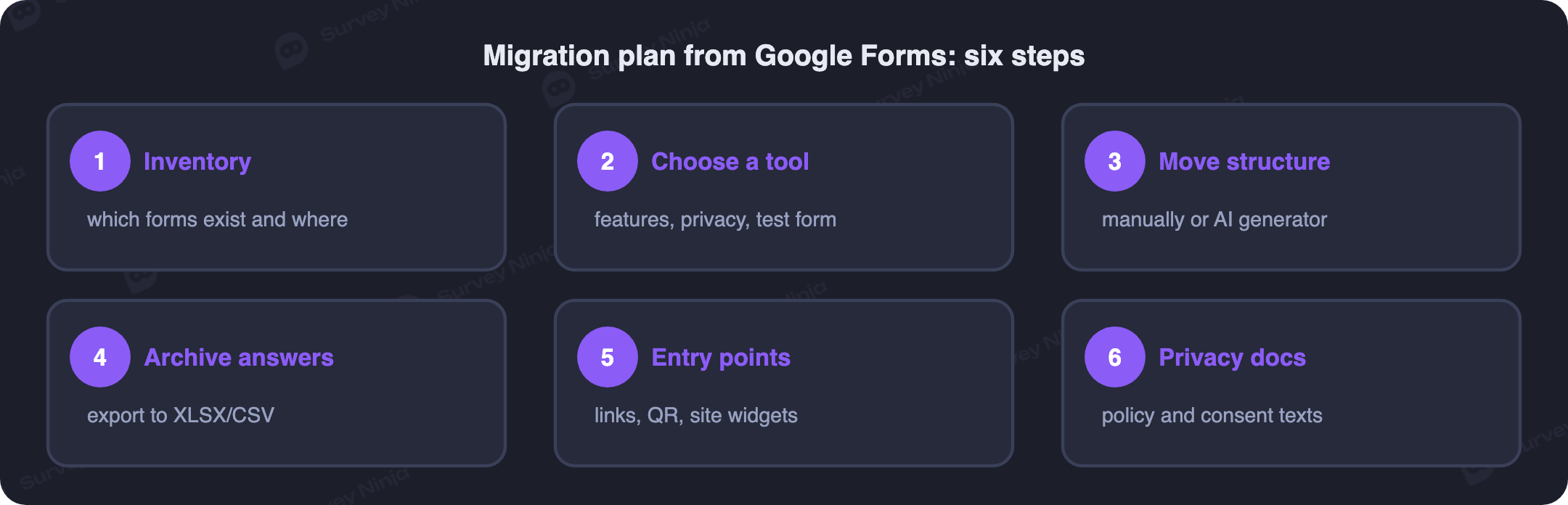
The migration plan: six steps
With the right preparation the move itself takes anywhere from a couple of hours to a couple of days, depending on how many forms you have. The important thing is to go in order rather than jumping straight to rebuilding.
- Inventory. Gather a list of every form you run: which are active, which are embedded on your site, which are linked in email signatures and QR codes, and which collect personal data. This step usually turns up a dozen forgotten forms that are easier to close than to move, so it doubles as a cleanup.
- Choose a tool and build a test form. Match the comparison above to your own needs, open a free account, and rebuild one real form from end to end, including its logic and notifications. Half an hour of hands-on testing tells you more than any review. If Google Forms is your reference point, our Google Forms comparison lays the differences out feature by feature.
- Rebuild the structure. No platform offers a direct one-click import of a Google Form, but you do not have to retype questions by hand either. An AI generator will draft a survey from a list of questions you paste in as text, and you are left to set the types and the branching. Treat this as a chance to clean the form up: it is a good moment to revisit how you write the questionnaire, drop the questions nobody needs and rewrite the clumsy ones.
- Archive the responses. In each Google Form open the Responses tab, export to Google Sheets, and download the file as XLSX or CSV. Put that archive in your own storage: after the move the primary copy of your data should live with you, not in someone else's cloud.
- Switch the entry points. Replace the links in email signatures, newsletters, social profiles and printed QR codes, and rebuild the widgets on your site. Close the old form to new responses and leave a link to the new one in its description, so you do not lose the stragglers who arrive late.
- Update your privacy documents. Refresh your privacy policy and the consent text inside the forms themselves: the processor has changed and, if you picked a platform with a signed DPA and clear data handling, your compliance trail is now in order. See how SurveyNinja handles this on our security page.
One extra piece of advice about timing: do not switch off the old forms the same day you launch the new ones. Run both versions in parallel for a week or two, compare how the responses line up, and only then close the Google Forms for good.
Common mistakes when migrating
A few rakes people step on most often:
- Moved the forms, forgot the QR codes. Printed codes on receipts, table tents and packaging keep pointing at a closed form for months. Inventorying your entry points matters more than inventorying the forms themselves.
- Compared tools on headline price rather than on limits. A cheap plan capped at a few hundred responses and a pricier one with unlimited responses work out very differently per response, so estimate your real monthly volume before you choose. This is also where a platform with no response limit quietly wins.
- Did not check where the data is actually stored. The word "secure" on a homepage is not a data processing agreement: ask for the terms in writing and confirm the GDPR posture before you trust the tool with customer data.
- Copied the questionnaire one to one. A migration is a convenient moment to reconsider your questions, throw out the dead ones and shorten the form. Old questionnaires collect ballast the same way old websites do.
- Forgot the consent checkbox. New forms should carry a consent checkbox with a link to your current privacy policy, otherwise your data may live in the right place but the legal basis for processing it still limps.
Key takeaways
Migrating from Google Forms is not about a trend or a logo swap. It comes down to three prosaic things: a functional ceiling on what the tool can do, real responsibility for the personal data your forms collect under laws like the GDPR, and simply outgrowing a utility that was never meant for business workflows. For anonymous personal use, staying put is a perfectly good choice. For customer-facing surveys and research, a dedicated platform almost always pays for itself, and with a plan in hand the move takes days rather than weeks.
The easiest way to see how painless it can be is to try it on your own data. SurveyNinja's free plan, with no response limit, lets you rebuild your busiest Google Form with all of its logic, and the AI generator drafts the first version for you. If something does not line up, you have lost half an hour rather than a budget, so you can create your first survey and judge the move for yourself.
Frequently asked questions
Why do teams migrate from Google Forms?
Usually for three reasons: they hit the functional ceiling (they need branching logic, ready metrics like NPS, website widgets or proper branding), they need clearer control over personal data under privacy laws like the GDPR, and they want a professional, on-brand experience rather than a form carrying someone else's logo. If your forms are anonymous and simple, none of this may apply.
Is Google Forms safe for collecting personal data under the GDPR?
Google Forms can be used, but responses are stored inside Google's infrastructure under Google's terms, and as the operator you remain responsible for where the data lives, who processes it and whether respondents consented. Obtaining a signed data processing agreement and the audit trail regulators expect is harder than with a platform built for it. A fully anonymous form that collects no names or contacts is much lower risk.
Is there a free alternative to Google Forms with no response limit?
Yes. SurveyNinja has a free plan with no cap on the number of responses, along with logic, analytics and ready-made templates, so you can rebuild and run a real form without paying. It is a natural fit when you want Google Forms simplicity but with more features and a clearer data-handling story.
Can you import forms automatically from Google Forms?
There is no direct one-click import of a Google Form file into another platform: you rebuild the structure in the new builder. The fastest way is an AI generator, where you paste your list of questions as text and the tool drafts the form, leaving you to set the types and branching. Your collected responses move separately, by exporting them to XLSX or CSV.
What happens to responses already collected in Google Forms?
They do not disappear, but leaving them as the only copy is risky. Export each form's responses to Google Sheets and download them as XLSX or CSV so the archive lives in your own storage. After the move, close the old forms to new submissions and keep the archive as your record.
How is a dedicated survey tool better than Google Forms functionally?
Dedicated builders offer more question types, more advanced branching logic, ready-made NPS and CSAT metrics that are calculated automatically, embeddable widgets for your site, triggered sends, exports to several formats and an API. Google Forms wins on simplicity and its seamless link to Google Sheets, which a good replacement matches with its own Sheets integration.
How long does it take to migrate from Google Forms?
With a plan, anywhere from a couple of hours to a couple of days, depending on how many forms you have. The work is mostly rebuilding the structure (fast with an AI generator), exporting old responses, and switching your entry points. Running the old and new forms in parallel for a week or two before you close the originals is a sensible safety margin.
Updated: Aug 26, 2026 Published: Aug 4, 2026