 WooCommerce Post-Purchase Survey: 7 Questions, When to Ask and What to Do Next
How to Write Survey Questions: 12 Rules With Bad and Better Examples
Survey design  Mike Taylor Updated: Nov 11, 2026 Reading time ≈ 19 min
Contents
- Start with the decision, then write the question
- 12 rules for good survey questions, with examples
- How wording changes the answers
- Answer options and rating scales
- How to review survey questions an AI drafted
- How many questions should a survey have?
- Pilot test your questions before launch
- How to write survey questions in SurveyNinja
- Frequently asked questions
To write survey questions that give usable answers, ask about one thing at a time, in neutral words your respondents use, about a period they can remember, with answer options that cover every case and do not overlap. This guide turns that into 12 rules with bad and better examples, a checklist for reviewing questions an AI drafted, and advice on order, length and pilot testing.
Every rule below fixes the same problem: a question that different people read differently, or that nudges them toward one answer. Extra responses do not repair either.
Key points
- Ask about one thing at a time, in neutral words respondents use, about a period they can remember, with options that cover every case without overlapping.
- Before writing questions, write down the decision the survey should inform, and drop any question whose answer would not trigger an action.
- Keep rating scales balanced and labeled, with one scale length and one direction for the whole survey so averages can sit side by side.
- Pilot the survey with think-aloud interviews of five to eight people, then a soft launch to 20 to 50 people, before sending it to everyone.
Start with the decision, then write the question
Good survey questions start before the first question is written. Write down the decision the survey should inform and what you would do with each possible answer. "Should we add evening support hours?" is a decision. "Learn about customer support" is a topic, and topics produce long surveys full of questions nobody acts on.
For each question you plan to ask, fill in one line: what the answer will be compared with, and which action a high or low result would trigger. If you cannot fill in the line, the question goes. This one habit cuts more bad questions than any wording rule, because a question with no job usually has no clear wording either.
Then picture the table you will show at the end. Comparing new and long-time customers needs a question that tells you which group each person is in, and a trend needs the same wording as last time.
12 rules for good survey questions, with examples
Each row shows a common mistake, a rewrite and the reason it matters. The examples are ready to copy and adapt.
| Rule | Bad question | Better question | Why |
|---|---|---|---|
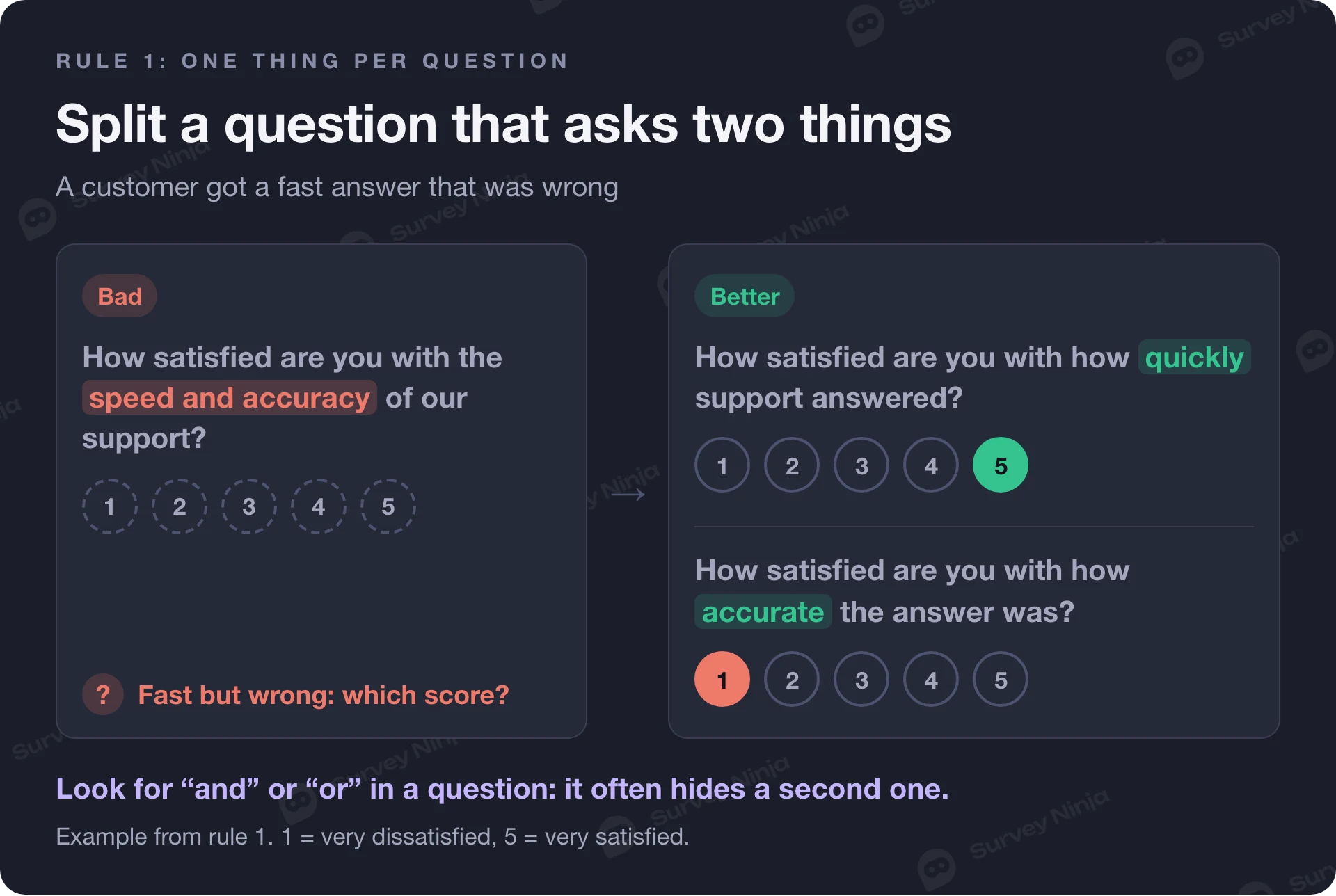
| 1. Ask about one thing | How satisfied are you with the speed and accuracy of our support? | Two questions: How satisfied are you with how quickly support answered? How satisfied are you with how accurate the answer was? | A fast but wrong answer has no honest score on the combined question |
| 2. Keep wording neutral | How much did you enjoy our new checkout? | How easy or difficult was it to complete your purchase? | "Enjoy" and "new" suggest the answer you hope for |
| 3. Drop built-in assumptions | What do you like most about working from home? | First: In the last 4 weeks, how many days did you work from home? Then, for those who did: What, if anything, do you like about it? | The bad version assumes the person works from home and likes it |
| 4. Give a concrete time frame | Do you exercise regularly? | In the past 7 days, on how many days did you exercise for at least 30 minutes? | "Regularly" means daily to one person and monthly to another |
| 5. Use the respondent's words | How would you rate our omnichannel onboarding? | How easy was it to set up your account? | People guess at jargon and then answer their guess |
| 6. Balance the scale | Fair, Good, Very good, Excellent | Very poor, Poor, Fair, Good, Very good | Three positive options out of four push the average up |
| 7. Make ranges exclusive and complete | Age: 18–25, 25–35, 35–45 | Age: under 18, 18–24, 25–34, 35–44, 45 or older, Prefer not to say | A 25-year-old fits two boxes, a 50-year-old fits none |
| 8. Give a way out | How satisfied are you with our mobile app? (asked of all customers) | The same question with "I haven't used the app", or a filter question first. Lists get "Other (please specify)" | Without an exit, people pick a random option to move on |
| 9. Avoid absolute words | Do you always read the terms before you sign up? Yes / No | How often do you read the terms before you sign up? Never, Rarely, Sometimes, Often, Always | Almost nobody does anything "always", so "no" tells you nothing |
| 10. Ask about behavior, not hypotheticals | Would you use a feature that exports reports to slides? | In the last month, did you share survey results with anyone? If yes, how? | People are generous about the future and accurate about last week |
| 11. Keep recall short | How many times did you eat out last year? | How many times did you eat at a restaurant in the past 7 days? | A year of meals cannot be counted, so people estimate and round |
| 12. Limit open questions | Five "Tell us about..." boxes in a row | A rating, then one optional follow-up: What is the main reason for your score? | Typing is the most tiring task in a survey, and quality drops after the first box |
Rules 1 and 2 cause the most damage, and both have glossary entries with more examples: the double-barreled question and the leading question. A quick test for rule 1 is to look for "and" or "or" in the question text. A quick test for rule 2 is to read the question as your least happy customer and ask whether it sounds like it expects a compliment.
Rule 3 is the quiet one. Loaded questions often read fine because the assumption matches what the author believes. The fix is nearly always a filter question first, then logic that shows the follow-up only to people it applies to. Rules 4 and 11 work together: a short, specific window ("the past 7 days") gives you counts people can actually recall, while "usually" or "last year" gives you their self-image.
Also watch for double negatives. "Do you oppose not extending the opening hours?" makes people stop and decode, and some decode it wrong. Rewrite the question so that agreement means the same thing as the plain statement.
How wording changes the answers
Small changes in wording move results by several points, and the published evidence is consistent about it. Pew Research Center's guide to writing survey questions gives examples from its own polls. In 2005, 51% favored making it legal for doctors to give terminally ill patients "the means to end their lives", while 44% favored making it legal for doctors to "assist terminally ill patients in committing suicide". Same policy, different words, a seven-point gap.
The format of the question matters as much. Asked which issue mattered most in their 2008 vote, 58% chose the economy when it appeared in a list, but only 35% named it when the question was open. The list reminded people of an answer they might not have produced on their own. Our article on open vs. closed questions covers when each format fits.
Order has the same kind of effect. In a 2003 Pew poll, support for legal agreements giving same-sex couples the same rights as married couples was 45% when the question came right after a question about marriage itself, and 37% when it did not. The earlier question changed how people read the later one.
These effects are a family of problems known as survey bias. When you compare results over time or between groups, keep wording, answer options and order identical, because a change in any of them can look like a change in opinion.
Answer options and rating scales
A closed question is only as good as its options. Every list should be mutually exclusive (each person fits one option) and exhaustive (every person fits some option). Exhaustive usually means adding "Other (please specify)", "None of these" or "Not applicable". Read your list as someone at the edge of your audience, such as a part-time employee or a customer who has not used the product yet.
Personal questions need one more test: ask only the ones your analysis will use. If you plan to compare groups by age, gender or income, make each question optional and add "Prefer not to say". Pew encourages more categories in demographic questions so that everyone can find an answer that fits. For gender, that means options such as "Woman", "Man", "Non-binary", "I prefer to self-describe" with a text box, and "Prefer not to say". Ethnicity, health and sexual orientation fall under stricter rules in many places, such as the GDPR in Europe, so check what applies to you before asking. In a small team, department plus age group can point to one person, so leave such combinations out of a survey you call anonymous.
Keep lists short. Pew recommends keeping the number of choices to about four or five at most when questions are read aloud, and long lists tire people on screen too. Factual questions such as country or industry can be longer, since people look for their own answer rather than weighing each option.
For rating scales, three decisions matter:
- Labels. Label every point if you can, or at least both ends. "1 to 5" means different things to different people until the numbers have words.
- Balance. As many positive as negative options, with a true midpoint if you use one.
- Consistency. One scale length and one direction for the whole survey, so averages sit side by side.
Our rating scale examples list ready labels for 1–5, 1–7, 1–10 and 0–10 scales, and the Likert scale guide covers agreement statements and how to analyze them. One more point from Pew: unordered lists can be shown in random order so no option always gets the top spot, but ordered scales stay in order. Pew reverses them for half the sample instead.
How to review survey questions an AI drafted
AI tools give you a first draft fast. The model works only from what you tell it, and a short prompt leaves out your decision, your audience and what you will compare the answers with, so the review is your job. When you check a draft from any AI tool, these are the problems to look for:
- Too many questions. Asked for "a customer survey", a model tends to cover every angle of the topic. You need the questions that serve one decision.
- Double-barreled items. "How satisfied are you with the price and quality?" is easy to generate and easy to miss.
- Generic options. "Social media, Search engine, Friend, Other" may not match where your customers actually come from.
- Scales without labels. A bare "1–5" with no words on the points, or a different scale on every question.
- Assumptions baked in. Questions that assume the person bought, used, attended or liked something.
Here is a 7-point review checklist. Run it on every AI draft before you share the survey with anyone:
- Purpose. Each question maps to the decision or to a comparison you plan to make. Delete the rest.
- One idea each. No question contains "and" or "or" joining two topics.
- Neutral words. No adjectives that praise you or the product, no "don't you agree".
- Real options. Lists use your actual products, channels and segments, they don't overlap, and they include "Other" or "Not applicable" where someone could fall outside them.
- Labeled scales. Every scale is balanced, labeled and runs in the same direction as the others.
- No hidden assumptions. Questions that apply only to some people sit behind a filter question and skip logic.
- Length and order. The estimated completion time fits the audience, easy questions come first, and demographics come last, stay optional and cover only what you will analyze.
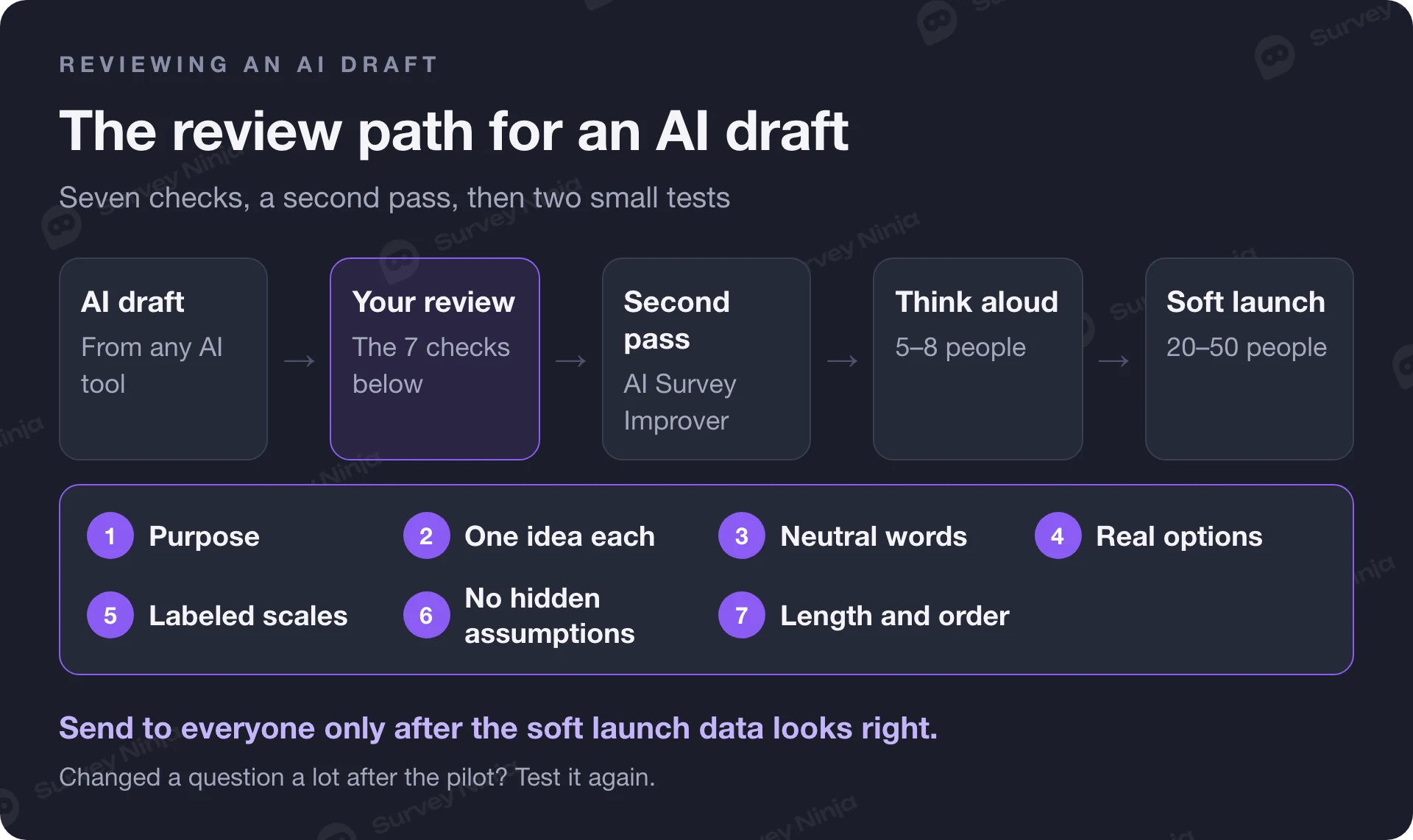
If you have a draft ready, you can paste it into our free AI Survey Improver. It returns a quality score, a list of issues and clearer, less biased wording for each question, which makes a good second pass after your own review.
How many questions should a survey have?
As few as your decision needs. Think in minutes rather than in question counts, because a 1–5 rating takes seconds and an open question or a large grid takes far longer. Our survey length calculator estimates completion time from the number of closed questions, open questions and matrices, plus the intro and the final screen. Run it before launch, and if the estimate feels long for a busy customer, cut questions instead of hoping they will push through.
Length and dropout are linked. Each extra screen is another place to quit, and people who stay often speed up and give less thought to each answer. Our guide on how to reduce survey dropout shows where respondents leave and how to fix each point.
A reliable order for most surveys:
- A short, easy question that matches the invitation, so people feel the survey is about what they were promised.
- General questions before specific ones on the same topic. If you want an open answer about what matters most, ask it before a list of options suggests answers.
- Questions grouped by topic, with a one-line transition when the topic changes.
- Sensitive questions in the second half, once people have settled in.
- Demographics at the end, and only the ones you will analyze, unless you need them to screen people out or route them.
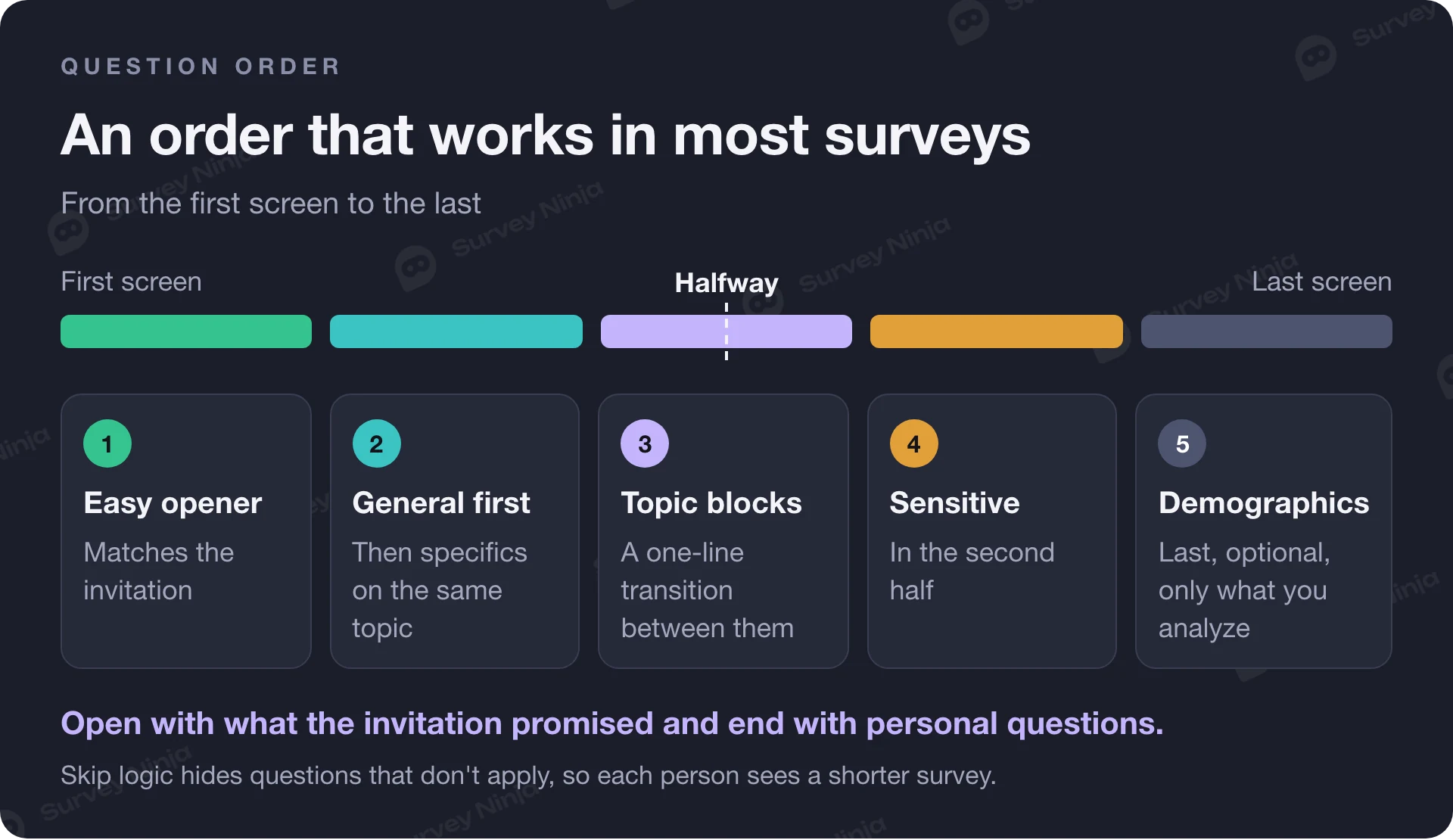
Use skip logic to remove what doesn't apply. A question someone skips because it is irrelevant costs nothing. A question they have to answer anyway costs attention and adds noise to your data.
Pilot test your questions before launch
A pilot is the cheapest fix in survey research. Pew Research Center calls pretesting "an essential step in the questionnaire design process", especially for new questions. Two small steps catch most problems.
Think-aloud interviews. Ask five to eight people from your audience to take the survey while saying out loud what they think each question means and how they choose an answer. Listen for hesitation, rereading and "it depends". Every "it depends" points to a missing option or a vague term. This method has a name, cognitive interviewing, and it is the fastest way to find questions that you read one way and respondents read another.
A soft launch. Send the final survey to a small slice of your list, say 20 to 50 people, and look at the raw data before sending the rest. Check:
- where people drop out;
- which questions get a lot of "Other" answers, and what they write there (often the option you forgot);
- whether anyone gives the same answer down a whole grid;
- how long completion really takes compared with your estimate;
- whether the data comes out in the shape your analysis plan needs.
Our glossary entry on the pilot survey covers how to set one up. Fix what you find, and if you change a question substantially, test it again.
How to write survey questions in SurveyNinja
Start with the draft. Describe what you want to learn and who you are asking, and Ninja AI builds the survey in the editor. You can also give it a document or an image of an existing questionnaire. Every change arrives as a card, and nothing enters your survey until you apply it. Each question then has its own AI actions: rephrase it, shorten it, make it more neutral or check it for errors, with the text before and after side by side. Ninja AI is in beta and available on every plan, including Free.
If you only need ideas, the free AI question generator writes a set of questions with suggested types for the topic you enter, without an account. Then run the 7-point checklist from this guide, and paste the result into the AI Survey Improver for a second opinion. Use skip logic to hide questions that don't apply, keep one labeled scale throughout, and send a pilot to a handful of people before the full launch.
Frequently asked questions
What makes a good survey question?
A good survey question asks about one thing, uses neutral words the respondent would use, and sets a clear time frame. Its answer options cover every case without overlapping, and rating scales are balanced and labeled. Above all, it serves a decision: if you would not act on the answer, the question does not belong in the survey.
How do you write unbiased survey questions?
Remove words that praise or judge, split questions that cover two topics, and drop assumptions about what the person did or feels. Offer balanced scales and an exit such as "Not applicable". Then pilot the survey with a few people from your audience and listen for questions they read differently than you intended.
How many questions should a survey have?
As few as the decision behind the survey needs. Plan by completion time rather than question count, because open questions and grids take much longer than a single rating. Estimate the time before launch, cut anything you would not act on, and use skip logic so people only see questions that apply to them.
What is a double-barreled question?
It is a question that asks about two things but allows one answer, such as "How satisfied are you with the price and quality?" Someone who likes the quality but not the price cannot answer honestly. Split it into two questions, one for each topic, and look for "and" or "or" in your drafts to catch them.
Should survey questions be open or closed?
Mostly closed, because closed questions are quick to answer and easy to count. Use open questions when you do not know the likely answers yet, or as one optional follow-up such as "What is the main reason for your score?" Several open boxes in a row tire respondents and lower the quality of what they write.
Can AI write good survey questions?
AI writes a useful first draft quickly, but it works only from what you tell it about your decision and your audience. Review every draft for too many questions, double-barreled items, generic answer options, unlabeled scales and built-in assumptions. Then pilot it with real people before launch, the same as a survey you wrote yourself.
Updated: Nov 11, 2026 Published: Nov 10, 2026