 WooCommerce Post-Purchase Survey: 7 Questions, When to Ask and What to Do Next
Product Survey Questions: 36 Examples by Product Stage, With When to Ask Each
Market research  Mike Taylor Nov 12, 2026 Reading time ≈ 18 min
Contents
- Product survey questions start with the moment
- Discovery questions before you build
- Onboarding survey questions and first value
- Feature adoption and feature request questions
- Product satisfaction questions: CSAT, CES and NPS
- Product-market fit questions
- Pricing perception questions
- Churn and cancellation survey questions
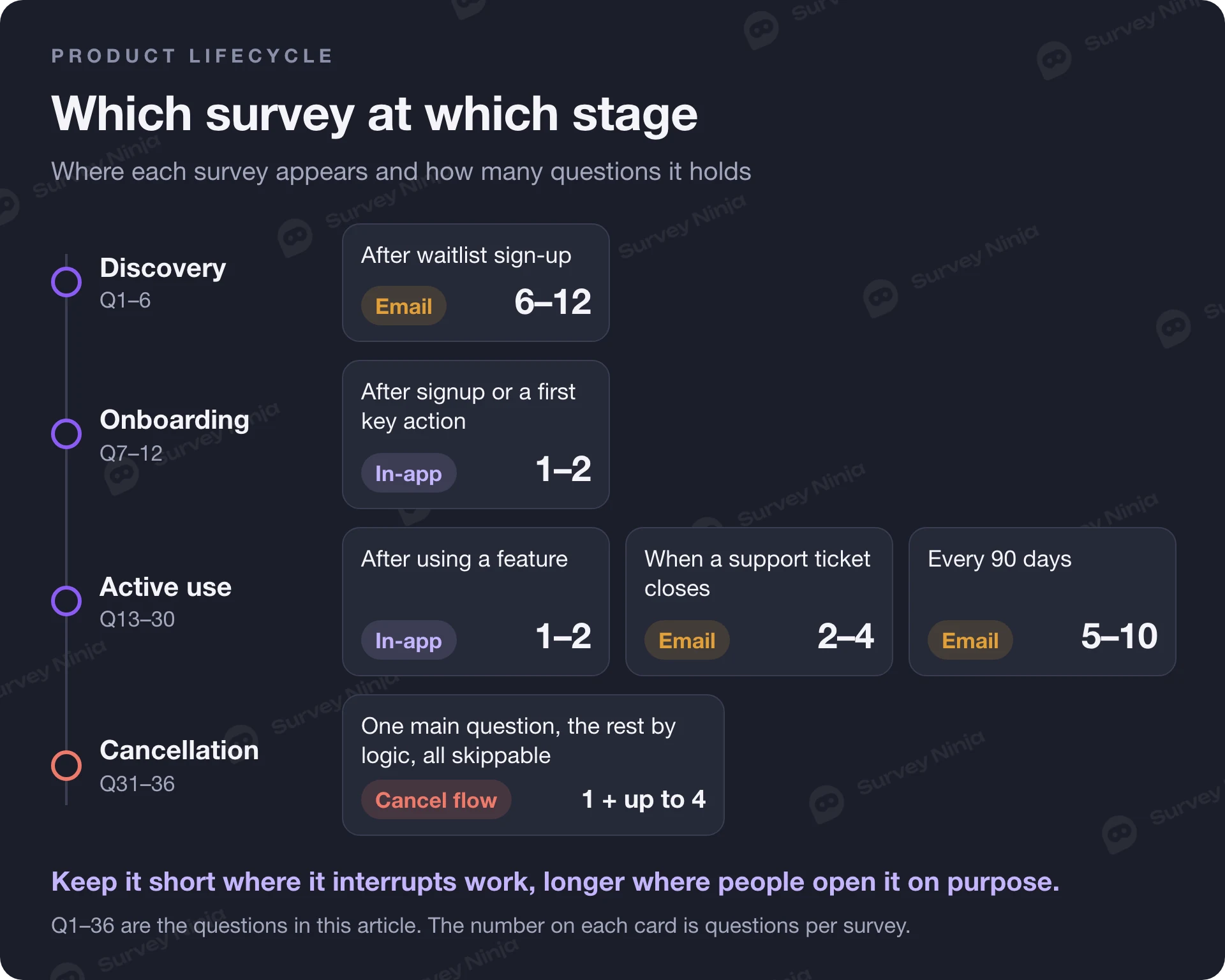
- How many questions should a product survey have?
- In-app or email: where to ask product questions
- 5 mistakes with product feedback surveys
- How to run product surveys in SurveyNinja
- Frequently asked questions
Product survey questions ask users about a product at a specific moment: before you build, right after signup, after they use a feature, after a support conversation or when they cancel. The moment decides the question. Below are 36 product feedback survey questions grouped by stage, each with an answer format and a trigger, followed by guidance on survey length, in-app versus email and five mistakes to avoid.
Use the tables as a bank. No single survey should contain more than a handful of these questions. Each row tells you which moment it belongs to, so you can attach it to that moment and leave the rest for later.
Key points
- Tie each product survey question to a moment, such as signup, the first and third use of a feature, a closed support ticket or cancellation.
- Use one or two questions in an in-app survey, two to four in an email after an event and five to ten in a relationship survey.
- Ask in the app about something the user just did, and use email for longer surveys and for users who rarely open the product.
- In the cancellation flow, ask one main question about the reason and let people skip it, so cancelling never depends on answering.
Product survey questions start with the moment
A product feedback survey works when the person answering has just done the thing you ask about. Someone who finished setting up an integration two minutes ago can tell you exactly where it was confusing. Someone asked about integrations in a quarterly survey will guess. So before choosing questions, choose the moment.
| Stage | Trigger | What you learn |
|---|---|---|
| Concept and discovery | Waitlist sign-up, landing page, interview screener | Whether the problem is real and how people solve it now |
| Onboarding | Right after signup, after the first key action, day 7 | Why people came and what blocks first value |
| Feature adoption | After the 1st and 3rd use of a feature, or after 30 days without using it | Whether a feature is usable, useful and discovered |
| Satisfaction | Every 90 days for active users, after a support ticket closes | CSAT, CES and NPS trends you can compare over time |
| Product-market fit | Active users who used the product at least twice in the last two weeks | Whether people would miss the product |
| Pricing | After upgrade, after the first payment, in a separate pricing study | How people perceive price and value |
| Churn | In the cancellation or downgrade flow | Why people leave and what would have kept them |
Most of these triggers are events in your product, which is why they work well as triggered surveys: the survey fires when the user does something.
Discovery questions before you build
Before you build, test the problem. Ask about current behavior and past experience. People are poor at predicting what they would use, and good at describing what they did last week.
| Question | Answer format | When to ask |
|---|---|---|
| 1. What is the hardest part of [task] for you today? | Open text | Waitlist sign-up or interview screener |
| 2. How do you handle [task] today? | Single choice: spreadsheet, another tool, manually, someone else does it, I don't | Waitlist sign-up |
| 3. How often do you run into this problem? | Single choice: daily, weekly, monthly, a few times a year | Waitlist sign-up |
| 4. What have you already tried to solve it? | Open text | Screener for interviews |
| 5. How much time does this problem cost you in a typical week? | Single choice: under 1 hour, 1–3 hours, 3–8 hours, more than 8 | Waitlist sign-up |
| 6. When did you last look for a better way to do [task]? | Single choice: this month, in the last 6 months, over a year ago, never | Waitlist sign-up |
Question 6 is the quiet filter. People who searched for a solution recently feel the problem strongly enough to switch. Recruit your first interviews from them.
Onboarding survey questions and first value
Onboarding questions answer two things: why this person signed up, and what stands between them and the first moment the product is useful. Ask the first question on the welcome screen and the rest after real actions.
| Question | Answer format | When to ask |
|---|---|---|
| 7. What do you want to do first with [product]? | Single choice: 4–6 main jobs, plus other | Right after signup, one question only |
| 8. How did you hear about us? | Single choice: search, a colleague, social media, a review site, AI assistant, other | Right after signup |
| 9. How easy was it to set up [product]? | Scale 1–7, from "very difficult" to "very easy" | After the setup step is completed |
| 10. Did you get what you came for today? | Yes, partly, no | End of the first session |
| 11. What almost stopped you from getting started? | Open text, optional | After the first key action |
| 12. What is missing before you can use [product] for real work? | Open text | Day 7, only users who have not reached the key action |
The answer to question 7 is worth storing with the user's profile. It lets you split every later survey by goal, and it often shows that one group of signups reaches value quickly while another never does.
Feature adoption and feature request questions
Feature questions come in two kinds. Adoption questions check whether a feature you shipped is found, usable and useful. Feature request questions collect what users want next. Keep them apart: a request question after someone struggled with a feature gets you a list of complaints.
| Question | Answer format | When to ask |
|---|---|---|
| 13. How easy was it to [do the task] with [feature]? | Scale 1–7 | Right after the first use of the feature |
| 14. How useful is [feature] for your work? | Scale 1–5, from "not useful" to "essential" | After the third use |
| 15. What did you expect [feature] to do that it did not? | Open text | Only when question 13 or 14 scored low |
| 16. Why haven't you tried [feature] yet? | Single choice: didn't know it existed, not relevant to me, looks complicated, I use another tool for this, other | Active users after 30 days without using the feature |
| 17. If you could add one thing to [product], what would it be? | Open text | Once a quarter, active users |
| 18. Which of these planned improvements would help you most? | Ranking, or pairwise comparison for longer lists | Before roadmap planning |
Question 16 is the one teams forget. Low usage of a feature can mean it is bad, or that nobody knows it exists, and the fix for each is different. For question 18, a ranking of five items is fine; for ten or more, a pairwise comparison gives cleaner priorities because people only choose between two at a time.
Product satisfaction questions: CSAT, CES and NPS
Satisfaction questions are your trend line. Ask them the same way every time, on a schedule or after the same event, so the numbers compare. Each metric answers a different question; CSAT vs NPS explains when to use which.
| Question | Answer format | When to ask |
|---|---|---|
| 19. How satisfied are you with [product] overall? | CSAT, scale 1–5 | Every 90 days, active users |
| 20. How satisfied are you with the help you received? | CSAT, scale 1–5 | When a support ticket is closed |
| 21. [Company] made it easy for me to handle my issue. | CES, agreement scale 1–7 | When a support ticket is closed, or after a key task |
| 22. How likely are you to recommend [product] to a colleague? | NPS, scale 0–10 | Every 3 or 6 months, active users |
| 23. What is the main reason for your score? | Open text | Directly after question 19 or 22 |
Customer effort is often the most actionable of the three for a product team, because a high-effort answer points at a specific step. Our guide to Customer Effort Score covers the wording and how to calculate it. Do not ask CSAT, CES and NPS in the same survey: pick the one that matches the moment.
Product-market fit questions
The product-market fit survey is short and has fixed wording, so copy it exactly. The core question is number 24, and the share of "very disappointed" answers is the score.
| Question | Answer format | When to ask |
|---|---|---|
| 24. How would you feel if you could no longer use [product]? | Very disappointed, somewhat disappointed, not disappointed | Active users who used the product at least twice in the last two weeks |
| 25. What is the main benefit you receive from [product]? | Open text | Same survey |
| 26. What type of people do you think would benefit most from [product]? | Open text | Same survey |
Who qualifies for the sample, the 40% line, how many answers you need and how to segment the result are all in our guide to the product-market fit survey.
Pricing perception questions
Pricing questions in a product survey measure perception: does the price feel fair for what people get? Setting a price is a separate study with its own method, and it belongs in a dedicated survey rather than a pop-up.
| Question | Answer format | When to ask |
|---|---|---|
| 27. For what you get, how would you rate the price of your plan? | Scale 1–5, from "very poor value" to "excellent value" | 30 days after the first payment |
| 28. What was the main reason you chose this plan? | Single choice: a specific feature, the response or usage limit, team seats, price, other | Right after upgrade |
| 29. What almost stopped you from upgrading? | Open text, optional | Right after upgrade |
| 30. How would you prefer to pay? | Single choice: monthly, every 6 months, yearly | After upgrade or in a pricing study |
To find the price range people accept, use a price sensitivity study. Our guide to the Van Westendorp pricing survey gives the four questions and shows how to read the answers.
Churn and cancellation survey questions
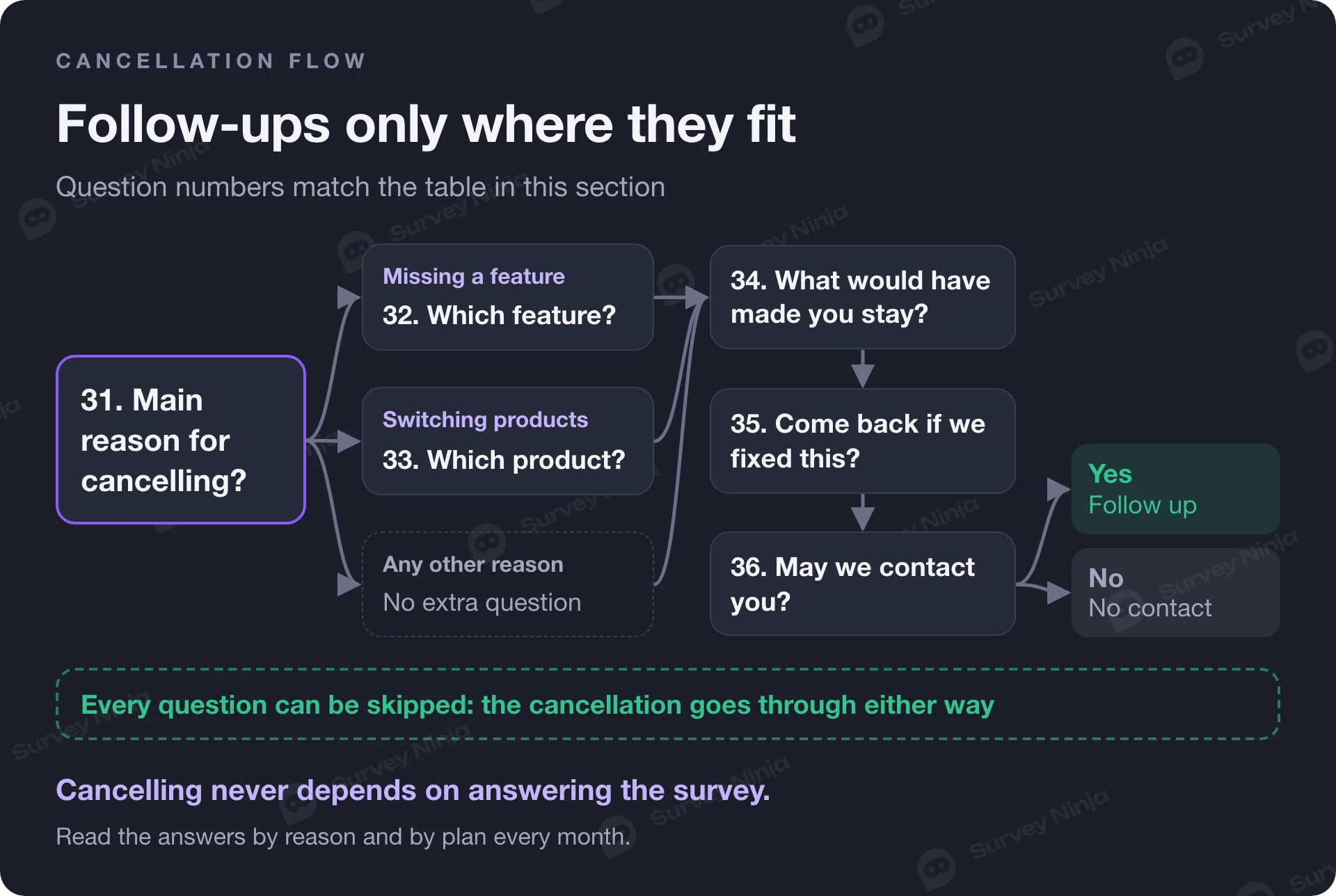
The cancellation flow is the one moment when almost every leaving user sees your question. Keep it to one main question and a few optional follow-ups that appear depending on the answer. Let people skip all of it: cancelling should never depend on answering a survey, and consumer rules in many markets expect cancelling to stay simple. Check the ones that apply to you.
| Question | Answer format | When to ask |
|---|---|---|
| 31. What is the main reason you are cancelling? | Single choice: too expensive, missing a feature, switching to another product, no longer need it, too hard to use, technical problems, temporary pause, other | In the cancellation flow, skippable |
| 32. Which feature were you missing? | Open text | Only if "missing a feature" |
| 33. Which product are you switching to? | Short text | Only if "switching to another product" |
| 34. What would have made you stay? | Open text, optional | In the cancellation flow |
| 35. Would you consider coming back if we fixed this? | Yes, maybe, no | In the cancellation flow |
| 36. May we contact you about your answer? | Yes, no | Last screen of the flow |
Read cancellation answers by reason and by plan every month. "Too expensive" from a user who never activated is an onboarding problem, and from a team on your largest plan it is a pricing one. Our guide to the customer churn survey covers how to turn the answers into actions. Follow up only with people who answered yes to question 36.
How many questions should a product survey have?
It depends on where the survey appears. A question that interrupts work should be one question, sometimes with one optional follow-up. A survey that people open on purpose can be longer.
| Survey type | Questions | Example |
|---|---|---|
| In-app micro-survey | 1–2 | Question 13, then 15 if the score is low |
| Event-triggered email | 2–4 | Questions 20, 21 and 23 after a support ticket |
| Cancellation flow | 1 main question, up to 4 more shown by logic, all skippable | Questions 31 to 36 |
| Relationship survey | 5–10 | Questions 19, 22, 23, 14 for key features, 17 |
| Discovery survey | 6–12 | Questions 1 to 6 plus two or three about role and company size |
The rule behind the table: every question should change a decision. If you cannot name what you would do differently based on the answer, cut it. Personal questions fail this test most often. Ask about age, gender or other personal traits only when a decision depends on them, make them optional and add "prefer not to say".
In-app or email: where to ask product questions
Ask in the app when the question is about something the user just did. Ask by email when the user is not in the app, when the survey is longer, or when you need answers from people who use the product rarely.
| In-app | ||
|---|---|---|
| Fits | Onboarding, feature adoption, CES after a task | Relationship surveys, discovery, churned users, support follow-up |
| Context | High: the experience is seconds old | Lower: the user has to remember |
| Length | 1–2 questions | Up to about 10 questions |
| Who you miss | Inactive and churned users | People who ignore product email |
Many teams use both: an in-app question at the moment, and an email survey for people who never come back to the app. Send email surveys only to people who agreed to hear from you, with a working unsubscribe link, and stop when someone opts out, churned users included. Our guide to in-app feedback covers placement, frequency caps and how not to annoy active users.
5 mistakes with product feedback surveys
- One giant survey for everything. Thirty questions about onboarding, features, pricing and support in one form produce tired, shallow answers. Split by moment.
- The wrong moment. Asking for a feature rating from someone who never used the feature, or for CSAT right after an error screen, measures the bad moment instead of the product.
- Leading wording. "How much do you love the new dashboard?" assumes the answer. Ask "How useful is the new dashboard for your work?" with a balanced scale.
- Asking people to predict the future. "Would you use a reporting feature?" collects polite yeses. Ask about what they did: "How did you build your last report?"
- Answers without context. A score with no plan, signup date or user role cannot be split by segment. Attach data you already hold when the survey is sent, so you do not have to ask for it, and say in the survey intro that answers are linked to the account. A survey that carries account data is not anonymous, so do not call it that.
How to run product surveys in SurveyNinja
For a ready start, copy the software satisfaction survey template: eighteen questions on ease of use, integrations, team collaboration, contact with your team and overall satisfaction, which you can cut down to the stage you are measuring. To draft questions for a specific moment, try the free product feedback question generator, the feature prioritization survey generator or the onboarding survey generator. In the builder, Ninja AI can draft a survey from a description and rephrase or neutralize a question; every change waits until you apply it.
Logic is on every plan, so the follow-up question appears only after a low score, and cancellation reasons branch to the right next question. Website micro-surveys (Beta) show a short survey on the pages you choose and can be opened from your own code with a JavaScript call, which suits event-based triggers. From the Basic plan, hidden variables in the survey link carry plan, role and signup date into every answer; pass codes like these rather than names or emails, because links get forwarded and logged. To test two wordings of the same question, the A/B test of a question is available on all plans. More workflows are on our page for product managers.
Frequently asked questions
What are good product survey questions?
Good product survey questions are tied to a moment: why the user signed up, how easy setup was, how useful a feature is after a few uses, how satisfied they are overall, and why they cancel. Each should have a clear answer format and lead to a decision you can make.
How many questions should a product feedback survey have?
One or two for an in-app survey that interrupts work, two to four for an email after a specific event, and five to ten for a relationship survey people open on purpose. Cut any question whose answer would not change what you do.
When should you send a product survey?
Right after the moment you ask about: after signup, after the first and third use of a feature, when a support ticket closes, in the cancellation flow. Relationship surveys with CSAT or NPS go to active users on a fixed schedule, such as every 90 days.
Is in-app or email better for product feedback?
In-app is better for questions about something the user just did, because the experience is fresh and the survey can stay at one or two questions. Email works better for longer surveys and for users who rarely open the product or have already left.
What should you ask users who cancel?
Ask one main question about the reason, with options such as too expensive, missing a feature or switching to another product, and let people skip it so cancelling never depends on answering. Then show a short follow-up depending on the answer, ask what would have made them stay, and whether you may contact them.
How do you ask about feature requests without bias?
Ask one open question about the single thing users would add, separately from questions about current features. When you need priorities, list the planned options and ask users to rank them or compare them in pairs, instead of rating each one as important.
Published: Nov 12, 2026