 WooCommerce Post-Purchase Survey: 7 Questions, When to Ask and What to Do Next
Plans and Limits
Updated
On this page
A SurveyNinja plan applies to the whole workspace. It sets how many surveys, questions, responses and members you can have, and which features are on. To see your plan and how much of it you've used, click your profile icon in the top right corner and choose Billing. Prices are on the pricing page.
Limits by plan
| Limit | Free | Basic | Standard | Premium | Enterprise |
|---|---|---|---|---|---|
| Surveys per account | 50 | 100 | 500 | Unlimited | Custom |
| Questions per survey | 30 | 50 | 100 | Unlimited | Custom |
| Responses per month | 100 | 1,000 | 5,000 | 20,000 | Custom |
| Members (seats) | 1 | 1 | 3 | 5 | Custom |
| Storage | Not included | 1 GB | 3 GB | 6 GB | Custom |
| Maximum file size | Not included | 100 MB | 300 MB | 500 MB | Custom |
| Recipients of response emails | 1 | 3 | 5 | 10 | Custom |
- Surveys. Archived surveys don't count. See Archive.
- Questions. Every element of the survey counts, except the Welcome Screen and the submit button.
- Members. Every member takes a seat, including you and people who haven't accepted the invitation yet. See Collaborative Survey.
- Storage. Respondents' files and the images you add to surveys share it. See File Upload.
On Enterprise, you set the number of members, responses per month and disk space when you buy the plan, and the price depends on them. See How to Buy a Plan.
Checking your usage
On the Billing page, the Plan limits block (1) shows how many surveys and responses you've used out of the total. Under Responses per month (2), "Limit on responses will be reset on …" shows when the count starts over. The Storage block below shows the used space. The number of used seats is on the Members page.
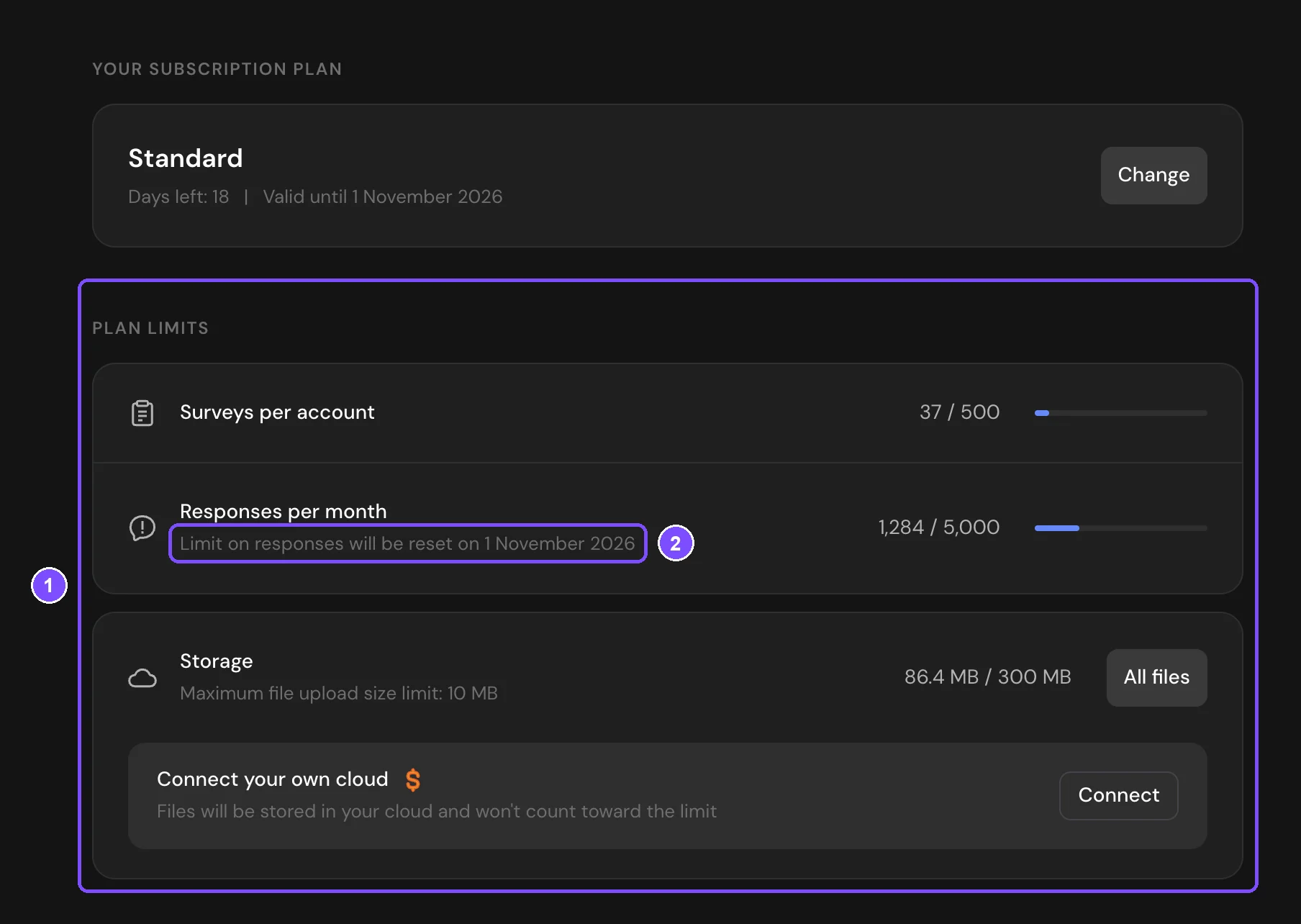
How the monthly response limit works
- Each completed response uses one response from the limit. Disqualified responses count too, incomplete responses don't.
- Deleting a response doesn't give it back to the limit.
- The count starts over once a month, on the same day of the month your current plan started, not on the 1st. Unused responses don't carry over.
When the limit is reached, your surveys stay open and respondents don't notice anything. New responses are saved, but hidden:
- They don't appear in Summary, Reports, Responses or downloaded files.
- They aren't sent to integrations, such as Google Sheets or webhooks, and no email notifications are sent about them.
- Responses shows the "Maximum Number of Responses Exceeded" banner. The first time this happens in a survey, the workspace owner also gets an email.
To see hidden responses, click Purchase More Responses in the banner and pay for them. See Why Don't I See All Responses? Moving to a higher plan raises the limit for new responses but doesn't show the ones already hidden.
If you move to a higher plan with more than 30 days left in the paid period, the responses you've already used this month are subtracted from the new limit. For example, you've used 600 of 1,000 responses on Basic and move to Standard: 4,400 responses are left until the reset date.
Note. The plan limit isn't the same as Limit on number of responses in survey settings. That setting closes one survey after the number you choose. See Response Limit and Survey Deadline.
Question types by plan
| Plan | Question types and screens |
|---|---|
| Every plan | Radio Button, Multiple Choice, Dropdown, Yes or No, Ranging, NPS, Slider, Rating, Smile rating, Opinion Scale, Enter Text, Full name, Email, Phone Number, Date and Time, Message, Question Group, Disqualification screen |
| Basic and higher | Welcome Screen, Thank You Screen, Media Choice, Matrix, Matrix 3D, Semantic differential, Allocation slider, Paired Comparison, Numerical Response, File Upload, Click Test, Hotspot Selection, Area Selection, Booking |
| Standard and higher | HTML Code, Map |
In the builder, types your plan doesn't include have a $ icon. See Question Types.
Features by plan
Each plan includes everything from the plans before it.
Every plan, including Free
| Area | Features |
|---|---|
| Logic | Logic jumps, disqualification and quotas |
| Settings | Password, IP and device restrictions, captcha, one response per person, progress bar, question numbering, no return to the previous question, closing a survey by hand, scheduled access, your own button and screen texts (Standard labels) |
| Design and quizzes | Ready-made themes, scoring and correct answers |
| Results | Reports, response tags, hiding responses, downloading responses, sharing results |
| Sharing | Survey link, embedding on a website |
| Integrations | API, MCP |
Basic adds
| Area | Features |
|---|---|
| Design | Images, video and audio in questions, custom themes and your logo |
| Settings | A custom message on a closed survey |
| Results | Filters |
| Sharing | Your own survey path and default address, hidden variables |
| Integrations | Google Sheets, webhooks, Zapier, Google Analytics, Meta Pixel |
| Notifications | Email notifications to respondents |
Standard adds
| Area | Features |
|---|---|
| Branding | No SurveyNinja logo in surveys |
| Settings | Response limit and deadline, timers, redirects, custom code, carrying forward answer options |
| Results | Incomplete responses, the Disqualified and All tabs |
| Sharing | Unique links |
| Integrations | Telegram |
| Account | Auto-backups, priority support |
Premium adds
| Area | Features |
|---|---|
| Team | Custom roles |
| Settings | Minimum view time, promo codes, SSO access to surveys |
| Results | Smart Analytics |
| Sharing | Custom domain |
| Account | SSO login, your own SMTP, your own file storage |
Trial
A new workspace gets a 14-day trial of the Premium plan, shown as Premium (trial), without a card. When it ends, the workspace moves to Free. See What Happens After the Trial Ends?
Moving to a lower plan
You can't move to a cheaper plan before the paid period ends. Turn off auto-pay on the Billing page. When the period ends, the workspace moves to Free, and you can buy the plan you need. See How to Buy a Plan.
On a lower plan, SurveyNinja doesn't delete surveys, questions or responses:
- Questions of types the plan doesn't include are highlighted in red in the builder and can't be edited.
- With more surveys or questions than the limit, everything keeps working, but you can't create surveys or add questions.
- Settings the plan doesn't include stop working for respondents. For example, surveys show the SurveyNinja logo.
- When files take more space than the plan's storage, new files are saved but hidden. Free has no storage, and File Upload questions aren't available.
See Why Is a Question Type or Feature Locked?
If something doesn't work
- New responses don't appear in Results. The monthly response limit is reached. See How the monthly response limit works.
- Billing shows more responses than you see in Results. Disqualified and deleted responses count toward the limit. Check the Deleted tab in Responses. The Disqualified tab needs Standard or higher.
- You can't create a survey or add a question. The plan's limit is reached. See Why Is a Question Type or Feature Locked?