 25 Questions for a Travel Agency Customer Satisfaction Survey
Matrix and Matrix 3D Questions
Updated
On this page
A matrix question is a grid: rows are the items being rated, and columns are answer options shared by all rows. Use it when several items get the same scale, for example "Rate our service" with rows Response time and Friendliness, and columns Poor to Excellent. Matrix 3D puts a dropdown in every cell, so one grid covers two dimensions: rows are products, columns are criteria such as Price and Quality, and each cell asks how satisfied the respondent is.
Paid feature. Matrix and Matrix 3D are available on the Basic plan and higher. Compare plans
Adding a matrix question
- In Builder, click + above or below a question.
- In the Scales and ratings section, click Matrix or Matrix 3D.
- Type the row and column labels. Add more with + Insert row and + Insert column.
A new matrix has 2 rows and 2 columns. Use the arrows and the trash can next to a label to move or delete a row or column. More on adding questions: Question Types.
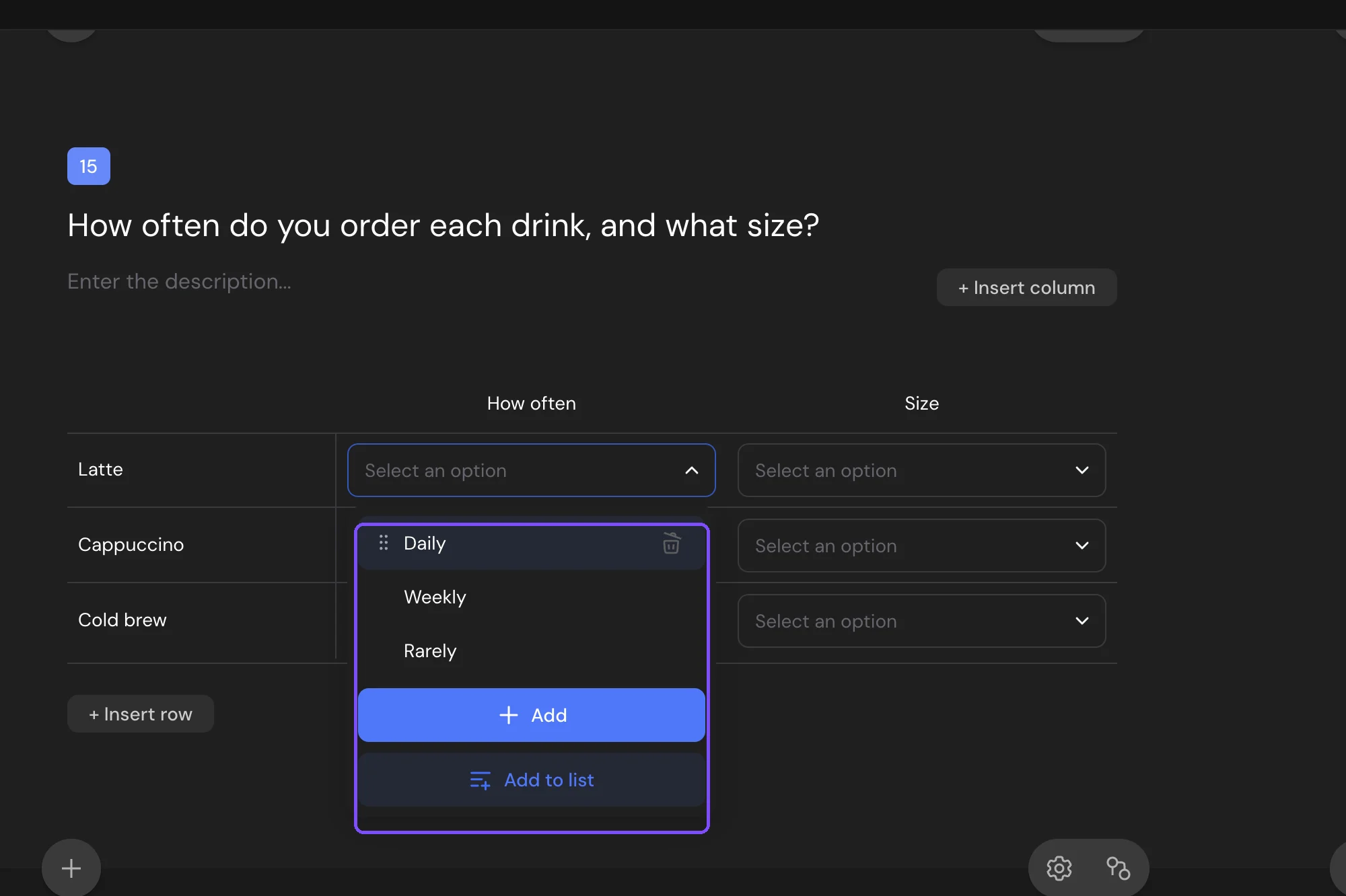
In Matrix 3D, click the arrow in a cell to edit the dropdown options. Add them one by one with Add, or paste a list with Add to list. By default, every cell uses the same list.
Settings
| Setting | What it does |
|---|---|
| Field type | Radio: one answer per row. Checkbox: several answers per row. In Matrix 3D, it sets whether the respondent picks one or several options in each cell's dropdown. |
| Sort rows, Sort columns | Default (your order), Alphabetically or Randomly. |
| Rows, Columns | What the labels show: Labels, Images or Labels and images. |
| Custom options for each column | Matrix 3D only. Each column gets its own dropdown list instead of one list for the whole grid. |
| Required response | Makes the matrix required. Then choose Answers in all fields (every row needs an answer) or At least one answer. With At least one answer, set Min. number of required rows and Max. number of required rows, and the same for columns. The respondent must answer at least the minimum and no more than the maximum. |

With Field type set to Checkbox, a column can work like "None of the above". In the column's tools, click Make this an exclusive option. In each row, choosing this column clears the other answers, and choosing any other column clears it. A matrix has one exclusive column, and it stays last when columns are sorted.
Common settings such as Add “Prefer not to answer”, Timer and Description are described in Question Settings.
What respondents see
On a computer, Matrix is a table. With many columns, arrows appear to scroll it sideways. On a phone, each row becomes a block: the row label first, then all column options under it.
In Matrix 3D, each cell is a dropdown (Select an option, or Choose several options with Checkbox). On a phone, each row is a block with one field per column.
Responses and report
In Results → Reports, a matrix has two views:
- Table: rows against columns. Each cell shows how many respondents chose it, and the cell gets more color as the share grows.
- List: one block per row with a bar for each column.
Above the report, switch between Numbers and percentages, Numbers and Percentages. Matrix 3D shows the same views per row: columns against dropdown options.
In a CSV or XLSX file, a matrix takes one column per row, named "Question title x Row label", with the chosen columns separated by commas. For Matrix 3D, the cell holds "Column: option" for each answered column. See Viewing and Downloading Survey Responses.
To filter responses by a matrix, add it in the report filter and pick a row and a column (Basic plan and higher). See Viewing the Survey Report.
Logic and scores
In logic jumps, pick the row and the column, then Checked or Not checked. For Matrix 3D, pick the row and column, then Equals, Does not equal or Is answered.
Matrix supports scores: you give points to cells, and every chosen cell adds its points. Matrix 3D has no scores.
Limits
- A matrix needs at least 1 row and 1 column.
- Matrix 3D: from 2 to 50 options in each dropdown list.
- Answers in all fields checks rows, not cells: a row counts as answered when it has at least one answer. In Matrix 3D, a row with one filled cell already counts.
- Matrix and Matrix 3D can't be used in micro surveys.