 WooCommerce Post-Purchase Survey: 7 Questions, When to Ask and What to Do Next
Why Is a Question Type or Feature Locked?
Updated
On this page
A question type, setting or page is locked when your workspace's plan doesn't include it. To check your plan, click your profile icon in the top right corner and choose Billing. To see what each plan includes, open the pricing page.
Locked items look the same everywhere: a $ icon next to the name, or a window with the Upgrade button. Upgrade opens Plans & Pricing, where you can choose another plan.
Your trial has ended
A new workspace gets a 14-day trial of the Premium plan. When it ends, the workspace moves to the Free plan, and everything Free doesn't include is locked at once. The line at the top of the page then says "Basic functionality of the service is used." with the Buy plan link. See What Happens After the Trial Ends?
The question type isn't on your plan
In the window that opens after +, types your plan doesn't include have a $ icon. Clicking one opens the Paid question types window: "This question type is available on a higher plan." The same window opens if you choose such a type at the top of a question's settings.
The Free plan includes most everyday types, such as Radio Button, Multiple Choice, Dropdown, NPS, Rating, Enter Text and Email. Other types, such as Matrix and File Upload, need the Basic plan, and HTML Code and Map need Standard. The full list is in Question Types. Choose a type your plan includes, or click Upgrade.
The survey has reached its question limit
Each plan limits the number of elements in one survey: 30 on Free, 50 on Basic, 100 on Standard, no limit on Premium. The Welcome Screen and the submit button don't count.
At the limit, the + window still shows all types, but a click on any of them opens the More questions in the survey window. The Copy button on a question turns red, its hint says "Limit exceeded", and a click opens the same window.
Delete questions you don't need: a new one can be added when the survey has fewer elements than the limit. Or move to a plan with a higher limit.
You've reached the survey limit
Each plan limits the number of surveys, shown as Surveys per account in Billing: 50 on Free, 100 on Basic, 500 on Standard, no limit on Premium. Archived surveys don't count.
At the limit, Create new survey opens the Survey limit reached window: "You've reached the maximum number of surveys on your current plan." Restoring a survey from the archive at the limit shows the Unavailable on your plan window.
To free a place, click ⋯ on the card of a survey you no longer use and choose Move to archive. Its responses stay. See Archive. Or move to a plan with more surveys.
A setting or page shows Upgrade
- A setting has a $ icon in survey Settings, design, notifications or question settings. A click on it opens a window named after the feature, with Upgrade.
- A page shows a plan message instead of its content:
| Where | What you see | Plan |
|---|---|---|
| SMTP in the profile menu | "SMTP is not available on your current plan" | Premium and higher |
| Results → Smart Analytics | "Analyze responses with our smart analytics" and Upgrade plan | Premium and higher |
| Incomplete tab in Results | Unavailable on your plan over blurred responses | Standard and higher |
| Share → URL parameters | "Available on a paid plan" and Upgrade | Basic and higher |
- Files are hidden in responses. The workspace storage is full. See File Upload.
What happens to surveys that already use a locked feature
When the plan changes, SurveyNinja doesn't delete surveys, questions or responses.
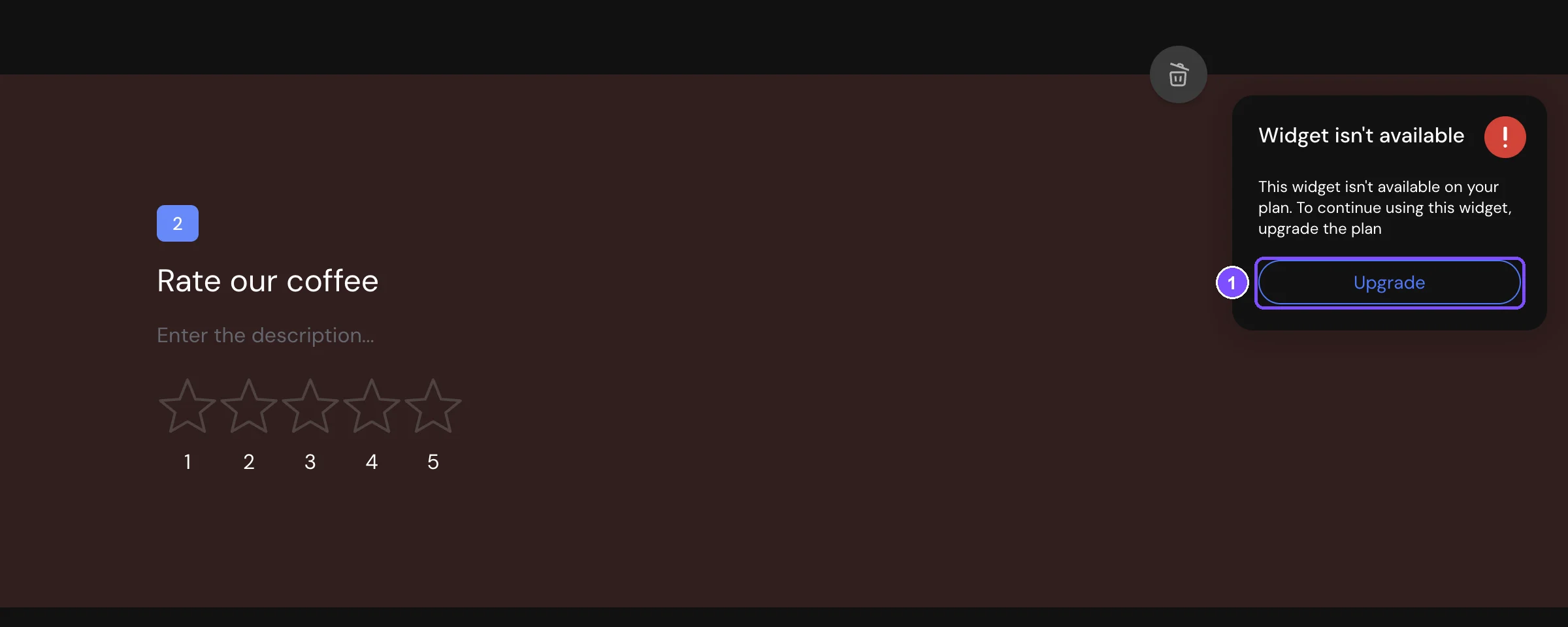
- A question of a locked type is highlighted in red in Builder and can't be edited: its toolbar has only Delete. Point to the warning icon in its top right corner to see "Widget isn't available" and Upgrade (1). The question stays in the survey, and its responses stay in Results. The same happens to a locked type added from Favorites, a template or an import.
- More elements than the limit: the survey keeps all of them, but you can't add or copy questions.
- More surveys than the limit: all of them keep their links and accept responses, but you can't create new ones.
- Settings the plan doesn't include stop working for respondents. For example, on the Free plan surveys show the SurveyNinja logo instead of yours.
Comparing and changing plans
- Compare plans on the pricing page.
- Click Upgrade in any of the windows above, or choose Plans & Pricing in the profile menu.
- Click Buy on the plan you need and pay. The steps are in How to Buy a Plan.
The plan applies to the whole workspace. After it is activated, locked types and features become available, and blocked questions can be edited again. In a workspace you were invited to, paying requires the Pay the Plan permission.
Still not working?
If something stays locked on a plan that should include it, write to support and include a link to the survey.